How to recover application if application owner is deleted or blocked in API Store- WSO2 API Manager.

If you are trying to recover applications created by one user then we have a quick hack. We discussed how we can solve for APIM 1.9.0 and later versions in this(http://sanjeewamalalgoda.blogspot.com/2016/06/how-to-recover-application-if.html) post.

Now lets see how we can do same for APIM 1.8.0 as well.
  • You need to create an user with application subscriber role using the Management Console or use an existing user which has application subscriber permissions.
  • Below SQL statements needs to be run against the WSO2AM_DB
  • Identify SUBSCRIBER_ID and USER_ID of both users (User who left the organization and the user that we are going to transfer application ownership) from AM_SUBSCRIBER table (eg: SELECT * FROM AM_SUBSCRIBER).
  • Identify the application that needs ownership transferring from the AM_APPLICATION table
    (eg: SELECT * FROM AM_APPLICATION)
  • Update the identified application's SUBSCRIBER_ID with the newly created user's SUBSCRIBER_ID from AM_APPLICATION table.
    (eg: UPDATE AM_APPLICATION SET SUBSCRIBER_ID=2 WHERE APPLICATION_ID=2)
  • Update SUBSCRIBER_ID to new user's SUBSCRIBER_ID from the AM_APPLICATION_REGISTRATION (You need to identify entries that needs to be updated based on old user's SUBSCRIBER_ID)
    (eg: UPDATE AM_APPLICATION_REGISTRATION SET SUBSCRIBER_ID =2 WHERE REG_ID =1)
  • Update AUTHZ_USER with the newly created user's USER_ID from IDN_OAUTH2_ACCESS_TOKEN table (You need to identify entries that needs to be updated based on old user's USER_ID)
    (eg: UPDATE IDN_OAUTH2_ACCESS_TOKEN SET AUTHZ_USER ='user2' WHERE ACCESS_TOKEN ='IhnmguiHsiDCFJFFwQugWZmUfdsa')
  • Update USERNAME with newly created user's USER_ID from IDN_OAUTH_CONSUMER_APPS table (You need to identify entries that needs to be updated based on old user's USER_ID/USERNAME)
    (eg: UPDATE IDN_OAUTH_CONSUMER_APPS SET USERNAME='user2' WHERE CONSUMER_KEY='MjTy3lFFcy2FSdkjZnPBxjQwIGoa')
Note: In above examples, new user's SUBSCRIBER_ID=2 and USER_ID=user2

Please note that this is a hack and not a formal solution, We are providing above workaround believing you are having issues accessing applications where application owner has left the organization.

How to revoke access tokens generated by client application on behalf of user - WSO2 API Manager

First let me explain how OAuth 2.0 works in securing APIs in WSO2 API Manager.

01. Application owner, designer will create application by bundling set of APIs and create OAuth application for them.
02. Then they will embed application access token, consumer key and secret within application and release it to client app store.
03. When clients wanted to use application he may provide user credentials(or authentication challenge) and get access token and refresh token.
04. Access token is having limited validity(by default 1 hour) period and it need to renew after that time.
05. And same applied to refresh token as well. So application cannot use access token more than 1 hour without user credentials.
06. After one hour time (again this is configurable and if need you can reduce that time to 5 minutes or so) application will not be able to do anything on behalf of user.

If you consider end user point of view its doesn't matter underlying authentication mechanism for them (its OAuth or any other mechanism). And most of the cases we didn't wanted to revoke them specifically unless client application thinks end user is misusing application.

But in some cases user do not want to app tp proceed with generated tokens by user. In that case user need to revoke tokens by himself.
If user do not trust client application(if device stolen or app seems misbehaving) then he should log into another system(usually authorization server) and ask to revoke access tokens belong to him.

If user is willing to do something like that then we may use identity server dashboard to do that(Please refer attached screen shot of identity server dashboard, where we list applications obtained tokens on behalf of user).


If you remove application from authorized apps then all tokens obtained by app will be revoked. Users can login to user profile and see application which generated tokens and revoke them if need.

Please note that you need to install API Management features on top of identity server to make this enable. Or we can direct users to web app(which is implemented using soap services to revoke tokens) where they can list active access tokens and revoke them.

And if you believe client application misuse refresh token and generate token again and again on behalf of user we may completely disable refresh token grant handler(configuration available in identity.xm configuration file). Or we can reduce refresh token validity period. With that i believe we can solve issues due to misusing refresh token. Please see below screenshot where you can disable refresh grant per app. Else disable it completely from server level.


How to search specific API by name using new REST API in WSO2 API Manager 1.10

Lets say we have 3 APIs are created namely API, API1, API2. 
With the below curl command it will retrieve details of 3 APIs available. Because all of these APIs contained API as part of name.

curl -H "Authorization: Bearer 8551158c1" http://127.0.0.1:9763/api/am/publisher/v0.9/apis?query='API'
Or
curl -H "Authorization: Bearer 94de782ddd64d3fea012bed4a71d764b" http://127.0.0.1:9763/api/am/publisher/v0.9/apis?query='Name:API'

But sometimes you may feel it didn't return you exact results (return only API and not API1, API2).
Reason is to match we used following regex and it will match with any string containing term in any place of string to be tested.
(?i)[\\w.|-]*term[\\w.|-]*
So if you need exact string match then we can do small hack for that. If you invoke API as follows and added ^ before search term and $ after search term it will return you exact match. See following command. Same applies for owner, content, version and other parameters too.

curl -H "Authorization: Bearer 94de782ddd64d3fea012bed4a71d764b" http://127.0.0.1:9763/api/am/publisher/v0.9/apis?query='Name:^CalculatorAPI$'

How to recover application if application owner is deleted or blocked in API Store- WSO2 API Manager.


From API Manager 1.9.0 onward we can address this using subscription sharing feature. All users within same group can add subscriptions, remove API subscriptions and update subscriptions, delete apps etc.
So basically all users in same group can do anything to application. So if one user leaves organization then others in group can act as application owner.

Now lets see how we can recover application in API Manager 1.8.0 and lower versions. Please note you can use same in API Manager 1.9.0 and later versions if need.

create new user from management console or use any other existing user who need to transfer application ownership.
Assign application specific roles to that user(if exists)


Then update CREATED_BY, SUBSCRIBER_ID to new users values as follows.
mysql> select * from AM_APPLICATION;
+----------------+--------------------+---------------+------------------+--------------+-------------+--------------------+----------+------------+---------------------+------------+---------------------+
| APPLICATION_ID | NAME               | SUBSCRIBER_ID | APPLICATION_TIER | CALLBACK_URL | DESCRIPTION | APPLICATION_STATUS | GROUP_ID | CREATED_BY | CREATED_TIME        | UPDATED_BY | UPDATED_TIME        |
+----------------+--------------------+---------------+------------------+--------------+-------------+--------------------+----------+------------+---------------------+------------+---------------------+
|              1 | DefaultApplication |             1 | Unlimited        | NULL         | NULL        | APPROVED           |          | admin      | 2016-06-24 13:07:40 | NULL       | 0000-00-00 00:00:00 |
|              2 | test-admin         |             1 | Unlimited        |              |             | APPROVED           |          | admin      | 2016-06-28 17:44:44 | NULL       | 0000-00-00 00:00:00 |
|              3 | DefaultApplication |             2 | Unlimited        | NULL         | NULL        | APPROVED           |          | sanjeewa   | 2016-06-28 17:46:49 | NULL       | 0000-00-00 00:00:00 |
+----------------+--------------------+---------------+------------------+--------------+-------------+--------------------+----------+------------+---------------------+------------+---------------------+


mysql> update AM_APPLICATION set CREATED_BY ='sanjeewa' where NAME = 'test-admin';
mysql> update AM_APPLICATION set SUBSCRIBER_ID ='2' where NAME = 'test-admin';

Now table will look like following
mysql> select * from AM_APPLICATION;
+----------------+--------------------+---------------+------------------+--------------+-------------+--------------------+----------+------------+---------------------+------------+---------------------+
| APPLICATION_ID | NAME               | SUBSCRIBER_ID | APPLICATION_TIER | CALLBACK_URL | DESCRIPTION | APPLICATION_STATUS | GROUP_ID | CREATED_BY | CREATED_TIME        | UPDATED_BY | UPDATED_TIME        |
+----------------+--------------------+---------------+------------------+--------------+-------------+--------------------+----------+------------+---------------------+------------+---------------------+
|              1 | DefaultApplication |             1 | Unlimited        | NULL         | NULL        | APPROVED           |          | admin      | 2016-06-24 13:07:40 | NULL       | 0000-00-00 00:00:00 |
|              2 | test-admin         |             2 | Unlimited        |              |             | APPROVED           |          | sanjeewa   | 2016-06-28 17:51:03 | NULL       | 0000-00-00 00:00:00 |
|              3 | DefaultApplication |             2 | Unlimited        | NULL         | NULL        | APPROVED           |          | sanjeewa   | 2016-06-28 17:46:49 | NULL       | 0000-00-00 00:00:00 |
+----------------+--------------------+---------------+------------------+--------------+-------------+--------------------+----------+------------+---------------------+------------+---------------------+


Then go to API store and log as new user.
You can generate new access tokens and add new API subscriptions to application.

How to enforce users to add only https URLs for call back URL when you create Application in API Store

Even though not required, TLS is strongly recommended for client applications. Since its not something mandate by spec we let our users to add both http and https URLs. But if you need to let users to add only HTTPS url then we have a solution for that as well. Since all users come to API store and create applications we may let users to add only HTTPS urls. You can do this with following steps.

(1) Navigate to "/repository/deployment/server/jaggeryapps/store/site/themes/fancy/subthemes" directory.
(2) Create a directory with the name of your subtheme. For example "test".
(3) Copy the "/wso2am-1.10.0/repository/deployment/server/jaggeryapps/store/site/themes/fancy/templates/application/application-add/js/application-add.js" to the new subtheme location "repository/deployment/server/jaggeryapps/store/site/themes/fancy/subthemes/test/templates/application/application-add/js/application-add.js".
(4) Update $("#appAddForm").validate in copied file as follows.

You should replace,
$("#appAddForm").validate({
submitHandler: function(form)
{ applicationAdd(); }

});

With following,
$("#appAddForm").validate({
submitHandler: function(form) {
var callbackURLTest =$("#callback-url").val();
var pattern = /^((https):\/\/)/;
if(pattern.test(callbackURLTest))
{ applicationAdd(); }

else
{ window.alert("Please enter valid URL for Callback URL. Its recommend to use https url."); }


}
});

(5) Then Edit "/repository/deployment/server/jaggeryapps/store/site/conf/site.json" file as below in order to make the new sub theme as the default theme.
"theme" :
{ "base" : "fancy", "subtheme" : "test" }

Then users will be able to add only HTTP urls when they create applications in API store. 

Details about ports in use when WSO2 API Manager started.

Management console ports. WSO2 products that provide a management console use the following servlet transport ports:
    9443 - HTTPS servlet transport (the default URL of the management console is https://localhost:9443/carbon)
    9763 - HTTP servlet transport

LDAP server ports
Provided by default in the WSO2 Carbon platform.
    10389 - Used in WSO2 products that provide an embedded LDAP server

KDC ports
    8000 - Used to expose the Kerberos key distribution center server

JMX monitoring ports
WSO2 Carbon platform uses TCP ports to monitor a running Carbon instance using a JMX client such as JConsole. By default, JMX is enabled in all products. You can disable it using /repository/conf/etc/jmx.xml file.
    11111 - RMIRegistry port. Used to monitor Carbon remotely
    9999 - RMIServer port. Used along with the RMIRegistry port when Carbon is monitored from a JMX client that is behind a firewall

Clustering ports
To cluster any running Carbon instance, either one of the following ports must be opened.
    45564 - Opened if the membership scheme is multicast
    4000 - Opened if the membership scheme is wka

Random ports
Certain ports are randomly opened during server startup. This is due to specific properties and configurations that become effective when the product is started. Note that the IDs of these random ports will change every time the server is started.

    A random TCP port will open at server startup because of the -Dcom.sun.management.jmxremote property set in the server startup script. This property is used for the JMX monitoring facility in JVM.
    A random UDP port is opened at server startup due to the log4j appender (SyslogAppender), which is configured in the /repository/conf/log4j.properties file.

These ports are randomly open at the server startup.
    tcp 0 0 :::55746 :::
    This port will be open by -Dcom.sun.management.jmxremote property set at the startup script. The purpose of this is to used for the JMX monitoring facility in JVM. So we don't have a control over this port.

    udp 0 0 :::46316 :::
    This port is open due to log4j appender (SyslogAppender). You can find this on
    /repository/conf/log4j.properties
    If you don't want this log on the log file, you can comment it and it will not harm to the server.

API Manager specific ports.
    10397 - Thrift client and server ports
    8280, 8243 - NIO/PT transport ports
    7711 - Thrift SSL port for secure transport, where the client is authenticated to BAM/CEP: stat pub

How refresh token validity period works in WSO2 API Manager 1.9.0 and later versions.

If refresh token renewal not enabled(using
<RenewRefreshTokenForRefreshGrant>

parameter in identity.xml configuration file), we use existing refresh token else we issue a new refresh token. If issuing new refresh token, use default refresh token validity period(which is configured in
<RefreshTokenValidityPeriod>

parameter of identity.xml) otherwise use existing refresh token's validity period.
That is how refresh grant handler logic implemented in OAuth code

First i will generate access token using password grant as follows.
curl -k -d "grant_type=password&username=admin&password=admin" -H "Authorization: Basic X3kzVVRFSnNLdUNKZlBwOUpNUlNiV3drbFE4YTpmSzVPUzZFNEJfaW8xSFk1SGZsZjVPeWFreW9h" -H "Content-Type: application/x-www-form-urlencoded" https://localhost:8243/token
{"scope":"default","token_type":"Bearer","expires_in":3600,"refresh_token":"f0b7e3839143eec6439c10faf1a4c714","access_token":"03a3b01747b92ea714f171abc02791ba"}

Then refresh token with default configurations.
curl -k -d "grant_type=refresh_token&refresh_token=f0b7e3839143eec6439c10faf1a4c714&scope=PRODUCTION" -H "Authorization: Basic X3kzVVRFSnNLdUNKZlBwOUpNUlNiV3drbFE4YTpmSzVPUzZFNEJfaW8xSFk1SGZsZjVPeWFreW9h" -H "Content-Type: application/x-www-form-urlencoded" https://localhost:8243/token
{"scope":"default","token_type":"Bearer","expires_in":3600,"refresh_token":"4f1bebe8b284b3216efb228d523df452","access_token":"d8db6c3892a48adf1a81f320a4a46a66"}

As you can see refresh token update with token generation request.
Now i disable reneval refresh token by updating following parameters.

<RenewRefreshTokenForRefreshGrant>false</RenewRefreshTokenForRefreshGrant>

Then generate access token using refresh token.
curl -k -d "grant_type=refresh_token&refresh_token=4f1bebe8b284b3216efb228d523df452&scope=PRODUCTION" -H "Authorization: Basic X3kzVVRFSnNLdUNKZlBwOUpNUlNiV3drbFE4YTpmSzVPUzZFNEJfaW8xSFk1SGZsZjVPeWFreW9h" -H "Content-Type: application/x-www-form-urlencoded" https://localhost:8243/token
{"scope":"default","token_type":"Bearer","expires_in":3600,"refresh_token":"4f1bebe8b284b3216efb228d523df452","access_token":"d7d2603c07fcadb9faf9593107bfbedd"}
As you can see refresh token did not changed and it remains as it is. While having new access token with same refresh token.

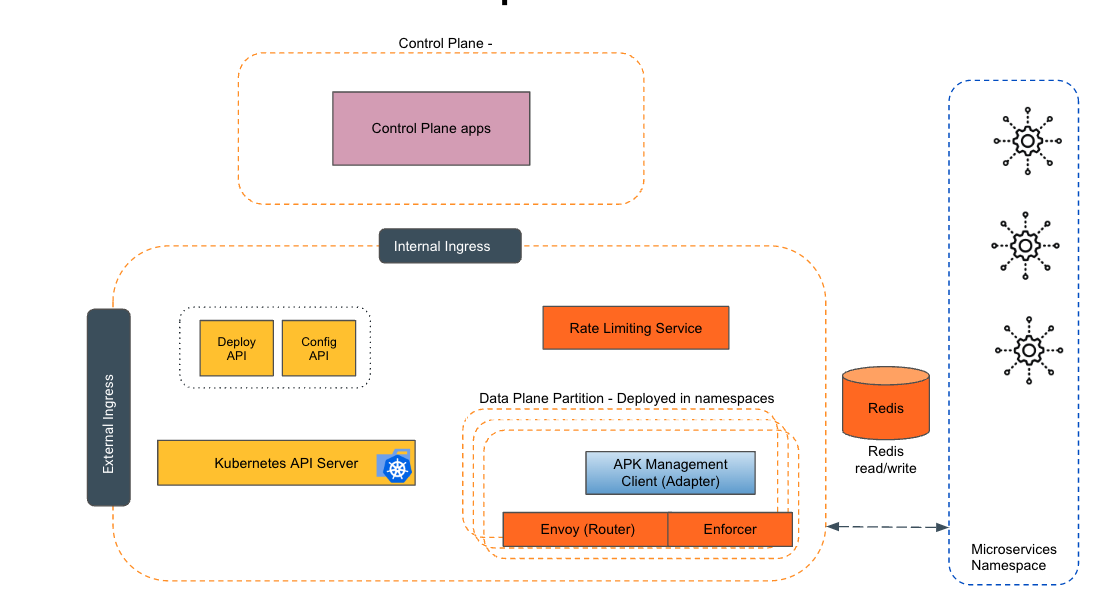
Empowering the Future of API Management: Unveiling the Journey of WSO2 API Platform for Kubernetes (APK) Project and the Anticipated Alpha Release

  Introduction In the ever-evolving realm of API management, our journey embarked on the APK project eight months ago, and now, with great a...