How to use mysql to get first/least/max row per group

This is really important if you need to latest or oldest entry when there are few matching entries on the table. See the use case below


As you can see there are multiple entries per given BC_TENANT_ID please note that BC_ID is auto increment field. let say you need to get latest entry for that paticular
BC_TENANT_ID.So ideallt we can do this by following way.
1. select all entries per given BC_TENANT_ID 
2.Then get the latest BC_ID within them
3.continue this for all BC_TENANT_ID s


 below query will do this
select f.BC_ID, f.BC_TENANT_ID, BC_FILTER from (select BC_TENANT_ID, MAX(BC_ID) as minID from BC_SUBSCRIPTION group by BC_TENANT_ID
) as x inner join BC_SUBSCRIPTION as f on f.BC_TENANT_ID = x.BC_TENANT_ID and f.BC_ID = x.minID;


See the below results
 
so you will get latest entry per each BC_TENANT_ID
If you need to do further filtering you can do it following way
 if you need to get latest entry per  BC_TENANT_ID with BC_FILTER = 'Demo' and BC_IS_ACTIVE='0'
use following query


select f.BC_ID, f.BC_TENANT_ID, BC_FILTER from (select BC_TENANT_ID, MAX(BC_ID) as minID from BC_SUBSCRIPTION group by BC_TENANT_ID
) as x inner join BC_SUBSCRIPTION as f on f.BC_TENANT_ID = x.BC_TENANT_ID and f.BC_ID = x.minID and f.BC_FILTER = 'Demo' and f.BC_IS_ACTIVE='0';


Results will look like this


change the query as you need and use it.

Some usefull windows commands

If you need to get installed windows version and service pack name from command line use following command.

C:\>systeminfo | findstr /B /C:”OS Name” /C:”OS Version”

Then you will see output as follows
OS Name: Microsoft Windows XP Professional
OS Version: 5.1.2600 Service Pack 2 Build 2600

Alfresco on WSO2 Stratos Application Server(1.5.1)

Bit about products and terms
Alfresco is the open source alternative for Enterprise Content Management (ECM), providing Document Management, Collaboration, Records Management, Knowledge Management, Web Content Management, and Imaging. If you need more information on alfresco go to to their home page by clicking this link.


WSO2 Stratos is the most complete, enterprise-grade, open PaaS, with support for more core services than any other available PaaS today.Developers can simply click to add users and services, develop new applications, and manage their own setup. New services automatically participate in and benefit from governance policies already in place. In addition, new service versions can be deployed and tested side-by-side with versions in production, allowing traffic to be carefully diverted to newer versions
http://wso2.com/cloud/stratos/

With WSO2 Stratos Application Server you can serve both sets of users and easily share logic, management, monitoring, and more. The WSO2 Stratos Application Server brings together the best of breed in open source technologies for Web Applications with Apache Tomcat, and Web Services with Apache Axis2.The WSO2 Application Server, supporting the development, deployment, and management of Web Services and Web applications, delivered as a multi-tenant, elastically scaling, metered platform.

To try ApplicationServer in cloud environment fell free  to visit this link


How to edit war file
We can deploy alfresco on WSO2 ApplicationServer4.1.0 and Stratos Application server1.5.1 both. In my previous post i have described how to deploy alfresco on WSO2 Application Server. Here i will explain additional details to deploy it on stratos. Here in this example we will see how to deploy alfresco on local stratos setup and later we will see how we can do it on stratosLive. First we have to create alfresco-wso2.war file by following the guidelines provided. Those steps are same for this deployment as well.please refer that post regarding those instructions here i will briefly list out them.
01. First unpack war file
02. Then we have to remove Catalina jar file
03. add mysql connector jar to the lib folder(alfresco/alfresco/WEB-INF/lib)
04. Add database configuration entries to alfresco/WEB-INF/classes/alfresco/repository.properties

Database creation
How to use WSO2 Stratos Data Services Server(DSS) for database
When we use stratos application server for databases we can use WSO2 Data Services Server for manage databases. It provides simplified user interface for users.
The WSO2 Data Services Server, a platform for hosting of data services, with service hosting, service testing, and message tracing features is delivered as a multi-tenant, elastically scaling, metered platform. Data as a Service exposes the data stored in a database. Database level operations can be done using the interface provided by Data as a Service.We will see how to create database using StratosLive DSS

First goto data base and create database


Then you will see database name and database url in user interface. Next goto manage


Then create privileged group.
Next add user and set privilage group. Now we have all necessary propertites for database connection.


Now we can use those permissions to database connection.See the following configurations

# Database configuration
db.schema.update=true
db.driver=com.mysql.jdbc.Driver
db.name=alfresco_sanjeewa_info
db.url=jdbc:mysql://rss4.crik244zrfxc.us-east-1.rds.amazonaws.com/alfresco_sanjeewa_info
db.username=sanj_92jp9Pdo
db.password=mypassword
db.pool.initial=10
db.pool.max=20

Deploy on Stratos
Now we have fix few issues due to security related restrictions on stratos.  Though you can deploy above created war file on Application server you canot deploy it on stratos application server due to security constrains. you will see some error messages if you try to do it.For this problem we have 2 solutions.

01. Then you jave to sign those jar files with server security key file. Use following command to do it.
wso2stratos-as-1.5.1$ jarsigner -keystore repository/resources/security/wso2carbon.jks -storepass wso2carbon location_of_jarfile  wso2carbon

02. We can disable security from Stratos Application server by removing following 2 entries from wso2server.sh file located at wso2stratos-as-1.5.1/bin folder.
#    -Djava.security.manager=java.lang.SecurityManager \
#    -Djava.security.policy=$CARBON_HOME/repository/conf/sec.policy \

Now we can deploy war file without having any issues.Go to webservices refresh window. then you will see Alsresco service. see following figures.


Screenshot-3

Why tenants cant deploy it on stratosLive.
Alfresco uses wso2stratos-as-1.5.1/alf_data for keep alfresco related data. Each alfresco deployment we need seperate folder.If one tenant deploy it next tenat will not be able to deploy it because that olso tries to access same folder and database. according to stratos design multiple tenats can deploy same war file without having any issues. but when this comes to alfresco installation it fails due to the way alfresco deploy on server. By its design we can run only one alfresco instance on one tomcat server.So the best way to deploy alfresco on public stratos deployment is first super tenat deploy it on Applicationserver and allow other users(Tenants) to use it. 

How to install alfresco on WSO2 Appserver 4.1.0

Alfresco is the open source alternative for Enterprise Content Management (ECM), providing Document Management, Collaboration, Records Management, Knowledge Management, Web Content Management, and Imaging. If you need more information on alfresco go to to their home page by clicking this link.
With WSO2 Application Server you can serve both sets of users and easily share logic, management, monitoring, and more. The WSO2 Application Server brings together the best of breed in open source technologies for Web Applications with Apache Tomcat, and Web Services with Apache Axis2. If you wish to aware more about WSO2 Application server go to here
We need WSO2 Application server to use as application server
you can download it from following url
http://wso2.org/downloads/appserver/
Then we need alfresco war file. you can download it by clicking on Alfresco war file or you can download alfresco file archive from their web site
Then we have to modify Alfresco War file in order to use it on WSO2 Application server. Alfresco war file has designed to use with tomcat sever. WSO2 Appserver has inbuilt tomcat server.we have to do few modifications to alfresco war file before host on Appserver.We will see those steps in detail now.
First unpack war file then you will see following three
.
|—css
|--images
|--index.jsp
|--jsp
|--META-INF
|--scripts
|--services
|--WEB-INF
|—wsdl
Then we have to remove Catalina jar file from the that war file.Go to alfresco/alfresco/WEB-INF/lib inside lib folder you will see Catalina jar. Then delete it.
META-INF.
        |—classes
        |--lib
        |—licenses

Database configuration change
Now we have to do Database configurations for war file.First we need mysql jar file(mysql-connector-java-5.0.8-bin.jar). Download mysql jar file from here.
Next we have to add it to the lib folder(alfesco/alfresco/WEB-INF/lib) inside extracted war file
Then we have to tell alfresco specifically what is our DB Connector.To do that we have to edit file located at alfresco/WEB-INF/classes/alfresco/.
Add the following entry to the line 73 of repository.properties file which is located at alfresco/WEB-INF/classes/alfresco/repository.properties
db.driver=com.mysql.jdbc.Driver
So we have configured Data Source successfully.
see the following entries at alfresco/WEB-INF/classes/alfresco/repository.properties

# Database configuration
db.schema.update=true
db.driver=com.mysql.jdbc.Driver
db.name=alfresco
db.url=jdbc:mysql:///${db.name}
db.username=alfresco
db.password=alfresco
db.pool.initial=10
db.pool.max=20

How to avoid BindException: Permission denied
The SMB/CIFS server uses ports 137, 138 and 139, the FTP server defaults to using port 21. All of these ports are in the privileged socket range, so if you use these directly you will be required to run Appserver from a privileged account. You can run SMB/CIFS on non privileged ports on Unix provided you redirect privileged ports to the unprivileged ones.
Firstly ensure alfresco is using unprivileged ports:
    Edit /alfresco/WEB-INF/classes/alfresco/file-servers.xml
    and uncomment

<tcpipSMB port="1445" platforms="linux,solaris,macosx"/>
<netBIOSSMB sessionPort="1139" namePort="1137" datagramPort="1138" platforms="linux,solaris,macosx"/>

Now we have fix all the issues in war file. so now we have to re create war file from the extracted folder. select all folders inside extracted folder and encode as jar file and rename it as alfresco-wso2.war. So now we can deploy this war file directly on WSO2 Application server.Copy war file in to /wso2as-4.1.0/repository/deployment/server/webapps or upload it using GUI. see the following figures.
Screenshot
Figure: From this window you will be able to upload war file
Screenshot-1
Figure: You will see deployed war files after refreshing UI
Screenshot-3
Figure : After clicking on deployed alfresco application you will see above window

Setting up database
Now we have to create databse for alfresco.To create database you have to follow next few steps   

mysql -u root -p < ./extras/databases/mysql/db_setup.sql  or type                                                   mysql> create database alfresco default character set utf8;
mysql> create user alfresco identified by 'alfresco';
mysql> grant all on alfresco.* to 'alfresco'@'localhost' identified by 'alfresco' with grant option;
mysql> grant all on alfresco.* to 'alfresco'@'localhost.localdomain' identified by 'alfresco' with grant option;
Now type show databases; and you will see following database structure

+------------------------------+
| Database                       |
+------------------------------+
| information_schema       |
| alfresco                         |
| mysql                            |
| test                               |
+------------------------------+

4 rows in set (0.00 sec)
Setting memory usage of Appserver
Before we can start deploying Alfresco, make sure your server installation has a configured heap size of at least 256 MB. By default, Tomcat is started with the default heap size of your JVM. Usually, with these default settings the deployment of Alfresco will fail. Set following parameter at wso2server.sh file which is available at #wso2as-4.1.0/bin
export JAVA_OPTS='-Xms128m -Xmx1024m -XX:MaxPermSize=256m -server'
  
Once you finished database creation you  will be able to deploy alfresco properly. run wso2server.sh and deploy war file and try the service.

Fixing minor issue after deployment
If you get following error we have to clear /wso2as-4.1.0/alf_data folder and we have to re create database
[2011-09-08 09:28:46,932] ERROR {org.springframework.web.context.ContextLoader} -  Context initialization failed
org.springframework.beans.factory.BeanCreationException: Error creating bean with name 'dictionaryRepositoryBootstrap' defined in class path resource [alfresco/core-services-context.xml]: Invocation of init method failed; nested exception is org.alfresco.error.AlfrescoRuntimeException: Failure during rollback: org.alfresco.repo.dictionary.DictionaryRepositoryBootstrap$1@354742ee
Caused by:
org.alfresco.error.AlfrescoRuntimeException: Failure during rollback: org.alfresco.repo.dictionary.DictionaryRepositoryBootstrap$1@354742ee
    at org.alfresco.repo.transaction.RetryingTransactionHelper.doInTransaction(RetryingTransactionHelper.java:281)
To fix the above issue
Delete all the contents inside /wso2as-4.1.0/alf_data
Go to mysql trminal and type
mysql> drop database alfresco;
mysql> create database alfresco default character set utf8;
Then restart Application server. Then you will see deployed service if you have any problems or issues please ask i will reply you soon.


How to get back missed 3 buttons(Maximize/Minimize/Close) in ubntu 11.04

Ubuntu 11.04 is the most annoyed Ubuntu operating system i have ever found(OS should be there to help us not for bug us). This time with 11.04 you will see  3 buttons(Maximize/Minimize/Close) vanishs after some time.That was really annoyed thing.so after searching some time i was able to found how to fix it.
Here are the steps.
Go to system> administration > Synaptic Package manager
You will see following window.

Then select  compiz-decorator and tick it and then apply it.

So now go to command line and type following command
>compiz-decorator

Then you will see those buttons come back.
Then you need to add this to start up applications.To do that do followings.

Goto preferences > Startup Applications
You will see following window and type there as shown in the below image


So thats it :)

How to get simple ubuntu 10 appearnce from 11.04

Did you messed up after new Ubuntu installation. Its really annoyed(with new side menu bar). i was able to fix this and get back my lovely ubntu UI. Here are the steps.
01. Type settings on search window(from menu search)
02. Go to login screen and click on it
You will see following window
     
Then unlock it by giving your password. Then select Ubuntu classic.yes you have done it. now you have to logout and re login. Thats it :)

How to Create WSO2 Stratos ESB proxy service and invoke by BlackBerry Mobile Client


This is very basic usage of ESB and you can do many things inside this proxy service(Calling few actual web services, mediate message, logging, ,message reformat). I used this example to just demonstrate how we can use ESB with BlackBerry client.
WSO2 Strstos
WSO2 Stratos is the most complete, enterprise-grade, open PaaS, with support for more core services than any other available PaaS today. The open nature of WSO2 Stratos makes it the perfect environment for hosting companies, ISVs and System Integrators to build and customize Industry-specific PaaS and SaaS platforms for vertical markets; for example, creating a Mobile PaaS for telecom companies.The WSO2 StratosLive Java PaaS, hosted by WSO2, enables developers to instantly provision and pay for just the middleware services they use.
Enterprises can use the WSO2 StratosLive to host business process flows between business partners as well as implement cloud-based services that access internal systems.Developers get all the benefits of the complete WSO2 Carbon enterprise middleware platform and the multi-tenant, elastic WSO2 Stratos cloud middleware platform without the hassles of setting up machines and middleware

WSO2 ESB
WSO2 ESB is unique Enterprise Service Bus from the ground up relying on innovative Carbon technology to give you a smooth start-to-finish project experience you cannot find elsewhere.
Easy configuration through an intuitive graphical interface allows you to get started – and into production – much faster.
Lean, high-performance design conserves resources through maximum efficiency.
Built on the WSO2 Carbon OSGi platform: adding new capabilities as you need them is a snap.

http://wso2.com/wp-content/themes/wso2ng-v3/images/stratoslive-diagram.gif
In this post i will describe how to deploy a simple proxy service in stratoslive and how we can invoke it by BlackBerry mobile device. First we need to setup eclipse IDE(Which use widely in enterprise level to develop BlackBerry Applications) to develop BlackBerry Apps. In my previous post i have describe this topic clearly you will find it here.
First we will see how we can deploy simple proxy service with StratosLive.
First to
https://stratoslive.com/ . you can create new account freely.Then login to the system go to ESB home page. See the figure

Screenshot 

Figure : Services Home WSO2 StratosLive
Then click on source view to edit configurations.
Screenshot44
Figure : Edit window for edit source of Configuration
Typically the ESB is deployed between the actual client and a backend service implementation to mediate the message flow in between. Thus WSO2 ESB can accept a message on behalf of the actual service, perform authentication, validation, transformation, logging, routing based on the content etc. and then decide the destination target endpoint for the message and direct it to an actual service implementation.We have to write configuration for those operations. These configuration are written using the Synapse configuration language which is a simple and easy to learn domain specific language based on XML. It is always recommended to use the graphical wizards and tools provided in the WSO2 ESB management console to setup the mediation configuration, thus avoiding having to write XML configurations manually. But for this simple configuration we will use XML writing method. See following configuration.
<?xml version="1.0" encoding="UTF-8"?>
<definitions xmlns="
http://ws.apache.org/ns/synapse">
    <registry provider="org.wso2.carbon.mediation.registry.WSO2Registry"/>
    <proxy name="EchoProxy" transports="https" startOnLoad="true" trace="disable">
        <target inSequence="response"/>
        <policy key="conf:/repository/axis2/service-groups/EchoProxy/services/EchoProxy/policies/UTOverTransport"/>
        <enableSec/>
    </proxy>
    <proxy name="loginproxy" transports="https http" startOnLoad="true" trace="disable">
        <target inSequence="main"/>
    </proxy>
    <sequence name="response">
        <script language="js">mc.setPayloadXML(
            &lt;greeting&gt;Hello World&lt;/greeting&gt;
            );</script>
        <header name="To" action="remove"/>
        <property name="NO_ENTITY_BODY" scope="axis2" action="remove"/>
        <property name="RESPONSE" value="true"/>
        <send/>
        <log level="full"/>
    </sequence>
    <sequence name="fault">
        <log level="full"/>
    </sequence>
    <sequence name="main">
        <log/>
        <drop/>
    </sequence>
</definitions>
There you will see EchoProxy which is use to set set XML Payload to response message.if you need you can do some thing more inside this proxy(Do Authentication check, send request to actual web service/data service and send response back).
Yo have to copy this configuration to your configuration and update
Next go to services and you will see deployed proxy service as follows


Screenshot-3 

figure : Deployed services window to view Proxy Services Deployed

Then click on the service and you will see following window. There you can edit your service/ generate WSDL/ Try service etc... Then click on try it and test your service by sending request. you will see the response with greeting message


Screenshot-7 
Figure : Service home window Edit and modify the service

Now we have created our proxy service successfully now we will see how we can invoke this by BlackBerry.First setup your Eclipse IDE using this guideline document.
Then download esb_client source code for here.Unzip it and open with eclipse ide.
You have to set your proxy service url properly in the code.for me it was

http://esb.stratoslive.wso2.com:8280/services/t/sanjeewa.info/EchoProxy"

In blackBerry mobile devices before send request to some url we have to append some part to it. It must contain [deviceside=true;apn=Apnkey]. When i developed my first application in 2009 i found simple solution for this.I was able to store some known apns with relative Mobile Network Code(MNC) and Mobile Country Code (MCC).
and retrive them when necessary.you will see more information on MCC/MNC here[
http://en.wikipedia.org/wiki/Mobile_Network_Code]. I have written separate post how to use that method, click here[http://sanjeewamalalgoda.blogspot.com/2009/09/run-blackberry-application-without-apn.html] to view it. I used same method for this example.
Here we will do simple http get() to that proxy service and get greeting message. you will see very basic UI for service invocation.

Then build project and run it on blackberry Device simulator.
Go to downloads for your Mobile device.You will see SendT program click on it you will see the following window

                                      clip_image002

Then Click on left button and press send request.Then you will see the status and response message as shown below
clip_image002[6]                 clip_image002[8]


so you can modify ESB configuration and client source code as you need for different kind of usages. if you need to test this program with actual device copy cod,jad or jar file to your mobile device using BlackBerry Desktop Software [http://us.blackberry.com/apps-software/desktop/]. And install program to your device.


Source Code for BlackBerry Client:


package senddTpkg;

//********************************************************
//@Auther  - MALALGODA S.R.B.(sanjeewa190@gmail.com)
//   
//@Date    -2009/07/04
//
//@Project -Blackberry Mobile application 
//
//@Code      - Java Blackberry application to send Http request to WSO2 Stratos ESB  
//            proxy service
//
//********************************************************
import java.io.IOException;
import java.io.InputStream;
import java.util.Vector;

import javax.microedition.io.Connector;
import javax.microedition.io.HttpConnection;
import javax.microedition.io.file.FileConnection;

import net.rim.device.api.system.Bitmap;
import net.rim.device.api.system.RadioInfo;
import net.rim.device.api.ui.Field;
import net.rim.device.api.ui.FieldChangeListener;
import net.rim.device.api.ui.MenuItem;
import net.rim.device.api.ui.UiApplication;
import net.rim.device.api.ui.component.BasicEditField;
import net.rim.device.api.ui.component.BitmapField;
import net.rim.device.api.ui.component.Dialog;
import net.rim.device.api.ui.component.LabelField;
import net.rim.device.api.ui.component.Menu;
import net.rim.device.api.ui.component.RichTextField;
import net.rim.device.api.ui.component.SeparatorField;
import net.rim.device.api.ui.container.HorizontalFieldManager;
import net.rim.device.api.ui.container.MainScreen;
import net.rim.device.api.ui.container.VerticalFieldManager;

public class sendTCls extends UiApplication {

    public static void main(String[] args) {
        sendTCls theApp = new sendTCls();
        theApp.enterEventDispatcher();
    }

    public sendTCls() {
        pushScreen(new UserInterfaceScreen());
    }
}

final class UserInterfaceScreen extends MainScreen {
    String words;
    String apn;
    HorizontalFieldManager _fieldManagerTop;
    VerticalFieldManager _fieldManagerMiddle;
    HorizontalFieldManager _fieldManagerBottom;
    BitmapField _bitmap;
    Bitmap _canadaImage;
    LabelField _label;
    static BasicEditField _input;
    String _canadaCapital;
    int displayed = 0;
    private static final int IMAGE_SIZE = 2430;
    private byte[] data = new byte[IMAGE_SIZE];

    RichTextField rtf = new RichTextField("");

    public UserInterfaceScreen() {
        super();
        LabelField title = new LabelField("WSO2 ESB Test Service",
                LabelField.ELLIPSIS | LabelField.USE_ALL_WIDTH);
        setTitle(title);
        _fieldManagerTop = new HorizontalFieldManager();
        _fieldManagerMiddle = new VerticalFieldManager();
        _fieldManagerBottom = new HorizontalFieldManager();
        add(_fieldManagerTop);
        add(new SeparatorField());
        add(_fieldManagerMiddle);
        add(new SeparatorField());
        add(_fieldManagerBottom);
        _label = new LabelField(
                "This is WSO2 Stratos ESB Proxy service test program."
                        + " press the left menu and click on send request buttion then you will send"
                        + " request to Hellow Service. Response will show below.");
        _fieldManagerMiddle.add(_label);
        add(rtf);
        FieldChangeListener listenerCanada = new FieldChangeListener() {
            public void fieldChanged(Field field, int context) {
                displayed = 0;
            }
        };
    };

    protected void makeMenu(Menu menu, int instance) {
        menu.add(_changeCapital);
        menu.add(_close);
    }

    private MenuItem _changeCapital = new MenuItem("Sent Request", 110, 10) {
        public void run() {
            try {
                String mcc = Integer.toHexString(RadioInfo.getMCC(RadioInfo
                        .getCurrentNetworkIndex()));
                String mnc = Integer.toHexString(RadioInfo.getMNC(RadioInfo
                        .getCurrentNetworkIndex()));
                String responseStr = getHttpResponce1("http://esb.stratoslive.wso2.com:8280/services/t/sanjeewa.info/EchoProxy"
                        + ";deviceside=true;apn="
                        + getTag(ReadFile(), mcc + "," + mnc));
                rtf.setText(responseStr);
                Dialog.alert("Successfull");
            } catch (Exception e) {
                Dialog.alert("Error In connecting=" + e.toString());
            }
        }
    };

    private MenuItem _close = new MenuItem("Close", 110, 10) {
        public void run() {
            onClose();
        }
    };

    public boolean onClose() {
        Dialog.alert("Goodbye!");
        System.exit(0);
        return true;
    }


    public String ReadFile() {
        try {
            Class classs = Class.forName("senddTpkg.sendTCls");
            // Source Package neme and Class name
            InputStream is = classs.getResourceAsStream("/test.txt");
            byte[] data = new byte[is.available()];
            is.read(data, 0, is.available());
            String c = new String(data);
            return c;
        } catch (Exception ioe) {
            Dialog.alert("Error");
            return null;
        }
    }

    public static String getTagFromStringXML(String XML, String TagName) {
        try {
            String returnStr = "";
            String frontTag1 = "<" + TagName;
            String backTag1 = "=";
            String front = "<" + TagName + ">";
            String back = "";
            String[] arrayGet = splitToArr(XML, frontTag1);
            if (arrayGet.length > 0) {
                String[] arrayGet1 = splitToArr(arrayGet[1], back);
                return arrayGet1[0];
            }
            arrayGet = splitToArr(XML, front);
            if (arrayGet.length > 0) {
                String[] arrayGet1 = splitToArr(arrayGet[1], back);
                return arrayGet1[0];
            }

            return returnStr;
        } catch (Exception e) {
            return "";
        }

    }

    private static String[] splitToArr(String inString, String delimeter) {

        String[] retAr = new String[0];
        try {
            Vector vec = new Vector();
            int indexA = 0;
            int indexB = inString.indexOf(delimeter);

            while (indexB != -1) {
                if (indexB > indexA)
                    vec.addElement(new String(inString
                            .substring(indexA, indexB)));
                indexA = indexB + delimeter.length();
                indexB = inString.indexOf(delimeter, indexA);
            }
            vec.addElement(new String(inString.substring(indexA, inString
                    .length())));
            retAr = new String[vec.size()];
            int intIteration = vec.size();
            for (int i = 0; i < intIteration; i++) {
                retAr[i] = vec.elementAt(i).toString();
            }
        } catch (Exception e) {

        }
        return retAr;
    }

    public static String getTag(String XML, String TagName) {
        try {
            String ans = "error";
            String front1 = "<" + TagName;
            String arrayGet = "=";
            String[] sssnew = split(XML, front1);
            if (sssnew.length > 1) {
                String back1 = null;
                String[] sss1new = split(sssnew[1], back1);
                if ((sss1new[0]).compareTo(" i:nil") < 1) {
                    ans = "";
                    return ans;
                }
            }
            String front = "<" + TagName + ">";
            String back = "";
            String[] sss = {};
            sss = split(XML, front);
            if (sssnew.length > 1) {
                String[] sss1 = {};
                sss1 = split(sss[1], back);
                ans = sss1[0];
            }

            return ans;
        } catch (Exception e) {
            return "";
        }

    }

    private static String[] split(String inString, String delimeter) {

        String[] retAr = new String[0];
        try {
            Vector vec = new Vector();
            int indexA = 0;
            int indexB = inString.indexOf(delimeter);

            while (indexB != -1) {
                if (indexB > indexA)
                    vec.addElement(new String(inString
                            .substring(indexA, indexB)));
                indexA = indexB + delimeter.length();
                indexB = inString.indexOf(delimeter, indexA);
            }
            vec.addElement(new String(inString.substring(indexA, inString
                    .length())));
            retAr = new String[vec.size()];
            int intIteration = vec.size();
            for (int i = 0; i < intIteration; i++) {
                retAr[i] = vec.elementAt(i).toString();
            }
        } catch (Exception e) {

        }
        return retAr;
    }

    public static String getHttpResponce1(String URL) {

        try {
            HttpConnection httpConnection = (HttpConnection) Connector
                    .open(URL);
            httpConnection.setRequestMethod(HttpConnection.GET);
            InputStream inputStream = httpConnection.openInputStream();

            StringBuffer sb = new StringBuffer();
            int C;

            while (-1 != (C = inputStream.read())) {
                sb.append((char) C);
            }

            return sb.toString();

        } catch (Exception e) {
            return "-1";
        }
    }
}
 common APN keys stored in test.txt file
<310,12>
<310,4> verizon
<310,38>     AT&T
<310,90>
<310,150>
<310,680>
<310,410>
<310,160>wap.voicestream.com
<310,170>wap.voicestream.com
<310,260>wap.voicestream.com
<310,490>wap.voicestream.com
<310,26>wap.voicestream.com
<890,126>wap.voicestream.com
<413,2>dialogbb
<302,720>internet.com
<22e2,0>
 Download full source code
http://wso2.org/files/proxy_service_test_BB_client_src.zip

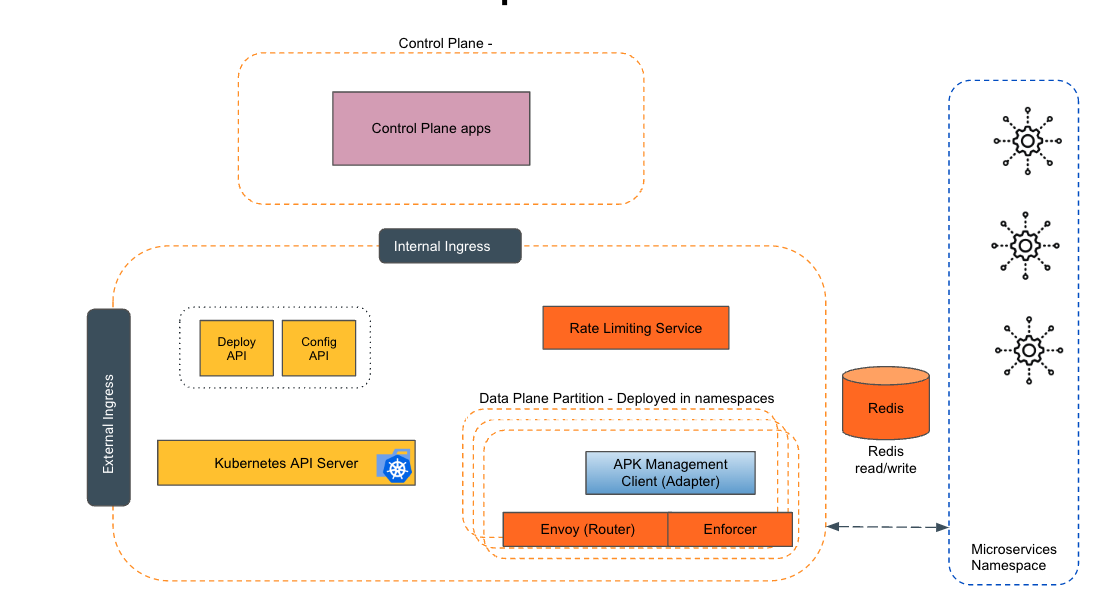
Empowering the Future of API Management: Unveiling the Journey of WSO2 API Platform for Kubernetes (APK) Project and the Anticipated Alpha Release

  Introduction In the ever-evolving realm of API management, our journey embarked on the APK project eight months ago, and now, with great a...