Simplest Way to save data in mysql database and text file using PHP

//==============================================

C:\wamp\www\saveD\  Used as project folder

This Code creates database and tables automatically when its load first time

I use wamp server to run program

//=============================================

index.php

This use to create database and tables and prompt user to add data

<html>
<head>
<title>Untitled Document</title>
<meta http-equiv="Content-Type" content="text/html; charset=iso-8859-1">
</head>
<body>
<?php
//Creatr Database Dinamically in run time
//Make Connection To Database in Local host
//Username=root and Password=""
//This is the basic way in Xamp & Wamp
$connect =mysql_connect("localhost","root","") or die(mysql_error());
//mysql_select_db("eee");
$quary="create database db1";
//Create Database named DB1
$quary1="use db1";
//Use db1
$quary2="create table table1(timeA int,timeB int,timeC int,timeU varchar(8))";
//Creates Table named table1
//Executes queries
$results = mysql_query($quary);
$results1 = mysql_query($quary1);
$results2 = mysql_query($quary2);
if($results2==1)
{
echo "create table succesfully";
}
else
{
echo "Already Exsists";
}
?>
<form name="form1" method="post" action="insert.php">
  <input type="submit" name="Submit" value="Insert Values">
</form>
<p>&nbsp;</p>
</body>
</html>

//========================================================

insert.php

This use to take input and post them to save page

<html>
<head>
<title>Untitled Document</title>
<meta http-equiv="Content-Type" content="text/html; charset=iso-8859-1">
</head>
<body>
<form action="save.php" method="post">

  <font color="#000000"><strong><font size="+2">value1</font></strong>:</font>
  <font color="#000000">
  <input type="text" name="val1">
    </font></strong></font></label>
    <font color="#000000"><strong><font size="+2">&nbsp;
</font></strong></font></p>
  <p><font color="#000000"><strong><font size="+2">value2:
    <input type="text" name="val2">
    </font></strong></font></p>
  <p> <font color="#000000"><strong><font size="+2">
    <label>value3:</label>
  </font></strong></font><font color="#0000FF"><strong><font
size="+2"><label></label>
  </font></strong></font><strong><font color="#8000FF"
size="+2"><label></label>
    </font> <font size="+2">
    <label></label>
    </font>
    <label></label>
    </strong>
    <label>
    <input type="text" name="val3">
    </label>
    &nbsp; </p>
  <p> <font color="#FF0080" size="+2">
    <input type="submit" name="Submit" value="Send Data">
    </font> </p>
</form>
</body>
</html>


//============================================================

save.php

This use to write data to the database and text file

<html>
<head>
<title>Untitled Document</title>
<meta http-equiv="Content-Type" content="text/html; charset=iso-8859-1">
</head>
<body>
<?php
echo $va11=$_POST['val1'];
echo $val2=$_POST['val2'];
echo $val3=$_POST['val3'];

$ourFileName = "C:\wamp\www\saveD\outtoc.txt";
$ourFileHandle = fopen($ourFileName,'w') or die("can't open file");
fwrite($ourFileHandle,$va11);
fwrite($ourFileHandle,$val2);
fwrite($ourFileHandle,$val3);
fclose($ourFileHandle);
$date_array = date(h);

$date_array1 = date(i);

$date_array3 = date(A);

$timeU ="$date_array:$date_array1$date_array3";
$dateU="$date_array2:$date_array2";
$connect =mysql_connect("localhost","root","") or die(mysql_error());
mysql_select_db("db1");
$quary3="insert into table1 values('$va11','$val2','$val3','$timeU')";
$results = mysql_query($quary3) or die(mysql_error());
if ($results==1)
{
print "\n";
echo "\n Insert values Success";
}
?>
</body>
</html>

Add certificate to keystore in blackberry mobile device

In blackberry applications when we establish connection with server that asks for
security certificate.To over come this problem we can add certificate and trust the application
using this method.To save certificate within application you can use my early post regarding
the store file within an application to store infomation.
This method add certificate to keystore when it runs

public void addCertToDeviceKeyStore (Certificate certificate)
{
KeyStore keyStore = DeviceKeyStore.getInstance();
//check if certificate is not already in the DeviceKeyStore
if (!keyStore.isMember(certificate))
{
try {
keyStore.set(null,certificate.getSubjectFriendlyName(),certificate,certificate.getStatus(),
keyStore.getTicket());
}
catch (Exception e)
{
\\error message
}
}

Read File in Source Folder (Class) Blackberry Mobile-Can use to keep constant values, Settings and certificates

Sometimes we need to keep some files within our project and use them to keep data.
for this purpose we can use this method.Once we make cod or alx we don't have to
worry about this file or its location.specially store information like top scores in some
game,settings,security certificates we can use this

public String ReadFile()
{
//This retturns the String in FileName.txt
//File must locate in Src Folder
try {
Class classs = Class.forName("packageName.ClassName");
//Source Package neme and Class name
InputStream is = classs.getResourceAsStream("/FileName.txt");
byte[] data = new byte[is.available()];
is.read(data, 0, is.available());
String c =new String(data);
return c;
}
catch (Exception ioe)
{
Dialog.alert("Error");
return null;
}
}

Display WebPage on Top of Application in Blackberry Mobile Device

Sometimes we need to display web page on top of our blackberry application
to display help page or link some web page in such cases we can use this method to
call that web page.That opens given web page on top of application

public void run()
{
//getPage method is also i have mentioned in This Blog
//please refer that
try {
BrowserSession bSession = Browser.getDefaultSession();
byte bytes[] = getPage("www.google.com").getBytes();
//To use this You have download "org/apache/commons/codec"
//and save in src folder
Base64 bb=new Base64();
byte bytes1[]=Base64.encodeBase64(bytes);
String str=new String(bytes1);
bSession.displayPage("data:text/html;base64,"+str);
}
catch (Exception e)
{
Dialog.alert("Error In connecting="+e.toString());
}
}

Read Text File in Blackberry Mobile Device

public String readFile(String path)
{
//File path Should be given like> readFile("file:///SDCard/as.txt")
String str = null;
try
{
FileConnection fc = (FileConnection)Connector.open(path,Connector.READ);
if(!fc.exists())
{
Dialog.alert("File doesn't exist!");
}
else
{
int size = (int)fc.fileSize();
InputStream is = fc.openInputStream();
byte bytes[] = new byte[size];
is.read(bytes, 0, size);
str=new String(bytes);
}

}
catch (IOException ioe)
{
Dialog.alert(ioe.getMessage());
}
return str;
}

Like to Play With android?

visit following link then you can find out more
http://developer.android.com/sdk/1.5_r3/installing.html

Get requested page from Http Connection java blackberry development

public static String getPage(String url)
{


String response = "";
try {
HttpConnection conn = (HttpConnection)Connector.open(url, Connector.READ_WRITE);
InputStream input =conn.openInputStream();
byte[] data = new byte[256];
int len = 0;
StringBuffer raw = new StringBuffer();
while( -1 != (len = input.read(data)))
{
raw.append(new String(data, 0, len));
}
response = raw.toString();
input.close();

} catch(Exception e)
{
Dialog.alert("Error");
}
return response;
}

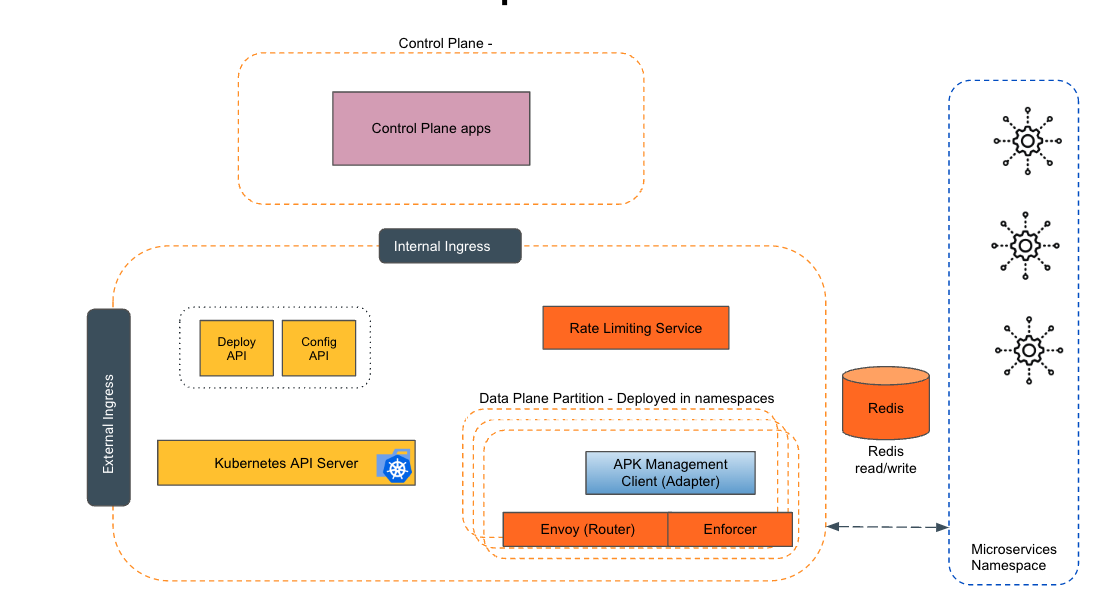
Empowering the Future of API Management: Unveiling the Journey of WSO2 API Platform for Kubernetes (APK) Project and the Anticipated Alpha Release

  Introduction In the ever-evolving realm of API management, our journey embarked on the APK project eight months ago, and now, with great a...