Invoke Kubernetes APIs via simple HTTP client, Invoke k8s API programmatically.

In this post i would like to explain how we can invoke k8s API and receive k8s cluster information. When we develop applications, programs sometimes we will need to invoke k8s APIs to perform some complex deployment tasks and in this post we will see how we can do that step by step. 


In my setup i have used Rancher desktop and k8s 1.24.3 version. Below instructions can slightly change in other versions.


First we need to create k8s user account. So for the creation of our user account, we will create service account, cluster role and cluster role binding. Please create below .yaml files for each of these resources and apply them into k8s cluster using 


ServiceAccount.yaml

apiVersion: v1

kind: ServiceAccount

metadata:

 name: apk-platform

 namespace: default


ClusterRole.yaml

apiVersion: rbac.authorization.k8s.io/v1

kind: ClusterRole

metadata:

 # "namespace" omitted since ClusterRoles are not namespaced

 name: apk-role

rules:

 - apiGroups: ["*"]

   resources: ["*"]

   verbs: ["*"]


ClusterRoleBinding.yaml

apiVersion: rbac.authorization.k8s.io/v1

# This cluster role binding allows anyone in the "manager" group to read secrets in any namespace.

kind: ClusterRoleBinding

metadata:

 name: role-binding

roleRef:

 kind: ClusterRole

 name: apk-role

 apiGroup: rbac.authorization.k8s.io

subjects:

 # You can specify more than one "subject"

 - kind: ServiceAccount

   name: apk-platform # "name" is case sensitive

   namespace: default


Apply below 3 commands

kubectl apply -f ServiceAccount.yaml
kubectl apply -f ClusterRole.yml
kubectl apply -f ClusterRoleBinding.yaml


Set below varaible as we are going to use them in next steps

>>SERVICE_ACCOUNT=apk-platform
>>APISERVER=https://$(kubectl -n default get endpoints kubernetes --no-headers | awk '{ print $2 }')


Now we have successfullycreate service account and cluster role binding. Next we will need to get token and certificate to invoke API


To get token execute following command with provided yaml file.


Token.yaml

apiVersion: v1

kind: Secret

metadata:

  name: apk-platform-token

  annotations:

    kubernetes.io/service-account.name: apk-platform

type: kubernetes.io/service-account-token

Execute following
kubectl apply -f ClusterRoleBinding.yaml


Now you can see generated token , cert etc using below command


>>kubectl get secret "apk-platform-token" -o json

{

    "apiVersion": "v1",

    "data": {

        "ca.crt": "XXX",

        "namespace": "ZGVmYXVsdA==",

        "token": "XXXX"

    },

    "kind": "Secret",

    "metadata": {

        "annotations": {

            "kubectl.kubernetes.io/last-applied-configuration": "{\"apiVersion\":\"v1\",\"kind\":\"Secret\",\"metadata\":{\"annotations\":{\"kubernetes.io/service-account.name\":\"apk-platform\"},\"name\":\"apk-platform-token\",\"namespace\":\"default\"},\"type\":\"kubernetes.io/service-account-token\"}\n",

            "kubernetes.io/service-account.name": "apk-platform",

            "kubernetes.io/service-account.uid": "e546dfae-7420-425f-881e-fcdcbe7ace9f"

        },

        "creationTimestamp": "2022-11-09T08:07:51Z",

        "name": "apk-platform-token",

        "namespace": "default",

        "resourceVersion": "43505",

        "uid": "d2d4f3ae-aee6-4784-8a5f-fa7d1e874bfb"

    },

    "type": "kubernetes.io/service-account-token"

}


Now lets extract token and certificate using below commands


Extract token data into varaible
>>TOKEN=$(kubectl get secrets apk-platform-token -o json | jq -Mr '.data.token' | base64 -d)


Extract certificate information to file

>>kubectl get secret "apk-platform-token" -o json | jq -Mr '.data["ca.crt"]' | base64 -d > /tmp/ca.crt


Now we have all required information to invoke k8s API. Lets execute curl command using token and certificate we obtained as follows.


curl -s $APISERVER/openapi/v2 --header "Authorization: Bearer $TOKEN" --cacert /tmp/ca.crt | less

New API Security Challenges

APIs have become the top-most asset for an organization’s digital transformation initiatives, empowering employees, partners, customers, and other stakeholders to access applications, data, and business functions across its digital ecosystem. According to a recent report [1] from Akamai, 83% of web traffic today is now API driven. At the same time, hackers have increased their waves of attacks against these critical enterprise assets. Unfortunately, it looks like the problem will only worsen. Gartner has predicted [2] that, “By 2022, API abuses will be the most-frequent attack vector resulting in data breaches for enterprise web applications.”

One API security breach can ruin an organization’s reputation within hours. For example, JustDial is an online directory for services and also offers facilities such as bill payments and bookings for restaurants, cabs, and tickets. In 2019, while implementing multi-factor authentication, they found four old APIs with leaky endpoints. Those API were left forgotten for many years and they were exposing company data outside and millions of user identities were exposed through this. Also within the past year, an API key was discovered in a public GitHub repository that allowed anyone to access Starbucks’ JumpCloud API. The researcher who found the key demonstrated how someone can utilize such keys to take full control of Starbucks’ AWS accounts. If this happened, it would have allowed hackers to execute commands on systems and add or remove users (source - [3]).

Many enterprises have responded by implementing API management solutions that provide mechanisms, such as authentication, authorization, and throttling. These are must-have capabilities for controlling who access APIs across an API ecosystem—and how often. However, in building their internal and external API strategies, organizations also need to address the growth of more sophisticated attacks on APIs by implementing more dynamic and smart security. Let's examine different security measures related to APIs and how they help to implement a successful security strategy.

Rule- and Policy-Based Security Measures

Rule-based and policy-based security checks, which can be performed in a static or dynamic manner, are mandatory parts of any API management solution. API gateways serve as the main entry point for API access and, therefore, typically handle policy enforcement by inspecting incoming requests against policies and rules related to security, rate limits, throttling, etc.

Static security checks do not depend on the request volume or any previous request data since they usually validate message data against a predefined set of rules or policies. Different static security scans are performed in gateways to block SQL injection, cohesive parsing attacks, entity expansion attacks, and schema poisoning, among others. Meanwhile, static policy checks can be applied to payload scanning, header inspection, access pattern checks, etc. For example, SQL injection is a common type of attack users perform using payloads.

Dynamic security checks, in contrast with static security scans, are always checking against something that varies over time. It usually validates request data with some decisions made with already available data. Dynamic checks are performed for access token validation, anomaly detection, and throttling, among others. While rule and policy-based security address most of the common security requirements, there can be more sophisticated attacks that cannot be caught by them. Next, let's analyze them and see possible solutions for these as well.

Beyond Traditional API Security

Policy-based approaches around authentication, authorization, rate limiting, and throttling are effective tools, but they still leave cracks through which hackers can exploit APIs. Notably, API gateways front multiple web services, and the APIs they manage are frequently loaded with a high number of sessions. Even if we analyzed all those sessions using policies and processes, it would be difficult for a gateway to inspect every request without additional computation power.

Additionally, each API has its own access pattern. So, a legitimate access pattern for one API could indicate malicious activity for a different API. For example, when someone buys items through an online shopping application, they will conduct multiple searches before making the purchase. So, a single user sending 5 to 10 requests to a search API within a short period of time can be a legitimate access pattern for a search API. However, if the same user sends multiple requests to the buying API, the access pattern could indicate malicious activity, such as a hacker trying to withdraw as much as possible using a stolen credit card. Therefore, each API access pattern needs to be analyzed separately to determine the correct response.

To fill the cracks left by policy-based API protections, modern security teams need artificial intelligence-based API security that can detect and respond to dynamic attacks and the unique vulnerabilities of each API. By applying AI models to continuously inspect and report on all API activity, enterprises can automatically discover anomalous API activity and threats across API infrastructures that traditional methods often miss.

When you select an API management solution for your organization, you will have to pay close attention to security and the level of support. The solution should allow you to expose your APIs to the outside world in a secure manner. While it is mandatory to support standard policy and rule-based security, it also needs to be equipped with additional security measurements such as payload scanning, schema validation, and AI-based security and analysis. Community-driven open-source projects are well-known for their security strengths. Most of the time, an open-source API management solution’s code can be accessed by a wide range of users, and, hence, it will be battle-tested against possible security threats.


[1]https://www.akamai.com/us/en/multimedia/documents/state-of-the-internet/state-of-the-internet-security-retail-attacks-and-api-traffic-report-2019.pdf

[2]https://www.gartner.com/en/documents/3834704/how-to-build-an-effective-api-security-strategy

[3]https://www.bleepingcomputer.com/news/security/starbucks-devs-leave-api-key-in-github-public-repo/

How WSO2 API Manager caches work with ditribute mode.

I'm adding small note on cache that helps anyone to understand how cluster caches work in WSO2 API Manager. Please note this is applicable for only WUM updated API Manager 2.1.0 and later versions and API Manager 3.0.0 or later versions by default.

Cache invalidation can happen in the following three ways.
  1. Ones that get synced with other nodes in all cases (add, update, delete)
  2. Ones that get synced with other nodes only on updates & deletes.
  3. Ones that does not get synced with other nodes and only depend on the cache timeout.

We have three types of configs related to this,
a. ForceLocalCache config in carbon xml
Enabling this will do two things,
(i) Change all caches in the server to act as local caches
(II) Enable cache invalidation listener
b. IsDistributed flag in respective cache configs
Setting this value to false will just make that specific cache to act as a local cache.
c. Clustering configuration in axis2.xml
Having clustering enabled with the respective cluster configuration is needed to

When we have ForceLocalCache set as true (If we have ForceLocalCache set as true OOTB) and,
  • when the clustering correctly in place all the caches will work as #2.
  • when the clustering not configured all the caches will work as #3.
When we have ForceLocalCache set as false (Older versions of IS products have the ForceLocalCache set as false OOTB) and,
  • When the clustering correctly in place,
    • For caches marked as IsDistributed true will work as #1
    • For caches marked as IsDistributed false will work as #3
  • When the clustering not configured all the caches will work as #3 regardless of isDistributed true or false.
More details - https://docs.wso2.com/display/IS560/Setting+Up+Deployment+Pattern+1


Different Token Types and their Usages - WSO2 API Manage


Different token types and their usages

In this section of this document we have discussed about different token types and their usages in detail. Whenever users create applications to consume APIs they have choice to select application type. Application type can be JWT or OAuth 2.0. Based on the requirements users can select app types.

JWT token retrieval process and use for API invocation

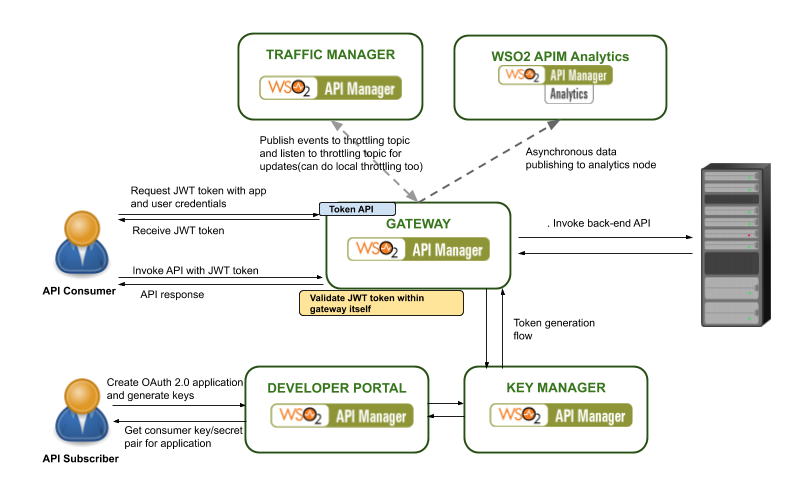
WSO2 API Manager 3.0.0 have the possibility to use JWT Authentication as an alternative to invoke APIs. WSO2 API Manager supports the use of self-contained and signed JWT formatted access tokens as API credentials. When an API is secured using the OAuth2 security scheme, the JWT tokens that are issued for the users from the Developer Portal can be used to invoke APIs.
Figure - Security Flow


You need to first get a JWT token from the WSO2 identity server(or API Manager) by using the token endpoint with the password grant type. You can use the below mentioned curl command to get a JWT token

Curl -u : -k -d “grant_type=password&username=testuser&password=testuser” -H “Content-Type:application/x-www-form-urlencoded” https://localhost:8243/token

Here you need to replace the : with the relevant values of the service provider which is configured at WSO2 Identity Server. This will return the JWT token with a response similar to below.


{“access_token”:”eyJhbGciOiJSUzI1NiJ9.eyJzdWIiOiJqb2huZG9lQGNhcmJvbi5zdXBlciIsImF1ZCI6WyJpcGtXTnlGMWZYdTRNYlNoRTZ2YUpHTkdrRElhIl0sImF6cCI6Imlwa1dOeUYxZlh1NE1iU2hFNnZhSkdOR2tESWEiLCJpc3MiOiJhcGltLWlkcCIsImV4cCI6MTUyODM2ODEwMCwiaWF0IjoxNTI4MzY0NTAwLCJqdGkiOiIxOTQxYmY5YS1jMTJkLTQ3NjYtOTMzMi02ZTg1YTNlNzI2MTIifQ.MiAZkGcOrog6KKYs5V1zED_ojQVs0vxZyFjPVjk29CPATaAEgpmH2Rq56kHJqhE3uQk4oSgMDJzp-Zk2CNPIRJYzy8pJaeP-gEE54NvRfDe1WHZJl72AAtEz9wEIQiKxkI4ZFdMlsnqmIdv8c0_lEfU4BXpH8Uho_Vatsvklv54WLEbSvHzf3M-0dioRnBDEf7xsImkcTGEsbulcKMNw9DOQFxlGLUv7r-qJIh9NUNlf0V7vXE9lVPaBSS8YDGKsjOV-PqnMAtmF6uL4eN36vcqMT5QP0C0s3pFJdz_YxEoN8xnrEn8_UNiJlZ-IxWooRFqQxFJri7fd4hlveoAKIQ”,”refresh_token”:”f723c75a-dd06–3b5e-99a6-b5291f3cab28",”token_type”:”Bearer”,”expires_in”:3600}


OAuth 2.0 token retrieval process and use for API invocation

OAuth 2 (Open Authorization) is an open standard for access delegation. It is used for token-based authentication and authorization. This standard is used by many technology providers, such as Google, Facebook, and Twitter. By using OAuth 2, it is possible to grant access to a secured resource (with an access token) for a specific period of time. Once the lifetime of that access token expires, the consumer has to refresh the token to obtain a new token.

By default, WSO2 API Manager’s key manager component is responsible for handling token-related operations. The key manager properly decouples operations to create OAuth applications and validate access tokens in OAuth 2.0 scenario. As a result, we can plug in a third-party authorization server for key validations if needed (e.g. WSO2 Identity Server or any other server which supports standard OAuth 2.0 protocol).
Figure - API Gateway processing flow


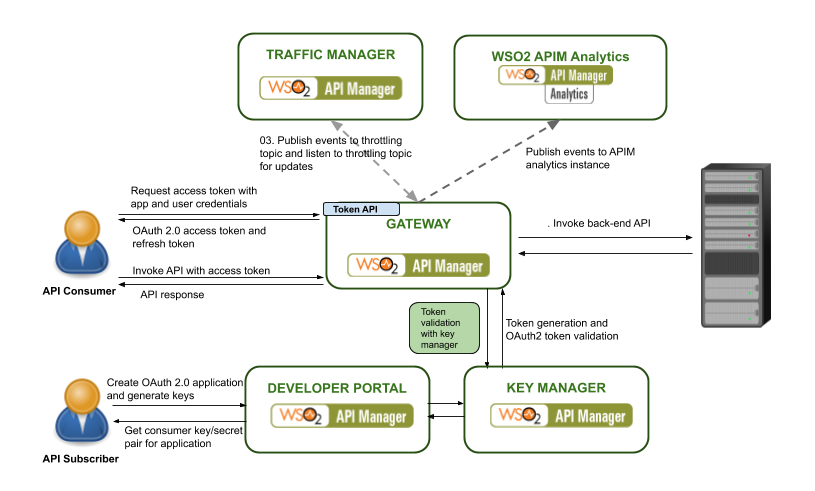
When a request comes to the API Gateway (i.e. when consuming an API), it will be validated with the key manager; access token validation occurs at this stage. The request is allowed to reach the backend endpoint only if the token is a valid token. This ensures that services exposed via APIs can only be consumed by authorized parties.
Figure - Security Flow


From API Manager 3.0.0 onward JWT token will be returned as default token. Before APIM 3.0.0 it was opaque OAuth 2.0 token. In below table we have listed features of both token types and their usages.

JWT
OAuth 2.0
Token revocation
Can do. Need ETCD(only for micro gateway) and JMS topic subscription to notify revoke tokens to gateway.
No need as token validation always happen against key manager when cache missed
Certificate Management
Need to have the same pair of keys as public/private cryptography used to validate signature
No need as token validation happens via service call.
Performance
Signature verification takes some time, no service calls or external communication
Depend on key validation flow, network delays and key manager side speed of processing
External Dependency
To validate JWT token API gateway do not need to communicate with key manager. JWT can be validated within gateway.
API Gateway need to communicate with key manager and validate access token.
Client Implementation
JWT and OAuth 2.0 access token generation and management almost same.
Scaling
When JWT token used API gateway do not have a dependency with external component such as key manager. Hence gateway can scale alone.
Gateway have dependency with key manager and scaling gateway need to scale key manager as well.

WSO2 API Manager Microgateway and Gateway Feature comparison - API Gateway vs. Microgateway 3.0.1


API gateway and microgateway can be compared in different aspects. Decision to select either of the gateways can be hugely depend on the architecture, design and deployment. Both of the gateways have most similar features and functionalities, but underlying works in a different manner in order to cater the purpose it was designed to. In this article we will discuss about different features supported by by each gateway type. Please note this comparison applicable for API Manager 3.0.1 version only.

Design and deployment comparison


API Gateway
Microgateway
Architecture
Designed for monolith
Designed for microservices
Horizontal Scaling
Scaling can be done with other components. As example traffic manager and key manager need to scale along with gateway.
Can scale independently as not direct run-time dependency with other components. Security, throttling validations happen within microgateway.
Deployment distribution
Centralized
Decentralized
Runtime footprint
Designed to run on high performing computers with high load (memory and high cpus)
Lightweight and can run on computers with low performance.
Isolated lock down environments
Limited functionalities(affect on throttling/ analytics)
Designed to work in a network isolated environment
Could ready
Yes
Yes
Automated API CI/CD flows
Supported using CLI tools
Supported with CLI tools
Update APIs
Mutable gateway, updating APIs supported
Immutable gateways. Rebuild the gateway upon updating the API

Security Comparison

API Gateway and microgateway both support different security mechanisms.

API Gateway
Microgateway
Oauth2 opaque tokens
Yes
Yes
Oauth2 self contained tokens
Yes
Yes
Mutual SSL
Yes
Yes
Basic Auth
Yes
Config based supported, can not plug user stores
API Keys
Yes
No


Feature Comparison

API gateway
Microgateway
SOAP back ends
Supported
Supported
REST APIs
Supported
Supported
JMS back-ends
Supported
Not supported
GraphQL APIs
Supported
Not supported
GRPC Services
Not supported
Not supported(will support in 3.1.0)
Web socket APis
Supported
Not supported
Custom mediation/transformation
Supported
Supported
Advance throttling(bandwidth, headers, IP address)
Supported
Not supported

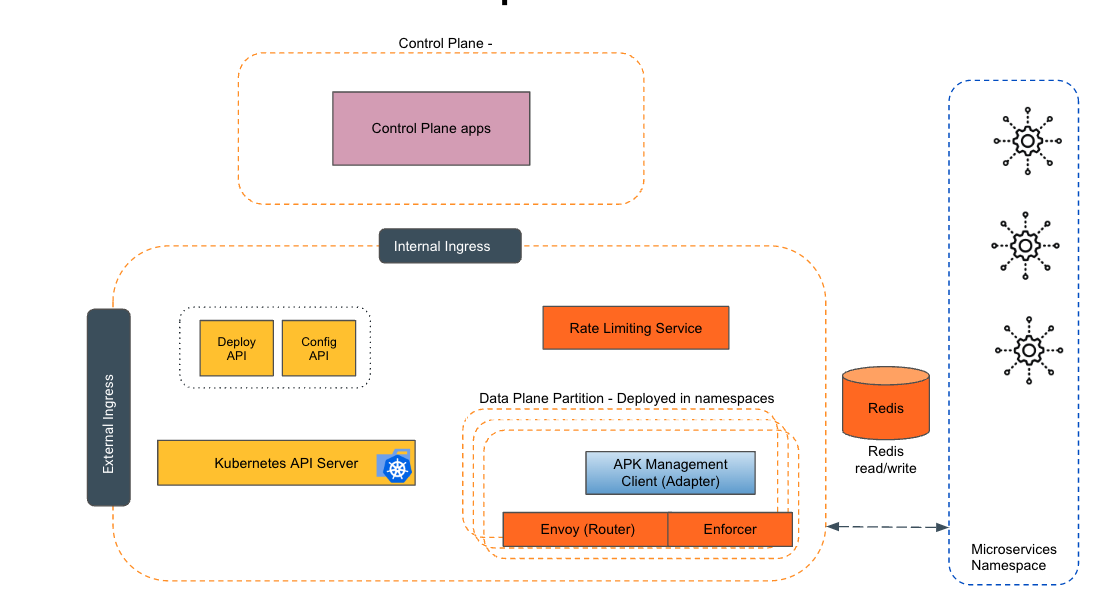
Empowering the Future of API Management: Unveiling the Journey of WSO2 API Platform for Kubernetes (APK) Project and the Anticipated Alpha Release

  Introduction In the ever-evolving realm of API management, our journey embarked on the APK project eight months ago, and now, with great a...