How to deploy WSO2 API Manager with MySQL database and nginx using docker

Install Docker. Please follow the instructions below. Original document for instructions available here(https://docs.docker.com/compose/install/). But only change is we need to change version to 1.7.0 as i listed here.
  1. Install Docker Engine:
  2. The Docker Toolbox installation includes both Engine and Compose, so Mac and Windows users are done installing. Others should continue to the next step.
  3. Go to the Compose repository release page on GitHub.
  4. Follow the instructions from the release page and run the curl command, which the release page specifies, in your terminal.
    Note: If you get a “Permission denied” error, your /usr/local/bin directory probably isn’t writable and you’ll need to install Compose as the superuser. Run sudo -i, then the two commands below, then exit.
    The following is an example command illustrating the format:
    curl -L https://github.com/docker/compose/releases/download/1.7.0/docker-compose-`uname -s`-`uname -m` > /usr/local/bin/docker-compose
    
    If you have problems installing with curl, see Alternative Install Options.
  5. Apply executable permissions to the binary:
    $ chmod +x /usr/local/bin/docker-compose
    
  6. Optionally, install command completion for the bash and zsh shell.
  7. Test the installation.
    $ docker-compose --version
    docker-compose version: 1.7.0
    

Add following entry to /etc/hosts in host machine as follows.
127.0.0.1 api-manager
Then we can refer api-manager url from host machine and access API Manager deployment. We are going to have simple deployment with following components.
  • One WSO2 API Manager 1.10 instance.
  • Nginx instance to act as proxy.
  • One MySQL instance to store data.


See following docker compose file with server definitions.

version: '2'
services:
  dbms:
    container_name: apim_rdbms
    build:
        context: .
        dockerfile: database/Dockerfile
    environment:
        MYSQL_ROOT_PASSWORD: root
  api-manager:
    container_name: api-manager
    build:
      context: .
      dockerfile: api-manager/Dockerfile
    environment:
      - SLEEP=100
    links:
      - nginx:api-manager
  nginx:
    container_name: nginx
    build:
      context: .
      dockerfile: nginx/Dockerfile
    environment:
      - SLEEP=100
    ports:
      - "444:9443"
      - "81:9763"
      - "8280:8280"
      - "8243:8243"


First we need to have docker base image for API Manager and you have to create it using docker or can download from docker repos. If you downloaded then you can import it as follows to local repository. You need to follow same steps to nginx and mysql servers as well(these base images will available on docker public repo). 

Import image.
docker load < wso2am.tgz
List loaded images.
docker images 
REPOSITORY                                       TAG                 IMAGE ID            CREATED             SIZE
dockerhub.private.wso2.com/sanjeewa-testubuntu   latest              a71fcdc506aa        18 minutes ago      188 MB
sanjeewa-ubuntu                                  latest              a71fcdc506aa        18 minutes ago      188 MB
dockerhub.private.wso2.com/wso2am                1.10.0              7ae5de86a076        3 weeks ago         1.032 GB
dockerhub.private.wso2.com/nginx                 latest              2fede7433e44        4 weeks ago         182.8 MB
dockerhub.private.wso2.com/svnrepo               latest              0530ac8e24b0        9 weeks ago         228.8 MB
dockerhub.private.wso2.com/ubuntu                latest              b72889fa879c        11 weeks ago        188 MB
dockerhub.private.wso2.com/mysql                 5.5                 783151ba5745        11 weeks ago        256.9 MB

Now you have API Manager image in repo and can use it for your deployments. Complete deployment pattern is available here and you need to download it. Then unzip content to directory. Then you will see following content.


As you can see we have all configuration files and data required for this deployment. When we start instances these config files and artifacts will replaced in original images.

Build and start deployment
docker-compose up --build
Stop running deployment.
docker-compose down 

Cleanup files.
docker rm -f $(docker ps -qa)

Then access created instance from host machine by accessing following URL.
https://apim-publisher:444/publisher/

Then you can login to publisher, store and management console to perform user operations. If you need to setup complex deployment you can design it and create docker compose file in same way we discussed here.

How to define Environment specific URL using system variables- WSO2 API Manager and ESB

Lets see to define Environment specific URL using system variables- WSO2 API Manager and ESB

Define your endpoint as follows.

<endpoint name="EP1" template="endPointTemplete"

  uri="http://{system.prop.env}.wso2.com" xmlns="http://ws.apache.org/ns/synapse"/>


it would refer to an endpoint template named as 'endPointTemplate'. The config for it is given below

<template name="endPointTemplete" xmlns="http://ws.apache.org/ns/synapse">

  <endpoint name="$name">
<address uri="$uri">
<suspendOnFailure>
<progressionFactor>1.0</progressionFactor>
</suspendOnFailure>
<markForSuspension>
<retriesBeforeSuspension>0</retriesBeforeSuspension>
<retryDelay>0</retryDelay>
</markForSuspension>
</address>
</endpoint>
</template>


Proxy service will refer the EP1 endpoint.
Environment name would be set as a param at server startup
wso2server.sh -Denv=QA

Some of the useful docker commands

List Docker images in system
docker images 
sanjeewa@sanjeewa-ThinkPad-X1-Carbon-3rd:~/work/docker$ docker images 
REPOSITORY                                       TAG                 IMAGE ID            CREATED             SIZE
dockerhub.private.wso2.com/sanjeewa-testubuntu   latest              a71fcdc506aa        6 minutes ago       188 MB
sanjeewa-ubuntu                                  latest              a71fcdc506aa        6 minutes ago       188 MB
dockerhub.private.wso2.com/ubuntu                latest              b72889fa879c        11 weeks ago        188 MB

List running docker instances
docker ps
Get the differences between instances
docker diff 
Commit running instance after some changes to local repository
docker commit c951e2725fca9519c82d665fba4fc1439a8076a6ca1a266783e0578a7d76fb3f sanjeewa-ubuntu
Tag docker available in local repo.
docker tag sanjeewa-ubuntu dockerhub.private.wso2.com/sanjeewa-testubuntu

Export image to repo
>docker push dockerhub.private.wso2.com/sanjeewa-testubuntu
The push refers to a repository [dockerhub.private.wso2.com/sanjeewa-testubuntu]
863e132d4800: Pushed
5f70bf18a086: Pushed
f75f146a5022: Pushed
711b0bd2cb6a: Pushed
595d1d53a534: Pushed
latest: digest: sha256:5fbd869f1c9a169c8811b34dd30a7f5dfac4335ecb98e3f22c629c9e2bf4a83a size: 1358


Import image from file system
docker load < wso2am.tgz
docker images 
REPOSITORY                                       TAG                 IMAGE ID            CREATED             SIZE
dockerhub.private.wso2.com/sanjeewa-testubuntu   latest              a71fcdc506aa        18 minutes ago      188 MB
sanjeewa-ubuntu                                  latest              a71fcdc506aa        18 minutes ago      188 MB
dockerhub.private.wso2.com/wso2am                1.10.0              7ae5de86a076        3 weeks ago         1.032 GB
dockerhub.private.wso2.com/nginx                 latest              2fede7433e44        4 weeks ago         182.8 MB
dockerhub.private.wso2.com/svnrepo               latest              0530ac8e24b0        9 weeks ago         228.8 MB
dockerhub.private.wso2.com/ubuntu                latest              b72889fa879c        11 weeks ago        188 MB
dockerhub.private.wso2.com/mysql                 5.5                 783151ba5745        11 weeks ago        256.9 MB


Run docker instance
docker run -p 9443:9443 dockerhub.private.wso2.com/wso2am:1.10.0
Creating directory /mnt/172.17.0.2...

List running docker instances
docker ps
CONTAINER ID        IMAGE                                      COMMAND                  CREATED             STATUS              PORTS                                                             NAMES
9867acff0f65        dockerhub.private.wso2.com/wso2am:1.10.0   "/usr/local/bin/init."   2 minutes ago       Up 2 minutes        8243/tcp, 8280/tcp, 9763/tcp, 10397/tcp, 0.0.0.0:9443->9443/tcp   sad_kirch


Get logs from container
docker logs -f 9867acff0f65

Access remote machine terminal
docker exec -it 9867acff0f65 /bin/bash
root@9867acff0f65:/mnt# 

List all meta-data
docker inspect 3c78e0d8947a
To stop running instalce
docker stop 3c78e0d8947a
Write docker componse file. Edit docker file and add some commands
FROM dockerhub.private.wso2.com/ubuntu
MAINTAINER test
//run in remote machine
RUN apt-get update && apt-get install apache2 apache2-utils -y
//copy something from local to remote machine
COPY run_apache.sh /var/www/
RUN chmod 755 /var/www/run_apache.sh
EXPOSE 80
//This will execute only when run time happens.
CMD ["/var/www/run_apache.sh"]


Build docker from script file. here testapache is name and . means pick docker file from current location.
docker build -t testapache .
edit file
vim docker-compose.yml
up composed pattern
docker-compose up
Stop running deployment.
docker-compose down
Cleanup files.
docker rm -f $(docker ps -qa)

How to enable per API logging in WSO2 API Manager - Create log file per API


 Though the log4j.properties file it is possible to control logging behavior per API as it create separate log file per API, define log category per proxy etc. What you need to do is add following to log4j.properties file and restart server.
If need you can add this once to file and update log level etc from management console.

log4j.appender.TestAPI_APPENDER=org.apache.log4j.RollingFileAppender
log4j.appender.TestAPI_APPENDER.File=${carbon.home}/repository/logs/${instance.log}/wso2-APILogs-service${instance.log}.log
log4j.appender.TestAPI_APPENDER.MaxFileSize=1000KB
log4j.appender.TestAPI_APPENDER.MaxBackupIndex=10
log4j.appender.TestAPI_APPENDER.layout=org.apache.log4j.PatternLayout
log4j.appender.TestAPI_APPENDER.layout.ConversionPattern=%d{ISO8601} [%X{ip}-%X{host}] [%t] %5p %c{1} %m%n
log4j.category.API_LOGGER.admin--CalculatorAPI= TRACE,  TestAPI_APPENDER


If you enabled it successfully then when you invoke APIs it will create wso2-APILogs-service.log file in repository/logs directory. And you can see API specific invocation details will add to that log file.  Content would be something like below.

2016-07-04 14:26:29,599 [-] [localhost-startStop-1]  INFO admin--CalculatorAPI Initializing API: admin--CalculatorAPI:v1.0
2016-07-04 14:26:57,546 [-] [PassThroughMessageProcessor-8]  WARN admin--CalculatorAPI ERROR_CODE : 0 ERROR_MESSAGE : Access-Control-Allow-Headers:authorization,Access-Control-Allow-Origin,Content-Type,Access-Control-Allow-Methods:GET,Access-Control-Allow-Origin:*, Unexpected error sending message back
2016-07-04 14:26:57,548 [-] [PassThroughMessageProcessor-8]  WARN admin--CalculatorAPI Executing fault sequence mediator : fault
2016-07-04 14:26:57,592 [-] [PassThroughMessageProcessor-8]  INFO admin--CalculatorAPI STATUS = Executing default 'fault' sequence, ERROR_CODE = 0, ERROR_MESSAGE = Access-Control-Allow-Headers:authorization,Access-Control-Allow-Origin,Content-Type,Access-Control-Allow-Methods:GET,Access-Control-Allow-Origin:*, Unexpected error sending message back

How to limit API edit to only API owner and prevent API edits from other users WSO2 API Manager.

All users in same tenant with publisher role can edit APIs. If the users are in different tenants,even though the users have publisher role cannot edit the APIs created by users in other tenants. super admin and users who have publisher role in that tenant can edit.

But we have few other solutions to address similar use cases.

If you need to avoid API developers updating running APIs in system, we can have solution for that. For that you can have 2 different roles for API creators and publisher with relevant permissions. Then API developers will have permission to only create and edit APIs. But they cannot publish those APIs or change running APIs. Only publishers can review changes with API developer and publish them to run time.

Another workaround is create different role for the APIs you don't want to access by other users.
Then grant login, API create, publish permission for that role. And you have to manually set registry permissions of API resource in a way only users with newly created role can edit and modify that.
But please note that manual resource permission changes can lead to issues if you exactly don't know what you are doing.
Or you can go to current provider level in registry(/_system/governance/apimgt/applicationdata/provider/sanjeewa) and control access in that level as follows. Here only sanjeewa user(who only have api_creator role) having permission to edit resource and others do not have permission to edit this resource. So other users have api_publisher role and they cannot modify, update resource.


And when you control access from registry level if someone tried to edit that API then it will print error logs saying you don't have permission to edit API. And in UI you will see error message saying error while updating API or something like that. So in summary this is not good solution but if you need to protect one API from others you may use similar approach. But we do not recommend this for many APIs.

How to Revoke access tokens belong to user without login to identity server dashboard and without having application internal details.(WSO2 API Manager, Identity Server)

We need to have full identity server profile for do this as identity server dashboard will run only within complete identity Server run time(not in API Manager run time).
But even from that application we are doing exact same soap calls i listed below.
If you do not run full identity server profile in any place of deployment you have 2 solutions.
01. Like we discussed can mitigate the security risk by shortening the access/refresh token or completely disabling the refresh token.
02. Implement custom web application where user can login and revoke their tokes using following web service calls. This approach is having some development tasks and UI implementation.

Here i have listed complete steps to list your applications and revoke tokens for them.
You may try this with soap ui or any other soap service client if required. I assume you have installed latest patches issued for API Manager.

Generate access token using password grant type or any other grant type as follows.
curl -k -d "grant_type=password&username=sanjeewa&password=sanjeewa" -H "Authorization: Basic ajdNc2pIUzBBMHkwQW9XcUlxcWcyMDZROEdVYTpLNXFPVV9HSDNSZWtNZV91d240U2pUVldscTRh" https://10.100.1.23:8243/token
{"scope":"default","token_type":"Bearer","expires_in":3600,"refresh_token":"0caede403416ba001cb735c4b3b87ea4","access_token":"a745bd59ecd37afd84f686b887e9ff5d"}

Now use generated token to access API service. As you see you will get successful response.
curl -X GET --header "Accept: application/json" --header "Authorization: Bearer a745bd59ecd37afd84f686b887e9ff5d" "http://10.100.1.23:8280/calc/1.0/add?x=4&y=4"
{"answer": "8.0"}

Now lets revoke token using soap service.
URL: https://sanjeewa-ThinkPad-X1-Carbon-3rd:9443/services/OAuthAdminService
Please note you need to pass basic auth credentials of the user. And in request pay load you need to pass app name of your application.

Here one limitation is you need to know application name before do this operation. But if you use identity server dashboard then you will see all app names.
But we do have web service for that as well.

Request:
POST https://sanjeewa-ThinkPad-X1-Carbon-3rd:9443/services/OAuthAdminService.OAuthAdminServiceHttpsSoap11Endpoint HTTP/1.1
Accept-Encoding: gzip,deflate
Content-Type: text/xml;charset=UTF-8
SOAPAction: "urn:getAppsAuthorizedByUser"
Authorization: Basic YWRtaW46YWRtaW4=
Content-Length: 231
Host: sanjeewa-ThinkPad-X1-Carbon-3rd:9443
Connection: Keep-Alive
User-Agent: Apache-HttpClient/4.1.1 (java 1.5)

<soapenv:Envelope xmlns:soapenv="http://schemas.xmlsoap.org/soap/envelope/" 
xmlns:xsd="http://org.apache.axis2/xsd">
   <soapenv:Header/>
   <soapenv:Body>
      <xsd:getAppsAuthorizedByUser/>
   </soapenv:Body>
</soapenv:Envelope>

Response:
<soapenv:Envelope xmlns:soapenv="http://schemas.xmlsoap.org/soap/envelope/">
<soapenv:Body>
<ns:getAppsAuthorizedByUserResponse xmlns:ns="http://org.apache.axis2/xsd" xmlns:ax2434="http://dto.oauth.identity.carbon.wso2.org/xsd" xmlns:ax2430="http://oauth.identity.carbon.wso2.org/xsd" xmlns:ax2431="http://base.identity.carbon.wso2.org/xsd">
         <ns:return xsi:type="ax2434:OAuthConsumerAppDTO" xmlns:xsi="http://www.w3.org/2001/XMLSchema-instance">
            <ax2434:OAuthVersion xsi:nil="true"/>
            <ax2434:applicationName>admin_rest_api_publisher</ax2434:applicationName>
            <ax2434:callbackUrl xsi:nil="true"/>
            <ax2434:grantTypes>urn:ietf:params:oauth:grant-type:saml2-bearer iwa:ntlm implicit refresh_token client_credentials authorization_code password</ax2434:grantTypes>           <ax2434:oauthConsumerKey>IVPk3cKAsyo2tZImmvv0cD7kkXAa</ax2434:oauthConsumerKey>
            <ax2434:oauthConsumerSecret xsi:nil="true"/>
            <ax2434:username>admin@carbon.super</ax2434:username>
         </ns:return>
         <ns:return xsi:type="ax2434:OAuthConsumerAppDTO" xmlns:xsi="http://www.w3.org/2001/XMLSchema-instance">
            <ax2434:OAuthVersion xsi:nil="true"/>      <ax2434:applicationName>admin_DefaultApplication_PRODUCTION</ax2434:applicationName>
            <ax2434:callbackUrl xsi:nil="true"/>
            <ax2434:grantTypes>urn:ietf:params:oauth:grant-type:saml2-bearer iwa:ntlm implicit refresh_token client_credentials authorization_code password</ax2434:grantTypes>   <ax2434:oauthConsumerKey>j7MsjHS0A0y0AoWqIqqg206Q8GUa</ax2434:oauthConsumerKey>
            <ax2434:oauthConsumerSecret xsi:nil="true"/>
            <ax2434:username>admin@carbon.super</ax2434:username>
         </ns:return>
      </ns:getAppsAuthorizedByUserResponse>
   </soapenv:Body>
</soapenv:Envelope>


As you can see here you can list all applications belong to authorized user.
Then we can get required application and revoke tokens for that application. Please refer steps listed below.

Complete Request:
POST https://sanjeewa-ThinkPad-X1-Carbon-3rd:9443/services/OAuthAdminService.OAuthAdminServiceHttpsSoap11Endpoint HTTP/1.1
Accept-Encoding: gzip,deflate
Content-Type: text/xml;charset=UTF-8
SOAPAction: "urn:revokeAuthzForAppsByResoureOwner"
Authorization: Basic c2FuamVld2E6c2FuamVld2E=
Content-Length: 811
Host: sanjeewa-ThinkPad-X1-Carbon-3rd:9443
Connection: Keep-Alive
User-Agent: Apache-HttpClient/4.1.1 (java 1.5)

<soapenv:Envelope xmlns:soapenv="http://schemas.xmlsoap.org/soap/envelope/" 
xmlns:xsd="http://org.apache.axis2/xsd" 
xmlns:xsd1="http://dto.oauth.identity.carbon.wso2.org/xsd">
   <soapenv:Header/>
   <soapenv:Body>
      <xsd:revokeAuthzForAppsByResoureOwner>
         <!--Optional:-->
         <xsd:revokeRequestDTO>
            <!--Zero or more repetitions:-->
            <xsd1:apps>admin_DefaultApplication_PRODUCTION</xsd1:apps>
            <!--Optional:-->
            <xsd1:authzUser>sanjeewa@carbon.super</xsd1:authzUser>
            <!--Optional:-->
            <xsd1:consumerKey></xsd1:consumerKey>
            <!--Optional:-->
            <xsd1:consumerSecret></xsd1:consumerSecret>
         </xsd:revokeRequestDTO>
      </xsd:revokeAuthzForAppsByResoureOwner>
   </soapenv:Body>
</soapenv:Envelope>


Response:
<soapenv:Envelope xmlns:soapenv="http://schemas.xmlsoap.org/soap/envelope/">
   <soapenv:Body>
      <ns:revokeAuthzForAppsByResoureOwnerResponse xmlns:ns="http://org.apache.axis2/xsd">
         <ns:return xsi:type="ax2434:OAuthRevocationResponseDTO" xmlns:ax2434="http://dto.oauth.identity.carbon.wso2.org/xsd" xmlns:ax2430="http://oauth.identity.carbon.wso2.org/xsd" xmlns:xsi="http://www.w3.org/2001/XMLSchema-instance" xmlns:ax2431="http://base.identity.carbon.wso2.org/xsd">
            <ax2434:error>false</ax2434:error>
            <ax2434:errorCode xsi:nil="true"/>
            <ax2434:errorMsg xsi:nil="true"/>
         </ns:return>
      </ns:revokeAuthzForAppsByResoureOwnerResponse>
   </soapenv:Body>
</soapenv:Envelope>

Now we have revoked all tokens obtained for default application. Now lwts try to invoke API again and see what happen.
curl -X GET --header "Accept: application/json" --header "Authorization: Bearer 2824ce3682f3cc1396a32dbc0dd4f92a" "http://10.100.1.23:8280/calc/1.0/add?x=4&y=4"
<ams:fault xmlns:ams="http://wso2.org/apimanager/security"
><ams:code>900901</ams:code>
<ams:message>Invalid Credentials</ams:message>
<ams:description>Access failure for API: /calc/1.0, version: 1.0. Make sure your have given the correct access token</ams:description></ams:fault>

Now you will see that access token is revoked and cannot be use anymore.

How to Revoke access tokens belong to user without login to identity server dashboard and without having application internal details.(WSO2 API Manager, Identity Server)

We need to have full identity server profile for do this as identity server dashboard will run only within complete identity Server run time(not in API Manager run time).
But even from that application we are doing exact same soap calls i listed below.
If you do not run full identity server profile in any place of deployment you have 2 solutions.
01. Like we discussed can mitigate the security risk by shortening the access/refresh token or completely disabling the refresh token.
02. Implement custom web application where user can login and revoke their tokes using following web service calls. This approach is having some development tasks and UI implementation.

Here i have listed complete steps to list your applications and revoke tokens for them.
You may try this with soap ui or any other soap service client if required. I assume you have installed latest patches issued for API Manager.

Generate access token using password grant type or any other grant type as follows.
curl -k -d "grant_type=password&username=sanjeewa&password=sanjeewa" -H "Authorization: Basic ajdNc2pIUzBBMHkwQW9XcUlxcWcyMDZROEdVYTpLNXFPVV9HSDNSZWtNZV91d240U2pUVldscTRh" https://10.100.1.23:8243/token
{"scope":"default","token_type":"Bearer","expires_in":3600,"refresh_token":"0caede403416ba001cb735c4b3b87ea4","access_token":"a745bd59ecd37afd84f686b887e9ff5d"}

Now use generated token to access API service. As you see you will get successful response.
curl -X GET --header "Accept: application/json" --header "Authorization: Bearer a745bd59ecd37afd84f686b887e9ff5d" "http://10.100.1.23:8280/calc/1.0/add?x=4&y=4"
{"answer": "8.0"}

Now lets revoke token using soap service.
URL: https://sanjeewa-ThinkPad-X1-Carbon-3rd:9443/services/OAuthAdminService
Please note you need to pass basic auth credentials of the user. And in request pay load you need to pass app name of your application.

Here one limitation is you need to know application name before do this operation. But if you use identity server dashboard then you will see all app names.
But we do have web service for that as well.

Request:
POST https://sanjeewa-ThinkPad-X1-Carbon-3rd:9443/services/OAuthAdminService.OAuthAdminServiceHttpsSoap11Endpoint HTTP/1.1
Accept-Encoding: gzip,deflate
Content-Type: text/xml;charset=UTF-8
SOAPAction: "urn:getAppsAuthorizedByUser"
Authorization: Basic YWRtaW46YWRtaW4=
Content-Length: 231
Host: sanjeewa-ThinkPad-X1-Carbon-3rd:9443
Connection: Keep-Alive
User-Agent: Apache-HttpClient/4.1.1 (java 1.5)

<soapenv:Envelope xmlns:soapenv="http://schemas.xmlsoap.org/soap/envelope/" 
xmlns:xsd="http://org.apache.axis2/xsd">
   <soapenv:Header/>
   <soapenv:Body>
      <xsd:getAppsAuthorizedByUser/>
   </soapenv:Body>
</soapenv:Envelope>

Response:
<soapenv:Envelope xmlns:soapenv="http://schemas.xmlsoap.org/soap/envelope/">
   <soapenv:Body>
      <ns:getAppsAuthorizedByUserResponse xmlns:ns="http://org.apache.axis2/xsd" xmlns:ax2434="http://dto.oauth.identity.carbon.wso2.org/xsd" xmlns:ax2430="http://oauth.identity.carbon.wso2.org/xsd" xmlns:ax2431="http://base.identity.carbon.wso2.org/xsd">
         <ns:return xsi:type="ax2434:OAuthConsumerAppDTO" xmlns:xsi="http://www.w3.org/2001/XMLSchema-instance">
            <ax2434:OAuthVersion xsi:nil="true"/>
            <ax2434:applicationName>admin_rest_api_publisher</ax2434:applicationName>
            <ax2434:callbackUrl xsi:nil="true"/>
            <ax2434:grantTypes>urn:ietf:params:oauth:grant-type:saml2-bearer iwa:ntlm implicit refresh_token client_credentials authorization_code password</ax2434:grantTypes>
            <ax2434:oauthConsumerKey>IVPk3cKAsyo2tZImmvv0cD7kkXAa</ax2434:oauthConsumerKey>
            <ax2434:oauthConsumerSecret xsi:nil="true"/>
            <ax2434:username>admin@carbon.super</ax2434:username>
         </ns:return>
         <ns:return xsi:type="ax2434:OAuthConsumerAppDTO" xmlns:xsi="http://www.w3.org/2001/XMLSchema-instance">
            <ax2434:OAuthVersion xsi:nil="true"/>
            <ax2434:applicationName>admin_DefaultApplication_PRODUCTION</ax2434:applicationName>
            <ax2434:callbackUrl xsi:nil="true"/>
            <ax2434:grantTypes>urn:ietf:params:oauth:grant-type:saml2-bearer iwa:ntlm implicit refresh_token client_credentials authorization_code password</ax2434:grantTypes>
            <ax2434:oauthConsumerKey>j7MsjHS0A0y0AoWqIqqg206Q8GUa</ax2434:oauthConsumerKey>
            <ax2434:oauthConsumerSecret xsi:nil="true"/>
            <ax2434:username>admin@carbon.super</ax2434:username>
         </ns:return>
      </ns:getAppsAuthorizedByUserResponse>
   </soapenv:Body>
</soapenv:Envelope>


As you can see here you can list all applications belong to authorized user.
Then we can get required application and revoke tokens for that application. Please refer steps listed below.

Complete Request:
POST https://sanjeewa-ThinkPad-X1-Carbon-3rd:9443/services/OAuthAdminService.OAuthAdminServiceHttpsSoap11Endpoint HTTP/1.1
Accept-Encoding: gzip,deflate
Content-Type: text/xml;charset=UTF-8
SOAPAction: "urn:revokeAuthzForAppsByResoureOwner"
Authorization: Basic c2FuamVld2E6c2FuamVld2E=
Content-Length: 811
Host: sanjeewa-ThinkPad-X1-Carbon-3rd:9443
Connection: Keep-Alive
User-Agent: Apache-HttpClient/4.1.1 (java 1.5)

<soapenv:Envelope xmlns:soapenv="http://schemas.xmlsoap.org/soap/envelope/" 
xmlns:xsd="http://org.apache.axis2/xsd" 
xmlns:xsd1="http://dto.oauth.identity.carbon.wso2.org/xsd">
   <soapenv:Header/>
   <soapenv:Body>
      <xsd:revokeAuthzForAppsByResoureOwner>
         <!--Optional:-->
         <xsd:revokeRequestDTO>
            <!--Zero or more repetitions:-->
            <xsd1:apps>admin_DefaultApplication_PRODUCTION</xsd1:apps>
            <!--Optional:-->
            <xsd1:authzUser>sanjeewa@carbon.super</xsd1:authzUser>
            <!--Optional:-->
            <xsd1:consumerKey></xsd1:consumerKey>
            <!--Optional:-->
            <xsd1:consumerSecret></xsd1:consumerSecret>
         </xsd:revokeRequestDTO>
      </xsd:revokeAuthzForAppsByResoureOwner>
   </soapenv:Body>
</soapenv:Envelope>


Response:
<soapenv:Envelope xmlns:soapenv="http://schemas.xmlsoap.org/soap/envelope/">

   <soapenv:Body>
      <ns:revokeAuthzForAppsByResoureOwnerResponse xmlns:ns="http://org.apache.axis2/xsd">
         <ns:return xsi:type="ax2434:OAuthRevocationResponseDTO" xmlns:ax2434="http://dto.oauth.identity.carbon.wso2.org/xsd" xmlns:ax2430="http://oauth.identity.carbon.wso2.org/xsd" xmlns:xsi="http://www.w3.org/2001/XMLSchema-instance" xmlns:ax2431="http://base.identity.carbon.wso2.org/xsd">
            <ax2434:error>false</ax2434:error>
            <ax2434:errorCode xsi:nil="true"/>
            <ax2434:errorMsg xsi:nil="true"/>
         </ns:return>
      </ns:revokeAuthzForAppsByResoureOwnerResponse>
   </soapenv:Body>
</soapenv:Envelope>


Now we have revoked all tokens obtained for default application. Now lwts try to invoke API again and see what happen.

curl -X GET --header "Accept: application/json" --header "Authorization: Bearer 2824ce3682f3cc1396a32dbc0dd4f92a" "http://10.100.1.23:8280/calc/1.0/add?x=4&y=4"
<ams:fault xmlns:ams="http://wso2.org/apimanager/security"
><ams:code>900901</ams:code>

<ams:message>Invalid Credentials</ams:message>
<ams:description>Access failure for API: /calc/1.0, version: 1.0. Make sure your have given the correct access token</ams:description></ams:fault>


Now you will see that access token is revoked and cannot be use anymore.

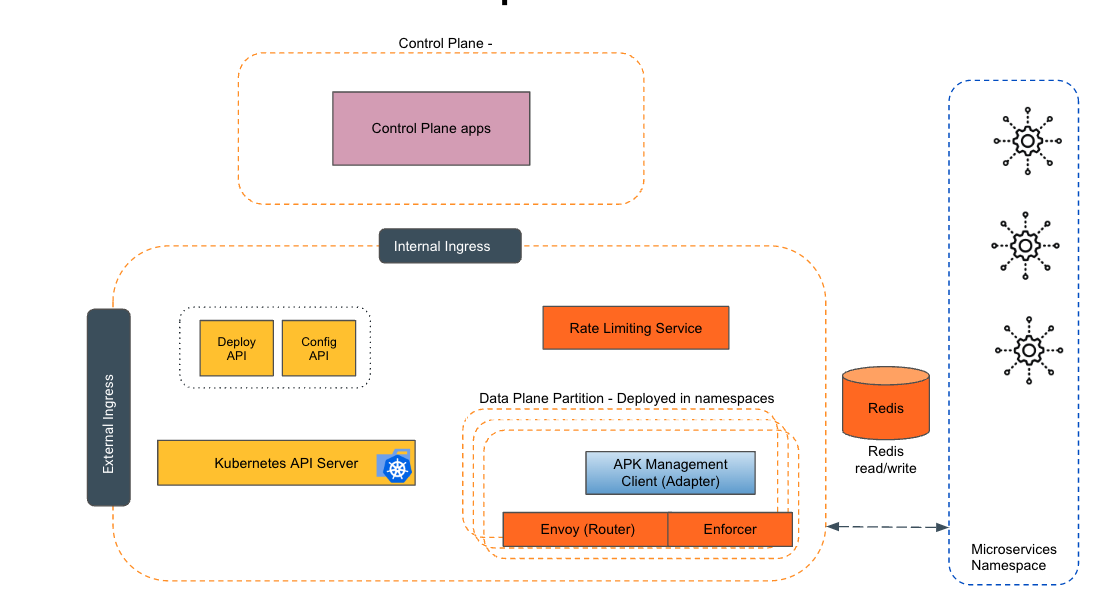
Empowering the Future of API Management: Unveiling the Journey of WSO2 API Platform for Kubernetes (APK) Project and the Anticipated Alpha Release

  Introduction In the ever-evolving realm of API management, our journey embarked on the APK project eight months ago, and now, with great a...