How to install Redis in ubuntu and send event

Please follow below instructions to install and use Redis
Type following commands in command line.

wget http://download.redis.io/releases/redis-stable.tar.gz

tar xzf redis-stable.tar.gz

cd redis-stable

make

make test

sudo make install

cd utils

sudo ./install_server.sh
As the script runs, you can choose the default options by pressing enter.

Port depends on the port you set during the installation. 6379 is the default port setting.

sudo service redis_6379 start
sudo service redis_6379 stop

Access redis command line tool
redis-cli

You will see following command line.
redis 127.0.0.1:6379>


Then send events with key and value as follows.
127.0.0.1:6379> publish EVENTCHANNEL sanjeewa11111199999999


How to increase time out value in WSO2 API Manager

When we increase timeout value in API Manager we have to set 3 properties.

1) Global timeout defined in synapse.properties (\repository\conf\synapse.properties)

synapse.global_timeout_interval=60000000


2) Socket timeout defined in the passthru-http.properties (ESB_HOME\repository\conf\passthru-http.properties )

http.socket.timeout=60000000

3) Also we need to set timeout in API level per each API.
 <endpoint name="admin--Stream_APIproductionEndpoint_0">
      <address uri="http://localhost:9763/example-v4/example">
 <timeout>
   <duration>12000000</duration>
  <responseAction>fault</responseAction>
  </timeout>
 </address>

How to avoid getting incorrect access tokens due to constraint violation when we have high load on token API(CON_APP_KEY violated).

Sometimes you may see following behavior when we have very high load on token API.
1. Call https://localhost:8243/token
2. Get constraint error.
{org.wso2.carbon.identity.oauth2.dao.TokenPersistenceTask} - Error occurred while persisting access token bsdsadaa209esdsadasdae21a17d {org.wso2.carbon.identity.oauth2.dao.TokenPersistenceTask}
org.wso2.carbon.identity.oauth2.IdentityOAuth2Exception: Access Token for consumer key : H5sadsdasdasddasdsa, user : sanjeewa and scope : default already exists
at org.wso2.carbon.identity.oauth2.dao.TokenMgtDAO.storeAccessToken(TokenMgtDAO.java:194)
at org.wso2.carbon.identity.oauth2.dao.TokenMgtDAO.persistAccessToken(TokenMgtDAO.java:229)
at org.wso2.carbon.identity.oauth2.dao.TokenPersistenceTask.run(TokenPersistenceTask.java:56)
at java.util.concurrent.ThreadPoolExecutor.runWorker(ThreadPoolExecutor.java:1145)
at java.util.concurrent.ThreadPoolExecutor$Worker.run(ThreadPoolExecutor.java:615)
at java.lang.Thread.run(Thread.java:744)
Caused by: java.sql.SQLIntegrityConstraintViolationException: ORA-00001: unique constraint (WSO2_APIM.CON_APP_KEY) violated

3. Attempt to use the access token when calling an API but get HTTP Status-Code=401 (Unauthorized) Invalid Credentials error

This issue happens because our token storing logic is not blocking call(this was implemented as improvement to token API as persisting can block token generation flow).
So due to that we already returned incorrect token to client(which is not already persisted). This happens only if constraint failed when we try to persist token.
But at that time we may return token to client.

If we made token persisting pool size 0 then this issue will not be there and user will immediately get error (probably internal server error) and token will not be return to client.
See following code block

try {
tokenMgtDAO.storeAccessToken(accessToken, oAuth2AccessTokenReqDTO.getClientId(),
accessTokenDO, userStoreDomain);
} catch (IdentityException e) {
throw new IdentityOAuth2Exception(
"Error occurred while storing new access token : " + accessToken, e);
}

You can set pool size as follows. By default it set to 100.
wso2am-1.9.0/repository/conf/identity.xml

<JDBCPersistenceManager>
    <SessionDataPersist>
        <PoolSize>0</PoolSize>
    </SessionDataPersist>
</JDBCPersistenceManager>
 

This Will resolve your issue
 

How to minimize solr idexing time(registry artifact loading time) in newly spawned instance

In API Management platform sometimes we need to add store and publisher nodes to cluster. But if you have large number of resources in registry solr indexing will take some time.
Solr indexing will be used to index registry data in local file system. In this post we will discuss how we can minimize time take to this loading process. Please note this will apply to all carbon kernel 4.2.0 or below versions. In GREG 5.0.0 we have handled this issue and do not need to do anything to handle this scenario.

You can minimize the time taken to list down existing API list in Store and Publisher by copying an already indexed Solr/data directory to a fresh APIM instance.
However note that you should NOT copy and replace Solr/data directories of different APIM product versions. (For example you can NOT copy and replace Solr/data directory of APIM 1.9 to APIM 1.7)

[1] First create a backup of Solr indexed files using the last currently running API product version.
   [APIM_Home]/solr/data directory
[2] Now copy and replace [Product_Home]/solr/data directory in the new APIM instance/s before puppet initializes it, which will list existing APIs since by the time your new carbon instance starts running we have already copied the Solr indexed file to the instance.

If you are using automated process its recommend to automate this process.
So you can follow these instructions to automate it.
01. Get backup of solr/data directory of running server and push it to some artifact server(you can use Rsynch or svn for this).
02. When new instance spawned before start it copy updated solr content from remote artifact server.
03. Then start new server.


If you need to manually re-index data you can follow approach listed below.

Shutdown the server if it is already started.
Rename the lastAccessTimeLocation in registry.xml ,
Eg:
/_system/local/repository/components/org.wso2.carbon.registry/indexing/lastaccesstime
To
/_system/local/repository/components/org.wso2.carbon.registry/indexing/lastaccesstime_1
Backup the solr directory and delete it.

/solr

Restart the server and keep the server idle few minutes to re-index.

How to handle ditributed counter across cluster when each node contribute to counter - Distributed throttling

Handle throttling in distributed environment is bit tricky task. For this we need to maintain time window and counters per instance and also those counters should be shared across cluster as well. Recently i worked on similar issue and i will share my thoughts about this problem.

Lets say we have 5 nodes. Then each node will serve x number of requests within minutes. So across cluster we can server 5X requests per minutes. And some cases node1 may server 2x while other servers 1x. But still we need to have 5x across cluster. To address this issue we need shared counter across cluster. So each and every node can contribute to that and maintain counters.

To implement something like that we may use following approach.

We can maintain two Hazelcast IAtomicLong data structures or similar distributed counter as follow. This should be handle in cluster level.
And node do not have to do anything about replication.

  • Shared Counter : This will maintain global request count across the cluster
  • Shared Timestamp : This will be used for manage time window across the cluster for particular throttling period

In each and every instance we should maintain following per each counter object.
  • Local global counter which sync up with shared counter in replication task(Local global counter = shared counter + Local counter )
  • Local counter which holds request counts until replication task run.(after replication Local counter = 0)

We may use replication task that will run periodically.
During the replication task following tasks will be happen.
Update the shared counter with node local counter and then update local global counter with the shared counter.
If global counter set to zero, it will reset the global counter.


In addition we need to set the current time into the hazelcast Atomic Long .When other servers get the first request it sets it first access time as the value in hazelcast according to the caller context ID.So all the servers will set into the one first access time. We check the throttle time will become to the time come from hazelcast and unit Time according to tier.
To check time window is elapsed so if this happen We set previous callercontext globalcount to 0.
As assumption we made was all nodes in cluster are having the same timestamp.


See following diagrams.


If you need to use throttle core for your application/component run in WSO2 runtime you can import throttle core to your project and use following code to check access availability.


Here i have listed code to throttle message using handler. So you can write your own handler and call doThrottle method in message flow. First you need to import org.wso2.carbon.throttle.core to your project.


       private boolean doThrottle(MessageContext messageContext) {
            boolean canAccess = true;
            boolean isResponse = messageContext.isResponse();
            org.apache.axis2.context.MessageContext axis2MC = ((Axis2MessageContext) messageContext).
                    getAxis2MessageContext();
            ConfigurationContext cc = axis2MC.getConfigurationContext();
            synchronized (this) {

                if (!isResponse) {
                    initThrottle(messageContext, cc);
                }
            }         // if the access is success through concurrency throttle and if this is a request message
            // then do access rate based throttling
            if (!isResponse && throttle != null) {
                AuthenticationContext authContext = APISecurityUtils.getAuthenticationContext(messageContext);
                String tier;             if (authContext != null) {
                    AccessInformation info = null;
                    try {

                        String ipBasedKey = (String) ((TreeMap) axis2MC.
                                getProperty("TRANSPORT_HEADERS")).get("X-Forwarded-For");
                        if (ipBasedKey == null) {
                            ipBasedKey = (String) axis2MC.getProperty("REMOTE_ADDR");
                        }
                        tier = authContext.getApplicationTier();
                        ThrottleContext apiThrottleContext =
                                ApplicationThrottleController.
                                        getApplicationThrottleContext(messageContext, cc, tier);
                        //    if (isClusteringEnable) {
                        //      applicationThrottleContext.setConfigurationContext(cc);
                        apiThrottleContext.setThrottleId(id);
                        info = applicationRoleBasedAccessController.canAccess(apiThrottleContext,
                                                                              ipBasedKey, tier);
                        canAccess = info.isAccessAllowed();
                    } catch (ThrottleException e) {
                        handleException("Error while trying evaluate IPBased throttling policy", e);
                    }
                }
            }         if (!canAccess) {
                handleThrottleOut(messageContext);
                return false;
            }

            return canAccess;
        }    


    private void initThrottle(MessageContext synCtx, ConfigurationContext cc) {
            if (policyKey == null) {
                throw new SynapseException("Throttle policy unspecified for the API");
            }         Entry entry = synCtx.getConfiguration().getEntryDefinition(policyKey);
            if (entry == null) {
                handleException("Cannot find throttling policy using key: " + policyKey);
                return;
            }
            Object entryValue = null;
            boolean reCreate = false;         if (entry.isDynamic()) {
                if ((!entry.isCached()) || (entry.isExpired()) || throttle == null) {
                    entryValue = synCtx.getEntry(this.policyKey);
                    if (this.version != entry.getVersion()) {
                        reCreate = true;
                    }
                }
            } else if (this.throttle == null) {
                entryValue = synCtx.getEntry(this.policyKey);
            }         if (reCreate || throttle == null) {
                if (entryValue == null || !(entryValue instanceof OMElement)) {
                    handleException("Unable to load throttling policy using key: " + policyKey);
                    return;
                }
                version = entry.getVersion();             try {
                    // Creates the throttle from the policy
                    throttle = ThrottleFactory.createMediatorThrottle(
                            PolicyEngine.getPolicy((OMElement) entryValue));

                } catch (ThrottleException e) {
                    handleException("Error processing the throttling policy", e);
                }
            }
        }


How to get MD5SUM of all files available in conf directory

We can use following command to get MD5SUM of all files available in the system. We can use this approach to check status of configuration file of multiple servers and check those are same or not.
find ./folderName -type f -exec md5sum {} \; > test.xml

How to use SAML2 grant type to generate access tokens in web applications (Generate access tokens programatically using SAML2 grant type). - WSO2 API Manager

Exchanging SAML2 bearer tokens with OAuth2 (SAML extension grant type)

SAML 2.0 is an XML-based protocol. It uses security tokens containing assertions to pass information about an enduser between a SAML authority and a SAML consumer.
A SAML authority is an identity provider (IDP) and a SAML consumer is a service provider (SP).
A lot of enterprise applications use SAML2 to engage a third-party identity provider to grant access to systems that are only authenticated against the enterprise application.
These enterprise applications might need to consume OAuth-protected resources through APIs, after validating them against an OAuth2.0 authentication server.
However, an enterprise application that already has a working SAML2.0 based SSO infrastructure between itself and the IDP prefers to use the existing trust relationship, even if the OAuth authorization server is entirely different from the IDP. The SAML2 Bearer Assertion Profile for OAuth2.0 helps leverage this existing trust relationship by presenting the SAML2.0 token to the authorization server and exchanging it to an OAuth2.0 access token.

You can use SAML grant type for web applications to generate tokens.
https://docs.wso2.com/display/AM160/Token+API#TokenAPI-ExchangingSAML2bearertokenswithOAuth2(SAMLextensiongranttype)


Sample curl command .
curl -k -d "grant_type=urn:ietf:params:oauth:grant-type:saml2-bearer&assertion=&scope=PRODUCTION" -H "Authorization: Basic SVpzSWk2SERiQjVlOFZLZFpBblVpX2ZaM2Y4YTpHbTBiSjZvV1Y4ZkM1T1FMTGxDNmpzbEFDVzhh, Content-Type: application/x-www-form-urlencoded" https://serverurl/token

How to invoke token API from web app and get token programmatically.

To generate user access token using SAML assertion you can add following code block inside your web application.
When you login to your app using SSO there would be access you will get SAML response. You can store that in application session and use it to get token whenever requires.


Please refer following code for Access token issuer.

package com.test.org.oauth2;
import org.apache.amber.oauth2.client.OAuthClient;
import org.apache.amber.oauth2.client.URLConnectionClient;
import org.apache.amber.oauth2.client.request.OAuthClientRequest;
import org.apache.amber.oauth2.common.token.OAuthToken;
import org.apache.catalina.Session;
import org.apache.commons.logging.Log;
import org.apache.commons.logging.LogFactory;

public class AccessTokenIssuer {
    private static Log log = LogFactory.getLog(AccessTokenIssuer.class);
    private Session session;
    private static OAuthClient oAuthClient;

    public static void init() {
        if (oAuthClient == null) {
            oAuthClient = new OAuthClient(new URLConnectionClient());
        }
    }

    public AccessTokenIssuer(Session session) {
        init();
        this.session = session;
    }

    public String getAccessToken(String consumerKey, String consumerSecret, GrantType grantType)
            throws Exception {
        OAuthToken oAuthToken = null;

        if (session == null) {
            throw new Exception("Session object is null");
        }
// You need to implement logic for this operation according to your system design. some url
        String oAuthTokenEndPoint = "token end point url"

        if (oAuthTokenEndPoint == null) {
            throw new Exception("OAuthTokenEndPoint is not set properly in digital_airline.xml");
        }


        String assertion = "";
        if (grantType == GrantType.SAML20_BEARER_ASSERTION) {
    // You need to implement logic for this operation according to your system design
            String samlResponse = "get SAML response from session";
    // You need to implement logic for this operation according to your system design
            assertion = "get assertion from SAML response";
        }
        OAuthClientRequest accessRequest = OAuthClientRequest.
                tokenLocation(oAuthTokenEndPoint)
                .setGrantType(getAmberGrantType(grantType))
                .setClientId(consumerKey)
                .setClientSecret(consumerSecret)
                .setAssertion(assertion)
                .buildBodyMessage();
        oAuthToken = oAuthClient.accessToken(accessRequest).getOAuthToken();

        session.getSession().setAttribute("OAUTH_TOKEN" , oAuthToken);
        session.getSession().setAttribute("LAST_ACCESSED_TIME" , System.currentTimeMillis());

        return oAuthToken.getAccessToken();
    }

    private static org.apache.amber.oauth2.common.message.types.GrantType getAmberGrantType(
            GrantType grantType) {
        if (grantType == GrantType.SAML20_BEARER_ASSERTION) {
            return org.apache.amber.oauth2.common.message.types.GrantType.SAML20_BEARER_ASSERTION;
        } else if (grantType == GrantType.CLIENT_CREDENTIALS) {
            return org.apache.amber.oauth2.common.message.types.GrantType.CLIENT_CREDENTIALS;
        } else if (grantType == GrantType.REFRESH_TOKEN) {
            return org.apache.amber.oauth2.common.message.types.GrantType.REFRESH_TOKEN;
        } else {
            return org.apache.amber.oauth2.common.message.types.GrantType.PASSWORD;
        }
    }
}


After you login to system get session object and initiate access token issuer as follows.
AccessTokenIssuer accessTokenIssuer = new AccessTokenIssuer(session);

Then keep reference for that object during session.
Then when you need access token request token as follows. You need to pass consumer key and secret key.

tokenResponse = accessTokenIssuer.getAccessToken(key,secret, GrantType.SAML20_BEARER_ASSERTION);

Then you will get access token and you can use it as required.

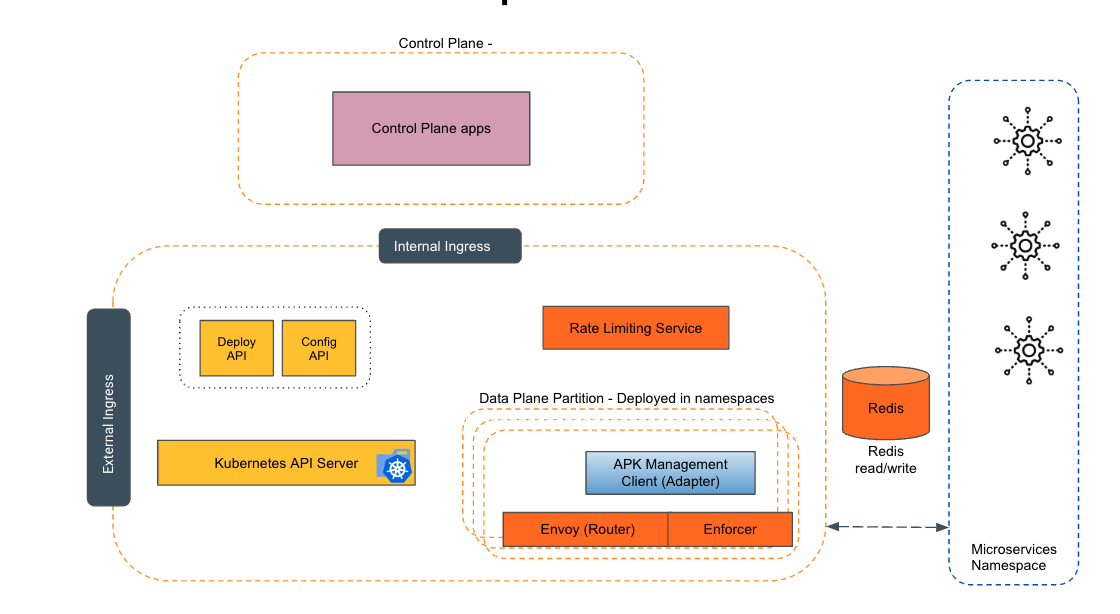
Empowering the Future of API Management: Unveiling the Journey of WSO2 API Platform for Kubernetes (APK) Project and the Anticipated Alpha Release

  Introduction In the ever-evolving realm of API management, our journey embarked on the APK project eight months ago, and now, with great a...