How to change endpoit configurations, timeouts of already created large number of APIs - WSO2 API Manager

How to add additional properties for already create APIs. Sometimes in deployments we may need to change endpoint configurations and some other parameters after we created them.
For this we can go to management console, published and change them. But if you have large number of APIs that may be extremely hard. In this post lets see how we can do it for batch of API.

Please note that test this end to end before you push this change to production deployment. And also please note that some properties will be stored in registry, database and synapse configurations. So we need to change all 3 places. In this example we will consider endpoint configurations only(which available on registry and synapse).

Changing velocity template will work for new APIs. But when it comes to already published APIs, you have to do following process if you are not modifying it manually.

Write simple application to change synapse configuration and add new properties(as example we can consider timeout value).
 Use a checkin/checkout client to edit the registry files with the new timeout value.
   you can follow below mentioned steps to use the checkin/checkout client,
 Download Governance Registry binary from http://wso2.com/products/governance-registry/ and extract the zip file.
 Copy the content of Governance Registry in to APIM home.
 Go into the bin directory of the Governance Registry directory.
 Run the following command to checkout registry files to your local repository.
         ./checkin-client.sh co https://localhost:9443/registry/path -u admin -p admin  (linux environment)
           checkin-client.bat co https://localhost:9443/registry/path -u admin -p admin (windows environment)
        
Here the path is where your registry files are located. Normally API meta data will be listed under each provider '_system/governance/apimgt/applicationdata/provider'.

Once you run this command, registry files will be downloaded to your Governance Registry/bin directory. You can find the directories with user names who created the API.
Inside those directories there are files with same name 'api' in the location of '{directory with name of the api}/{directory with version of the api}/_system/governance
/apimgt/applicationdata/provider/{directory with name of the user}\directory with name of the api}/{directory with version of the api}' and you can edit the timeout value by
using a batch operation(shell script or any other way).

Then you have to checkin what you have changed by using the following command.
     ./checkin-client.sh ci https://localhost:9443/registry/path -u admin -p admin  (linux)
      checkin-client.bat ci https://localhost:9443/registry/path -u admin -p admin (windows)
   

Open APIM console and click on browse under resources. Provide the loaction as '/_system/governance/apimgt/applicationdata/provider'. Inside the {user name} directory
there are some directories with your API names. Open the 'api' files inside those directories and make sure the value has been updated.

Its recommend to change both registry and synapse configuration. This change will not be applicable to all properties available in API Manager.
This solution specifically designed for endpoint configurations such as time outs etc.

How to add secondry user store domain name to SAML response from shibboleth side. WSO2 Identity server SSO with secondary user store.

When we configure shibboleth as identity provider in WSO2 Identity server as described in this article(http://xacmlinfo.org/2014/12/04/federatation-shibboleth/) deployment would be something like below.

http://i0.wp.com/xacmlinfo.org/wp-content/uploads/2014/12/sidp0.png


In this case shibboleth will act as identity provider for WSO2 IS and will provide SAML assertion to WSO2 IS. But actual permission check will happen from IS side and we may need complete user name for that. If we configured user store as secondary user store then user store domain should be part of name. But shibboleth do not know about secondary user store. So in IS side you will username instead of DomainName/UserName. Then it will be an issue if we try to validate permissions per user.

To over come this we can configure shibboleth to send domain aware user name from their end. Let say domain name is LDAP-Domain then we can set it from shibboleth side with following configuration. Then it will send user name like this LDAP-Domain/userName.

 (attribute-resolver.xml)

    <!-- This is the NameID value we send to the WS02 Identity Server. -->
    <resolver:AttributeDefinition xsi:type="ad:Script" id="eduPersonPrincipalNameWSO2">
        <resolver:Dependency ref="eduPersonPrincipalName" />

        <resolver:AttributeEncoder xsi:type="enc:SAML2StringNameID" nameFormat="urn:oasis:names:tc:SAML:2.0:nameid-format:persistent" />

        <ad:Script>
            <![CDATA[
                importPackage(Packages.edu.internet2.middleware.shibboleth.common.attribute.provider);

                eduPersonPrincipalNameWSO2 = new BasicAttribute("eduPersonPrincipalNameWSO2");
                eduPersonPrincipalNameWSO2.getValues().add("LDAP-Domain/" + eduPersonPrincipalName.getValues().get(0));
            ]]>
        </ad:Script>
    </resolver:AttributeDefinition>

How to write custom throttle handler to throttle requests based on IP address - WSO2 API Manager

Please find the sample source code for custom throttle handler to throttle requests based on IP address. Based on your requirements you can change the logic here.

package org.wso2.carbon.apimgt.gateway.handlers.throttling; import org.apache.axiom.om.OMAbstractFactory;
import org.apache.axiom.om.OMElement;
import org.apache.axiom.om.OMFactory;
import org.apache.axiom.om.OMNamespace;
import org.apache.axis2.context.ConfigurationContext;
import org.apache.commons.logging.Log;
import org.apache.commons.logging.LogFactory;
import org.apache.http.HttpStatus;
import org.apache.neethi.PolicyEngine;
import org.apache.synapse.Mediator;
import org.apache.synapse.MessageContext;
import org.apache.synapse.SynapseConstants;
import org.apache.synapse.SynapseException;
import org.apache.synapse.config.Entry;
import org.apache.synapse.core.axis2.Axis2MessageContext;
import org.apache.synapse.rest.AbstractHandler;
import org.wso2.carbon.apimgt.gateway.handlers.Utils;
import org.wso2.carbon.apimgt.gateway.handlers.security.APISecurityUtils;
import org.wso2.carbon.apimgt.gateway.handlers.security.AuthenticationContext;
import org.wso2.carbon.apimgt.impl.APIConstants;
import org.wso2.carbon.throttle.core.AccessInformation;
import org.wso2.carbon.throttle.core.RoleBasedAccessRateController;
import org.wso2.carbon.throttle.core.Throttle;
import org.wso2.carbon.throttle.core.ThrottleContext;
import org.wso2.carbon.throttle.core.ThrottleException;
import org.wso2.carbon.throttle.core.ThrottleFactory;

import java.util.Map;
import java.util.TreeMap;


public class IPBasedThrottleHandler extends AbstractHandler {

    private static final Log log = LogFactory.getLog(IPBasedThrottleHandler.class);

    /** The Throttle object - holds all runtime and configuration data */
    private volatile Throttle throttle;

    private RoleBasedAccessRateController applicationRoleBasedAccessController;

    /** The key for getting the throttling policy - key refers to a/an [registry] entry    */
    private String policyKey = null;
    /** The concurrent access control group id */
    private String id;
    /** Version number of the throttle policy */
    private long version;

    public IPBasedThrottleHandler() {
        this.applicationRoleBasedAccessController = new RoleBasedAccessRateController();
    }

    public boolean handleRequest(MessageContext messageContext) {
        return doThrottle(messageContext);
    }

    public boolean handleResponse(MessageContext messageContext) {
        return doThrottle(messageContext);
    }

    private boolean doThrottle(MessageContext messageContext) {
        boolean canAccess = true;
        boolean isResponse = messageContext.isResponse();
        org.apache.axis2.context.MessageContext axis2MC = ((Axis2MessageContext) messageContext).
                getAxis2MessageContext();
        ConfigurationContext cc = axis2MC.getConfigurationContext();
        synchronized (this) {

            if (!isResponse) {
                initThrottle(messageContext, cc);
            }
        }         // if the access is success through concurrency throttle and if this is a request message
        // then do access rate based throttling
        if (!isResponse && throttle != null) {
            AuthenticationContext authContext = APISecurityUtils.getAuthenticationContext(messageContext);
            String tier;             if (authContext != null) {
                AccessInformation info = null;
                try {

                    String ipBasedKey = (String) ((TreeMap) axis2MC.
                            getProperty("TRANSPORT_HEADERS")).get("X-Forwarded-For");
                    if (ipBasedKey == null) {
                        ipBasedKey = (String) axis2MC.getProperty("REMOTE_ADDR");
                    }
                    tier = authContext.getApplicationTier();
                    ThrottleContext apiThrottleContext =
                            ApplicationThrottleController.
                                    getApplicationThrottleContext(messageContext, cc, tier);
                    //    if (isClusteringEnable) {
                    //      applicationThrottleContext.setConfigurationContext(cc);
                    apiThrottleContext.setThrottleId(id);
                    info = applicationRoleBasedAccessController.canAccess(apiThrottleContext,
                                                                          ipBasedKey, tier);
                    canAccess = info.isAccessAllowed();
                } catch (ThrottleException e) {
                    handleException("Error while trying evaluate IPBased throttling policy", e);
                }
            }
        }         if (!canAccess) {
            handleThrottleOut(messageContext);
            return false;
        }

        return canAccess;
    }     private void initThrottle(MessageContext synCtx, ConfigurationContext cc) {
        if (policyKey == null) {
            throw new SynapseException("Throttle policy unspecified for the API");
        }         Entry entry = synCtx.getConfiguration().getEntryDefinition(policyKey);
        if (entry == null) {
            handleException("Cannot find throttling policy using key: " + policyKey);
            return;
        }
        Object entryValue = null;
        boolean reCreate = false;         if (entry.isDynamic()) {
            if ((!entry.isCached()) || (entry.isExpired()) || throttle == null) {
                entryValue = synCtx.getEntry(this.policyKey);
                if (this.version != entry.getVersion()) {
                    reCreate = true;
                }
            }
        } else if (this.throttle == null) {
            entryValue = synCtx.getEntry(this.policyKey);
        }         if (reCreate || throttle == null) {
            if (entryValue == null || !(entryValue instanceof OMElement)) {
                handleException("Unable to load throttling policy using key: " + policyKey);
                return;
            }
            version = entry.getVersion();             try {
                // Creates the throttle from the policy
                throttle = ThrottleFactory.createMediatorThrottle(
                        PolicyEngine.getPolicy((OMElement) entryValue));

            } catch (ThrottleException e) {
                handleException("Error processing the throttling policy", e);
            }
        }
    }     public void setId(String id) {
        this.id = id;
    }     public String getId(){
        return id;
    }     public void setPolicyKey(String policyKey){
        this.policyKey = policyKey;
    }     public String gePolicyKey(){
        return policyKey;
    }     private void handleException(String msg, Exception e) {
        log.error(msg, e);
        throw new SynapseException(msg, e);
    }     private void handleException(String msg) {
        log.error(msg);
        throw new SynapseException(msg);
    }     private OMElement getFaultPayload() {
        OMFactory fac = OMAbstractFactory.getOMFactory();
        OMNamespace ns = fac.createOMNamespace(APIThrottleConstants.API_THROTTLE_NS,
                                               APIThrottleConstants.API_THROTTLE_NS_PREFIX);
        OMElement payload = fac.createOMElement("fault", ns);         OMElement errorCode = fac.createOMElement("code", ns);
     errorCode.setText(String.valueOf(APIThrottleConstants.THROTTLE_OUT_ERROR_CODE));
        OMElement errorMessage = fac.createOMElement("message", ns);
        errorMessage.setText("Message Throttled Out");
        OMElement errorDetail = fac.createOMElement("description", ns);
        errorDetail.setText("You have exceeded your quota");

        payload.addChild(errorCode);
        payload.addChild(errorMessage);
        payload.addChild(errorDetail);
        return payload;
    }     private void handleThrottleOut(MessageContext messageContext) {
        messageContext.setProperty(SynapseConstants.ERROR_CODE, 900800);
        messageContext.setProperty(SynapseConstants.ERROR_MESSAGE, "Message throttled out");

        Mediator sequence = messageContext.getSequence(APIThrottleConstants.API_THROTTLE_OUT_HANDLER);
        // Invoke the custom error handler specified by the user
        if (sequence != null && !sequence.mediate(messageContext)) {
            // If needed user should be able to prevent the rest of the fault handling
            // logic from getting executed
            return;
        }         // By default we send a 503 response back
        if (messageContext.isDoingPOX() || messageContext.isDoingGET()) {
            Utils.setFaultPayload(messageContext, getFaultPayload());
        } else {
            Utils.setSOAPFault(messageContext, "Server", "Message Throttled Out",
                               "You have exceeded your quota");
        }
        org.apache.axis2.context.MessageContext axis2MC = ((Axis2MessageContext) messageContext).
                getAxis2MessageContext();

        if (Utils.isCORSEnabled()) {
            /* For CORS support adding required headers to the fault response */
            Map headers = (Map) axis2MC.getProperty(org.apache.axis2.context.MessageContext.TRANSPORT_HEADERS);
            headers.put(APIConstants.CORSHeaders.ACCESS_CONTROL_ALLOW_ORIGIN, Utils.getAllowedOrigin((String)headers.get("Origin")));
            headers.put(APIConstants.CORSHeaders.ACCESS_CONTROL_ALLOW_METHODS, Utils.getAllowedMethods());
            headers.put(APIConstants.CORSHeaders.ACCESS_CONTROL_ALLOW_HEADERS, Utils.getAllowedHeaders());
            axis2MC.setProperty(org.apache.axis2.context.MessageContext.TRANSPORT_HEADERS, headers);
        }
        Utils.sendFault(messageContext, HttpStatus.SC_SERVICE_UNAVAILABLE);
    }
}

As listed above your custom handler class is : "org.wso2.carbon.apimgt.gateway.handlers.throttling.IPBasedThrottleHandler", the following will be the handler definition for your API.


<handler class="org.wso2.carbon.apimgt.gateway.handlers.throttling.IPBasedThrottleHandler">
<property name="id" value="A"/>
<property name="policyKey" value="gov:/apimgt/applicationdata/tiers.xml"/>
</handler>

Then try to invoke API and see how throttling works.

How to send specific status code and message based on different authentication faliures WSO2 API Manager

In WSO2 API Manager all authentication faliures will hit auth failure handler. There you will be able to change message body, content, header based on internal error codes.
As example if we got resource not found error while doing token validation then Error Code will be 900906. So in same way we will have different error codes for different failures.

So in this sample will generate custom message for resource not found issues while doing token validation.
For this we will specifically check error code 900906 and then route request to specific sequence.

Please refer following sequence and change to auth_failure_handler to call sequence.

_auth_failure_handler_

<sequence name="_auth_failure_handler_" xmlns="http://ws.apache.org/ns/synapse">
    <property name="error_message_type" value="application/xml"/>    
    <filter source="get-property('ERROR_CODE')" regex="900906">
      <then>
          <sequence key="sample"/>
          <drop/>  
      </then>
      <else>         
      </else>
    </filter>
    <sequence key="_build_"/>
</sequence>


sequence

<?xml version="1.0" encoding="UTF-8"?>
<sequence xmlns="http://ws.apache.org/ns/synapse" name="sample">
    <payloadFactory media-type="xml">
        <format>
            <am:fault xmlns:am="http://wso2.org/apimanager">   
                <am:message>Resource not found</am:message>
                <am:description>Wrong http method</am:description>
            </am:fault>
        </format>
    </payloadFactory>
    <property name="RESPONSE" value="true"/>
    <header name="To" action="remove"/>
    <property name="HTTP_SC" value="405" scope="axis2"/>
    <property name="messageType" value="application/xml" scope="axis2"/>
    <send/>   
</sequence>    

WSO2 API Manager CORS support and how it works with API gateway - APIM 1.8.0

According to wiki cross-origin resource sharing (CORS) is a mechanism that allows restricted resources (e.g. fonts, JavaScript, etc.) on a web page to be requested from another domain outside the domain from which the resource originated.  Also "Cross-domain" AJAX requests are forbidden by default because of their ability to perform advanced requests (POST, PUT, DELETE and other types of HTTP requests, along with specifying custom HTTP headers) that introduce many security issues as described in cross-site scripting.

In WSO2 API Manager cross domain resource sharing is happening between AM and the client application.
See following sample CORS specific headers
< Access-Control-Allow-Headers: authorization,Access-Control-Allow-Origin,Content-Type
< Access-Control-Allow-Origin: localhost
< Access-Control-Allow-Methods: GET,PUT,POST,DELETE,OPTIONS
'Access-Control-Allow-Origin' header in the response is set in API gateway by validating the 'Origin' header from the request.
(CORS related requests should have a 'Origin' header to identify the requesting domain).
Please refer following config element in api-manager.xml file.

    <CORSConfiguration>
    <!--Configuration to enable/disable sending CORS headers from the Gateway-->
    <Enabled>true</Enabled>
    <!--The value of the Access-Control-Allow-Origin header. Default values are
        API Store addresses, which is needed for swagger to function.-->
    <Access-Control-Allow-Origin>localhost</Access-Control-Allow-Origin>
    <!--Configure Access-Control-Allow-Methods-->
    <Access-Control-Allow-Methods>GET,PUT,POST,DELETE,OPTIONS</Access-Control-Allow-Methods>
    <!--Configure Access-Control-Allow-Headers-->
    <Access-Control-Allow-Headers>authorization,Access-Control-Allow-Origin,Content-Type</Access-Control-Allow-Headers>
    </CORSConfiguration>

We set the CORS related headers in the response from the APIAuthenticationHandler before we send the response back to the client application.

API gateway first we check the 'Origin' header value from the request (one sent by the client) against the list of defined in the api-manager.xml.
If this host is in the list, we set it in the Access-Control-Allow-Origin header of the response.
Otherwise we set it to null. If this is null, then this header will be removed from the response(not allow access).

See following sample curl commands and responses to see how this origin header change response.

curl -k -v -H "Authorization: Bearer 99c85b7da8691f547bd46d159f1d581" -H "Origin: localhost"  https://10.100.1.65:8243/qqqq/1.0.0/

< HTTP/1.1 200 OK
< ETag: "b1-4fdc9b19d2b93"
< Access-Control-Allow-Headers: authorization,Access-Control-Allow-Origin,Content-Type
< Vary: Accept-Encoding
< Access-Control-Allow-Origin: localhost
< Last-Modified: Wed, 09 Jul 2014 21:50:16 GMT
< Access-Control-Allow-Methods: GET,PUT,POST,DELETE,OPTIONS
< Content-Type: text/html
< Accept-Ranges: bytes
< Date: Wed, 24 Jun 2015 14:17:16 GMT
* Server WSO2-PassThrough-HTTP is not blacklisted
< Server: WSO2-PassThrough-HTTP
< Transfer-Encoding: chunked


 curl -k -v -H "Authorization: Bearer 99c85b7da8691f547bd46d159f1d581" -H "Origin: localhostXX"  https://10.100.1.65:8243/qqqq/1.0.0/
< HTTP/1.1 200 OK
< ETag: "b1-4fdc9b19d2b93"
< Access-Control-Allow-Headers: authorization,Access-Control-Allow-Origin,Content-Type
< Vary: Accept-Encoding
< Last-Modified: Wed, 09 Jul 2014 21:50:16 GMT
< Access-Control-Allow-Methods: GET,PUT,POST,DELETE,OPTIONS
< Content-Type: text/html
< Accept-Ranges: bytes
< Date: Wed, 24 Jun 2015 14:17:53 GMT
* Server WSO2-PassThrough-HTTP is not blacklisted
< Server: WSO2-PassThrough-HTTP
< Transfer-Encoding: chunked


As you can see Access-Control-Allow-Origin header is missed in 2nd response as we send origin which was not defined in cors configuration in api-manager.xml file.

Enable debug logs and check token expire time in WSO2 API Manager

To do that you can enable debug logs for following class.
org.wso2.carbon.apimgt.impl.dao.ApiMgtDAO

Then it will print following log
log.debug("Checking Access token: " + accessToken + " for validity." + "((currentTime - timestampSkew) > (issuedTime + validityPeriod)) : " + "((" + currentTime + "-" + timestampSkew + ")" + " > (" + issuedTime + " + " + validityPeriod + "))");


Then whenever this call fails we need to check for this log during that time. Then we can get clear idea about validity period calculation.

To enable debug logs add below line to log4j.properties that reside in /repository/conf/
log4j.logger.org.wso2.carbon.apimgt.impl.dao.ApiMgtDAO=DEBUG

And restart the server. You need to do enable debug log in Identity Server side if you use IS as key manager scenario.


Then you can check how token validity period behave with each API call we make.

How to enable AWS based clustering mode in WSO2 Carbon products (WSO2 API Manager cluster with AWS clustering)

To try aws based clustering on AWS you can change the membership scheme to AWS, and then provide the following parameters in the clustering section of the axis2.xml file. Before you try this on API Manager 1.8.0 please download this jar[JarFile] files and add them as patch.

1. accessKey       
<parameter name="accessKey">TestKey</parameter>

2. secretKey
 <parameter name="secretKey">testkey</parameter>

3. securityGroup       
<parameter name="securityGroup">AWS_Cluster</parameter>

4. connTimeout (optional)
5. hostHeader (optional)
6. region (optional)
7. tagKey (optional)
8. tagValue (optional)


See following sample configuration. Edit clustering section in the CARBON_HOME/repository/conf/axis2/axis2.xml file as follows.

<clustering class="org.wso2.carbon.core.clustering.hazelcast.HazelcastClusteringAgent"
                enable="true">
        <parameter name="AvoidInitiation">true</parameter>
        <parameter name="membershipScheme">aws</parameter>
        <parameter name="domain">wso2.am.domain</parameter>
        <parameter name="localMemberPort">5701</parameter>
        <parameter name="accessKey">test</parameter>
        <parameter name="secretKey">test</parameter>
        <parameter name="securityGroup">AWS_Cluster</parameter>


By default, Hazelcast uses port 5701. It is recommended to create a Hazelcast specific security group. Then, an inbound rule for port 5701 from s
g-hazelcast needs to be added to this security group.
Open the Amazon EC2 console.
Click Security Groups in the left menu.
Click Create Security Group and enter a name (e.g. sg-hazelcast ) and description for the security group, click Yes, Create .
On Security Groups page, select the security group sg-hazelcast on the right pane.
You will see a field below the security group list with the tabs Details and Inbound. Select Inbound.
Select Custom TCP rule in the field Create a new rule.
Type 5701 into the field Port range and sg-hazelcast into Source.

Then when we initialize cluster all nodes in same security group will be added as WKA members.
Once you done with configurations restart servers.

Then you will following message in carbon logs.
[2015-06-23 10:02:47,730]  INFO - HazelcastClusteringAgent Cluster domain: wso2.am.domain
[2015-06-23 10:02:47,731]  INFO - HazelcastClusteringAgent Using aws based membership management scheme
[2015-06-23 10:02:57,604]  INFO - HazelcastClusteringAgent Hazelcast initialized in 9870ms
[2015-06-23 10:02:57,611]  INFO - HazelcastClusteringAgent Local member: [5e6bd517-512a-45a5-b702-ebf304cdb8c4] - Host:10.0.0.172, Remote Host:null, Port: 5701, HTTP:8280, HTTPS:8243, Domain: wso2.am.domain, Sub-domain:worker, Active:true
[2015-06-23 10:02:58,323]  INFO - HazelcastClusteringAgent Cluster initialization completed
Then spawn next instance. When next server startup completed you will see following message in current node.
[2015-06-23 10:06:21,344]  INFO - AWSBasedMembershipScheme Member joined [417843d3-7456-4368-ad4b-5bad7cf21b09]: /10.0.0.245:5701
Then terminate second instance. Then you will see following message.
[2015-06-23 10:07:39,148]  INFO - AWSBasedMembershipScheme Member left [417843d3-7456-4368-ad4b-5bad7cf21b09]: /10.0.0.245:5701
This means you have done configurations properly.

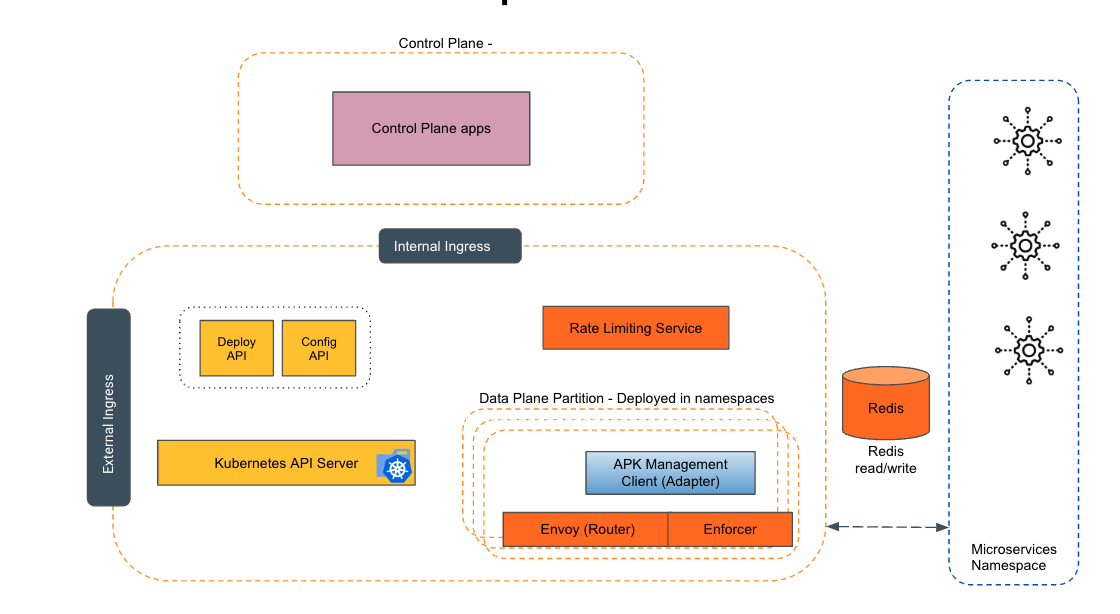
Empowering the Future of API Management: Unveiling the Journey of WSO2 API Platform for Kubernetes (APK) Project and the Anticipated Alpha Release

  Introduction In the ever-evolving realm of API management, our journey embarked on the APK project eight months ago, and now, with great a...