How to change logged in user password in WSO2 Carbon based products

If you need to call user admin service and perform this operation you can use following information.
Service URL
https://sanjeewa-ThinkPad-T530:9443/services/UserAdmin

PayLoad
<soapenv:Envelope xmlns:soapenv="http://schemas.xmlsoap.org/soap/envelope/" 
xmlns:xsd="http://org.apache.axis2/xsd">
   <soapenv:Header/>
   <soapenv:Body>
      <xsd:changePasswordByUser>
         <xsd:oldPassword>testsanjeewa</xsd:oldPassword>
         <xsd:newPassword>sanjeewa</xsd:newPassword>
      </xsd:changePasswordByUser>
   </soapenv:Body>
</soapenv:Envelope>
Other possible solution is change password from management console user interface.
Visit following URL https://10.100.1.65:9443/carbon And go to change password window.
Home > Configure > Users and Roles > Change Password

API Manager distributed deployment best practices - API gateway Deployment in DMZ and MZ

Normally when we deploy API Manager in different zones we need to follow security related best practices. Here in this post we will briefly describe about API Manager gateway deployment in DMZ and MZ.

How API Gateway and key manager communication happens
In API Manager we have authentication handler to authenticate all incoming requests. From authentication handler we will will initiate token validation flow. We do have extension point to authentication handler. So if you need to implement some custom flow you can write new handler and use it. In key manager side we have exposed web service and thrift service for this(key validation service). We have two options to select when we call key manager from gateway.
01. Web service call.
In this case we will do a web service call from gateway to key manager. For this call we will Https and we will be using transport layer security for this. for this gateway will authenticate with key manager by using configured username/password in api-manager.xml file.
02. Thrift call.
In this case we will do a thrift service call from gateway to key manager. For this call also we will be using transport layer security(for login). And gateway will authenticate with key manager(thrift server) by using configured username/password in api-manager.xml file.

How to secure deployment(API gateway) in DMZ from common attacks
We have configurations files, run time artifacts and required jar file in repository directory.
We can use secure vault(https://docs.wso2.com/display/Carbon420/WSO2+Carbon+Secure+Vault) to protect repository/conf directory. Then attacker will not get sensitive data like user name, passwords and important urls. With this we will be able to recover configurations even if attacker got file system access.
And if we can keep open 8280 and 8243 then we don't need to expose management urls to outside world. So external users cannot use management services perform server side operations.
If we are having API gateway with worker manager separated then, only workers will reside in DMZ. Even if attacker destroyed synapse configuration in worker nodes still manager node and svn repository will have original configurations. So we can easily recover from this type of situation.
And we can enable java security manager to avoid some common form of attacks(jar file modifications etc).

Please see attached image to identify call between MZ and DMZ.


We have few call between MZ and DMZ
Key validation call from gateway to key manager(connect over https).
Token generation request from gateway to key manager(connect over https).
Artifact synchronize call to svn server(connect over https).
Call from gateway to back end services hosted in MZ(connect over https or http).
Cluster communication between workers and manager node(tcp level cluster messages).


Enable web service key validation and session affinity - WSO2 API Manager deployment in AWS

In clustered environment following issue can happen if we didn't enabled session affinity.
TID: [0] [AM] [2015-11-01 23:31:42,819] WARN {org.wso2.carbon.apimgt.keymgt.service.thrift.APIKeyValidationServiceImpl} - Invalid session id for thrift authenticator. {org.wso2.carbon.apimgt.keymgt.service.thrift.APIKeyValidationServiceImpl}
TID: [0] [AM] [2015-11-01 23:31:42,820] WARN {org.wso2.carbon.apimgt.gateway.handlers.security.thrift.ThriftKeyValidatorClientPool} - Login failed.. Authenticating again.. {org.wso2.carbon.apimgt.gateway.handlers.security.thrift.ThriftKeyValidatorClientPool}
TID: [0] [AM] [2015-11-01 23:31:42,821] ERROR {org.wso2.carbon.apimgt.gateway.handlers.security.APIAuthenticationHandler} - API authentication failure {org.wso2.carbon.apimgt.gateway.handlers.security.APIAuthenticationHandler}

When API gateway receives API call we do token validation call to key management service running on key management server. First we will authenticate with key management service and then do secure call to validate token. This key management service is running on all API Manager nodes. When client call to validate token it will authenticate with service running in one server and actual validation service call going to other server. To resolve this issue please follow below instructions.

Set following properties in API Manager configuration file and restart servers. With this we will be using web service call between gateway and key manager to validate token. Most of load balancers cannot route thrift messages in session aware way. So we will use web service call for that.

<KeyValidatorClientType>WSClient</KeyValidatorClientType>
<EnableThriftServer>false</EnableThriftServer>
Also you need to configure key management server URL properly in configurations(see following configuration).


<APIKeyManager>
        <ServerURL>https://test.wso2.com:9443/services/&lt;/ServerURL>
To enable session affinity. Enable session affinity and enable application generated session cookies in load balancer level. Also set cookie name as JSESSIONID. Then it will route requests in session aware manner.

How to modify JWT to retrieve subscriber details instead of end user - WSO2 API Manager

IN WSO2 API Manager JWT generated per API call. To generate we will use access token coming with the request. From this token we will retrieve token owner(person who generated token).
Once we have token owner, we will retrieve claims associated with that user. In this case we need to get application owner details(person who create application and subscribe to API). We have an extension point to implement claim retriever.

We can find more information from this[1] document. If you need to generate custom claims based on your requirement you need to implement claim retriever class and configure following[2] parameter in api-manager.xml configuration file.
Inside our implementation we need to retrieve application owner and retrieve his claims. For this first we need to get SUBSCRIBER_ID from AM_APPLICATION table by using application Id(we already have it in JWT). Then need to retrieve USER_ID from AM_SUBSCRIBER table by using previously retrieved SUBSCRIBER_ID. Then from that USER_ID we will be able to retrieve claims of Application owner in the same way we do it for end user. Hope this will help you.

[1]https://docs.wso2.com/display/AM170/Passing+Enduser+attributes+to+the+Backend+Using+JWT
[2]<ClaimsRetrieverImplClass>org.wso2.carbon.apimgt.impl.token.DefaultClaimsRetriever</ClaimsRetrieverImplClass>

Read system property using proxy service deployed in WSO2 ESB

Here i have added sample synapse configuration to get carbon server home property and return it as response. Add this configuration and invoke proxy service. You will get carbon.home as response.


<proxy name="EchoProxyTest"
          transports="https http"
          startOnLoad="true"
          trace="disable">
      <description/>
      <target>
         <inSequence>
            <sequence key="responseTest1"/>
         </inSequence>
         <outSequence>
            <send/>
         </outSequence>
      </target>
   </proxy>
 <sequence name="responseTest1">
      <script language="js">var carbonHome = java.lang.System.getProperty("carbon.home");
      mc.setPayloadXML(&lt;serverHome&gt;{carbonHome}&lt;/serverHome&gt;);</script>
      <header name="To" action="remove"/>
      <property name="NO_ENTITY_BODY" scope="axis2" action="remove"/>
      <property name="RESPONSE" value="true"/>
      <send/>
      <log level="full"/>
   </sequence>

How to write sample class mediator to get system property and inject to synapse properties / How to generate response with synapse property using script mediator

Here i have added class mediator code and sample synapse configuration to get carbon server home property. To test this create java project and add following class mediator code file to /repository/components/lib directory and add following synapse configuration to source view.  Then you can invoke created proxy service.

Class mediator code.

package main.java.org.wso2.carbon.custommediator;
import org.apache.synapse.MessageContext;
import org.apache.synapse.core.axis2.Axis2MessageContext;
import org.apache.synapse.mediators.AbstractMediator;
public class SampleCustomMediator extends AbstractMediator {

public boolean mediate(MessageContext synapseMsgContext) {
    String carbonHome = System.getProperty("carbon.home");
    log.info("Carbon Home is : "+carbonHome);
    synapseMsgContext.setProperty("CARBON_HOME", carbonHome);
    return true;
 }


Synapse configuration.

 
<proxy name="EchoProxyTest"
          transports="https http"
          startOnLoad="true"
          trace="disable">
  <target>
   <inSequence>
     <class name="main.java.org.wso2.carbon.custommediator.SampleCustomMediator"/>
     <sequence key="responseTest"/>
   </inSequence>
   <outSequence>
      <send/>
   </outSequence>
 </target>
</proxy>
<sequence name="responseTest">
      <script language="js">var carbonHome = mc.getProperty("CARBON_HOME");
      var carbonHomeTest = "sanjeewa";
      mc.setPayloadXML(&lt;serverHome&gt;{carbonHome}&lt;/serverHome&gt;);</script>
      <header name="To" action="remove"/>
      <property name="NO_ENTITY_BODY" scope="axis2" action="remove"/>
      <property name="RESPONSE" value="true"/>
      <send/>
      <log level="full"/>
</sequence>


You can invoke create proxy service by calling following URL
https://130.76.202.98:9443/services/EchoProxyTest

Then you will get following response.
 
<serverHome>/home/sanjeewa/work/packs/wso2esb-4.8.0</serverHome>

WSO2 API Manager - Basic user operations curl command( How to do basic operations using curl commands)

Here in this post i will list out curl commands that required to cover complete API Manager (basic) use case. Here we will do fallowing operations. Here we need to login API Manager publisher and store multiple times. Here user will be tenant user(ttt@ttt.ttt). if need change any parameter.

1) Create APIs
2) Publish APIs
3) Create application
4) Subscribe to APIs for that application
5) Remove subscriptions
6) Remove application
7) Remove APIs

API Publisher
=============
curl -X POST -c cookies http://localhost:9763/publisher/site/blocks/user/login/ajax/login.jag -d 'action=login&username=ttt@ttt.ttt&password=tttttt'

1) Create APIs
curl -X POST -b cookies http://localhost:9763/publisher/site/blocks/item-add/ajax/add.jag -d "action=addAPI&name=sanjeewa-api&context=/sanjeewa-api&version=1.0.0&tier=Bronze&tier=Gold&transports=http&http_checked=http&transports=https&https_checked=https&description=sanjeewa-api&visibility=public API&tags=sanjeewa-api,api&resourceCount=0&resourceMethod-0=GET,PUT,POST,DELETE,OPTIONS&resourceMethodAuthType-0=Application & Application User,Application & Application User,Application & Application User,Application & Application User,None&uriTemplate-0=/*&resourceMethodThrottlingTier-0=Unlimited, Unlimited, Unlimited, Unlimited, Unlimited&tiersCollection=Bronze,Gold,Silver,Unlimited" -d 'endpoint_config={"production_endpoints":{"url":"http://search.twitter.com","config":null},"endpoint_type":"http"}'

2) Publish APIs
curl -X POST -b cookies 'http://localhost:9763/publisher/site/blocks/life-cycles/ajax/life-cycles.jag' -d 'action=updateStatus&name=sanjeewa-api&version=1.0.0&provider=ttt@ttt.ttt&status=PUBLISHED&publishToGateway=true&requireResubscription=true'

API Store
=========
curl -X POST -c cookies http://localhost:9763/store/site/blocks/user/login/ajax/login.jag -d 'action=login&username=ttt@ttt.ttt&password=tttttt'

3) Create application
curl -X POST -b cookies http://localhost:9763/store/site/blocks/application/application-add/ajax/application-add.jag -d 'action=addApplication&application=sanjeewa-application&tier=unlimited&description=&callbackUrl='

4) Subscribe to APIs for that application
curl -b cookies http://localhost:9763/store/site/blocks/application/application-list/ajax/application-list.jag?action=getApplications
Got app id for sanjeewa-application each time and used it for further calls.

curl -X POST -b cookies http://localhost:9763/store/site/blocks/subscription/subscription-add/ajax/subscription-add.jag -d 'action=addSubscription&name=sanjeewa-api&version=1.0.0&provider=ttt@ttt.ttt&tier=Unlimited&applicationId=7'

5) Remove subscriptions
curl -X POST -b cookies http://localhost:9763/store/site/blocks/subscription/subscription-remove/ajax/subscription-remove.jag -d 'action=removeSubscription&name=sanjeewa-api&version=1.0.0&provider=ttt@ttt.ttt&applicationId=7'

6) Remove application
curl -X POST -b cookies http://localhost:9763/store/site/blocks/application/application-remove/ajax/application-remove.jag -d "action=removeApplication&application=sanjeewa-application"

API Publisher
=============
curl -X POST -c cookies http://localhost:9763/publisher/site/blocks/user/login/ajax/login.jag -d 'action=login&username=ttt@ttt.ttt&password=tttttt'
7) Remove APIs
curl -X POST -b cookies http://localhost:9763/publisher/site/blocks/item-add/ajax/remove.jag -d "action=removeAPI&name=sanjeewa-api&version=1.0.0&provider=ttt@ttt.ttt"

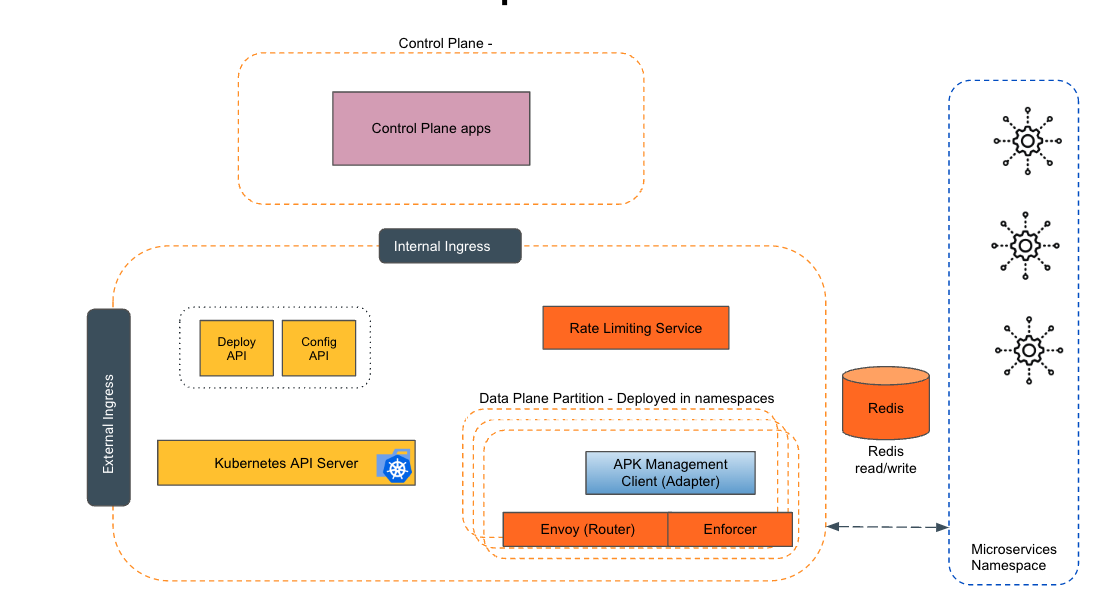
Empowering the Future of API Management: Unveiling the Journey of WSO2 API Platform for Kubernetes (APK) Project and the Anticipated Alpha Release

  Introduction In the ever-evolving realm of API management, our journey embarked on the APK project eight months ago, and now, with great a...