WSO2 ESB - How to secure API with Basic Auth

01. You can download basicAuth JAR file from the following location[1], copy it to the repository/component/lib directory, and restart the ESB. 
02. Please copy this configuration to your synapse configuration 
03. Invoke it with following curl command or any client(please note you must send basic auth header with request and invoke through https ports). 
      curl -v -k -H "Authorization: Basic YWRtaW46YWRtaW4=" https://localhost:8243/RESTWebService/dept/1

[1]https://svn.wso2.org/repos/wso2/carbon/platform/branches/4.1.0/products/esb/4.7.0/modules/samples/integration-scenarios/starbucks_sample/bin/WSO2-REST-BasicAuth-Handler-1.0-SNAPSHOT.jar

configuration 
========== 
   <api name="test-api" context="/RESTWebService"> 
      <resource methods="GET" protocol="https" uri-template="/dept/{id}"> 
         <inSequence> 
            <log level="full"/> 
            <log> 
               <property name="REST_URL_POSTFIX" expression="get-property('uri.var.id')"/> 
            </log> 
            <property name="POST_TO_URI" value="true" scope="axis2"/> 
            <send> 
               <endpoint name="test-api_APIEndpoint_0"> 
                  <address uri="http://service_host:port/RESTWebService/rest/departments/"/> 
               </endpoint> 
            </send> 
         </inSequence> 
         <outSequence> 
            <send/> 
         </outSequence> 
      </resource> 
      <handlers> 
         <handler class="org.wso2.rest.BasicAuthHandler"/> 
      </handlers> 
   </api>

How to get client IP from out going requests of WSO2 Elastic load balancer (Avoid masking client IP)

Normally when requests pass through load balancers client IP for actual back end server would be load balancers IP. But sometimes actual back end server may need actual client and load balancers (all  load balancers message passed) IPs to tracing message flows. In such cases normally we use  X-Forwarded-For[1]  header. If we need to achieve same using WSO2  elastic load balancer we need to add following configuration to main sequence. Also if header is already present we should append ip by separating ",". We can use this to avoid masking client IP from WSO2 ELB


[1]http://en.wikipedia.org/wiki/X-Forwarded-For 

Add following configuration to main sequence in flow

<filter source="get-property('transport','X-Forwarded-For')" regex=".*">
<then>
<property name="coming-X-Forwarded-For" expression="fn:concat(get-property('transport','X-Forwarded-For'),
', ')" scope="axis2" type="STRING"/>
<property name="clientIP" expression="get-property('axis2','REMOTE_ADDR')"/>
<property name="X-Forwarded-For" expression="fn:concat(get-property('axis2','coming-X-Forwarded-For'),
get-property('clientIP'))" scope="transport" type="STRING"/>
</then>
<else>
<property name="X-Forwarded-For" expression="get-property('axis2','REMOTE_ADDR')" scope="transport" type="STRING"/>
</else>
</filter>

How to increase maximum number of Proxies using JMS Listeners - WSO2 ESB

Here we will see how we can increase maximum number of Proxies using JMS Listeners. When you create JMS proxy services in WSO2 ESB you might see something like below(if you created at-least 20 JMS proxies).

[2013-11-07 20:25:41,875]  WARN - JMSListener Polling tasks on destination : JMStoHTTPStockQuoteProxy18 of type queue for service JMStoHTTPStockQuoteProxy18 have not yet started after 3 seconds ..

So lets see how we can avoid this issue. For this we need to increase number of threads which consume messages from jms queues. So we need to edit wso2Server.sh file and add following 2 parameters as system properties.

    -Dsnd_t_core=200 \
    -Dsnd_t_max=250 \


Then restart server.Or you can create new folder named /conf inside server root and add file named jms.properties. Contents of jms.properties should be as follows.

snd_t_core=200
snd_t_max=250


Add that file and restart server.

WSO2 ESB JSON to XML transformation sample


1. Deploy the SimpleStockQuoteService in sample Axis2 server and start it on port 9000.
  goto wso2esb-4.7.0/samples/axis2Client/SimpleStockQuoteService/
  Then run ant command to build sample(type ant)
   Start axis2 server by using command sh axis2server.sh      
   (wso2esb-4.7.0/samples/axis2Server)

2. Start WSO2 ESB and add following proxy service configuration from source view.


 <proxy name="JSONProxy" transports="http https">
        <target>
            <endpoint>
                <address uri="http://localhost:9000/services/SimpleStockQuoteService"/>
            </endpoint>
            <inSequence>
                <log level="full"/>
                <xslt key="in_transform"/>
                <property name="messageType" scope="axis2" value="text/xml"/>
            </inSequence>
            <outSequence>
                <log level="full"/>
                <xslt key="out_transform"/>
                <property name="messageType" scope="axis2" value="application/json"/>
                <send/>
            </outSequence>
        </target>
    </proxy>
 
    <localEntry key="in_transform">
        <xsl:stylesheet xmlns:xsl="http://www.w3.org/1999/XSL/Transform"
                        xmlns:fn="http://www.w3.org/2005/02/xpath-functions"
                        xmlns:m0="http://services.samples" version="2.0" exclude-result-prefixes="m0 fn">
            <xsl:output method="xml" omit-xml-declaration="yes" indent="yes"/>
            <xsl:template match="*">
                <xsl:element name="{local-name()}" namespace="http://services.samples">
                    <xsl:copy-of select="attribute::*"/>
                    <xsl:apply-templates/>
                </xsl:element>
            </xsl:template>
        </xsl:stylesheet>
    </localEntry>
 
    <localEntry key="out_transform">
        <xsl:stylesheet xmlns:xsl="http://www.w3.org/1999/XSL/Transform" version="1.0">
            <xsl:output method="xml" version="1.0" encoding="UTF-8"/>
            <xsl:template match="*">
                <xsl:element name="{local-name()}">
                    <xsl:apply-templates/>
                </xsl:element>
            </xsl:template>
        </xsl:stylesheet>
    </localEntry>


3. Invoke created JSON proxy by using following request
payload> {"getQuote":{"request":{"symbol":"IBM"}}}
Header> Content-Type: application/json


Sample curl request

curl -v -H "Content-Type: application/json" POST -d '{"getQuote":{"request":{"symbol":"IBM"}}}' http://localhost:8280/services/JSONProxy


Then you will recieve JSON response similar to
{"getQuoteResponse":{"return":{"change":"4.037527807194175","earnings":"-8.090117195350409","high":"70.45626821525283","last":
"67.1998913871881","lastTradeTimestamp":"Wed Oct 16 14:39:16 IST 2013","low":"68.94581289774287","marketCap":"-5387372.221669148","name":"IBM Company","open":"-66.52524061422466","peRatio":"23.47679801684674","percentageChange":
"5.438572840664724","prevClose":"74.23873735780825","symbol":"IBM","volume":"18254"}}}


Here what happen is
Client > sending json request > JSON proxy in sequence -convert message to xml  > send to actual back end server > JSON proxy in sequence -convert xml response to JSON > Client will receive JSON response

JSON client will send a stockquote request to ESB using the JSON content interchange format. Synapse will transform it into a SOAP request and forward to the Axis2 server. The SOAP response from the Axis2 server will be converted into a JSON message and sent back to the JSON client.

How to convert xml formatted authentication faliure error into JSON errors in WSO2 API manager

For this we need to add additional sequence which convert message into JSON. Then we need to add that sequence to auth failure sequence so authentication faliure message will be convert and sent to client.

Add convert sequence to _auth_failure_handler_
 

<sequence name="_auth_failure_handler_" xmlns="http://ws.apache.org/ns/synapse">
    <sequence key="convert"/>
</sequence>

convert sequence

<sequence xmlns="http://ws.apache.org/ns/synapse" name="convert">
<sequence key="_build_"/>
<filter source="get-property('MESSAGE_FORMAT')" regex="soap1[1-2]">
<then>
<property name="SOAP_FAULT_CODE" value="Server"/>
<makefault>
<code expression="$ctx:SOAP_FAULT_CODE"/>
<reason expression="$ctx:ERROR_MESSAGE"/>
</makefault>
</then>
<else>
<payloadFactory>
<format>
<am:fault xmlns:am="http://wso2.org/apimanager">
<am:code>$1</am:code>
<am:type>Status report</am:type>
<am:message>Runtime Error</am:message>
<am:description>$2</am:description>
</am:fault>
</format>
<args>
<arg expression="$ctx:ERROR_CODE"/>
<arg expression="$ctx:ERROR_MESSAGE"/>
</args>
</payloadFactory>
<filter source="$axis2:HTTP_METHOD" regex="^(?!.*(POST|PUT)).*$"></filter>
</else>
</filter>
<filter xpath="$ctx:CUSTOM_HTTP_SC">
<then>
<property name="HTTP_SC" expression="$ctx:CUSTOM_HTTP_SC" scope="axis2"/>
</then>
<else>
<property name="HTTP_SC" value="500" scope="axis2"/>
</else>
</filter>
<class name="org.wso2.carbon.apimgt.usage.publisher.APIMgtFaultHandler"/>
<property name="RESPONSE" value="true"/>
<header name="To" action="remove"/>
<property name="NO_ENTITY_BODY" scope="axis2" action="remove"/>
<property name="ContentType" scope="axis2" action="remove"/>
<property name="Authorization" scope="transport" action="remove"/>
<property name="Host" scope="transport" action="remove"/>
<property name="Accept" scope="transport" action="remove"/>
<property name="X-JWT-Assertion" scope="transport" action="remove"/>
<property name="messageType" value="application/json" scope="axis2"/>
<send/>
</sequence>

How to convert token API response into xml format WSO2 API manager - json to soap conversion


Here in this post i have described how to convert token/login API response into xml format WSO2 API manager. This is similar to json to soap conversion in WSO2 ESB. Here is the updated token API. Please copy this and replace with current token api synapse configuration.


<api name="_WSO2AMLoginAPI_" context="/login" xmlns="http://ws.apache.org/ns/synapse"> 
    <resource methods="POST" url-mapping="/*"> 
        <inSequence> 
<property name="inSeqFORMAT" expression="$trp:Accept"/> 
<property name="Accept" action="remove" scope="transport"/> 
            <send> 
                <endpoint> 
                    <address uri="https://localhost:9443/oauth2endpoints/token"/> 
                </endpoint> 
            </send> 
        </inSequence> 
        <outSequence> 
<filter source="get-property('inSeqFORMAT')" regex="application/xml"> 
<then> 
<builder> 
<messageBuilder contentType="application/json" class="org.apache.axis2.json.JSONBuilder" 
formatterClass="org.apache.axis2.json.JSONMessageFormatter"/> 
<messageFormatter contentType="application/xml" 
class="org.apache.axis2.transport.http.ApplicationXMLFormatter"/> 
</builder> 
<property name="messageType" value="application/xml" scope="axis2"/> 
<property name="ContentType" value="application/xml" scope="axis2"/> 
<payloadFactory> 
<format> 
<m:root xmlns:m="http://services.samples"> 
<token_type>$1</token_type> 
<expires_in>$2</expires_in> 
<refresh_token>$3</refresh_token> 
<access_token>$4</access_token> 
</m:root> 
</format> 
<args> 
<arg expression="//token_type"/> 
<arg expression="//expires_in"/> 
<arg expression="//refresh_token"/> 
<arg expression="//access_token"/> 
</args> 
</payloadFactory> 
</then> 
<else> 
</else> 
</filter> 
            <send/> 
        </outSequence> 
    </resource> 
</api>

Throttling Support at API Resource Level and http verb level in WSO2 API manager

We will add Throttling Support at API Resource Level in API manager 1.5.0 and onwards. Here is a brief description on what we have done here.In WSO2 API manager we have API level throttling support and application level throttling support. API level throttling can be defined when API creator creates the API and subscribers can select one of throttling tiers when they subscribe API under an Application. Application level throttling tier can be defined when you create applications. So all the APIs available in given application will be allowed up to application level throttling limit. With this new feature, Throttling Tier can be engaged to each resource at HTTP verb level. When adding an API, you can configure the Throttle Tier for each HTTP verb under each API resource. By default every HTTP verb will be assigned to Unlimited Tier.


Current functionality:
Now we do have throttling support at API level and application level. Consumer can select throttling tier for API when they subscribe to API, also they can define throttling tier when they create application(application is bundle of APIs). 

New Addition:
Support for providing throttling tier support for resource level and HTTP verb level.

Throttling tiers per resource and http verb level can be define when we create API like we add throttling tiers per API. So when subscribers going to subscribe to API they will notify throttling limits at resource level. see following sample.


API - testAPI (allow subscribers to select gold and unlimited).
/testAPI/1.0.0/. Subscribers can select this when they subscribe to API
    |---Resource - student/ 
         |--get - Bronze (define when we create api and subscribers cannot change this. But they will notify limits). 
         |--put -Silver (define when we create api and subscribers cannot change this.But they will notify limits). 
         |--delete - Bronze(define when we create api and subscribers cannot change this.But they will notify limits).
         
         
Our plan is to add this resource section of API create UI. 

So API publishers can select throttling tier when they create API and add resource level permissions to API.

Implementation:
Throttling key for this scenario will contain access_token + api +resource + http_verb combination. Throttling values once loaded will be cached for performance.
 
 
Below you can see the default Throttle tier selection. Using the drop down menu, Tiers can be changed.


 View Tiers from the Store
The Resource level throttling Tiers can be viewed by the API subscribers through the new available Tab
'Throttle Tiers'. It displays the throttle information for each HTTP verb, under each resource.


When an API is invoked, first it checks whether request is allowed by API level throttling limit. If it has
exceeded request will be terminated.
If it is allowed then it checks whether request is allowed by Application level throttling limit. If it has
exceeded request will be terminated.
If it is also allowed it checks whether request is allowed by Resource level throttling limit.
So if the request was allowed by API and Application level throttling limits, API can be invoked up to
the resource level throttling limit.
 

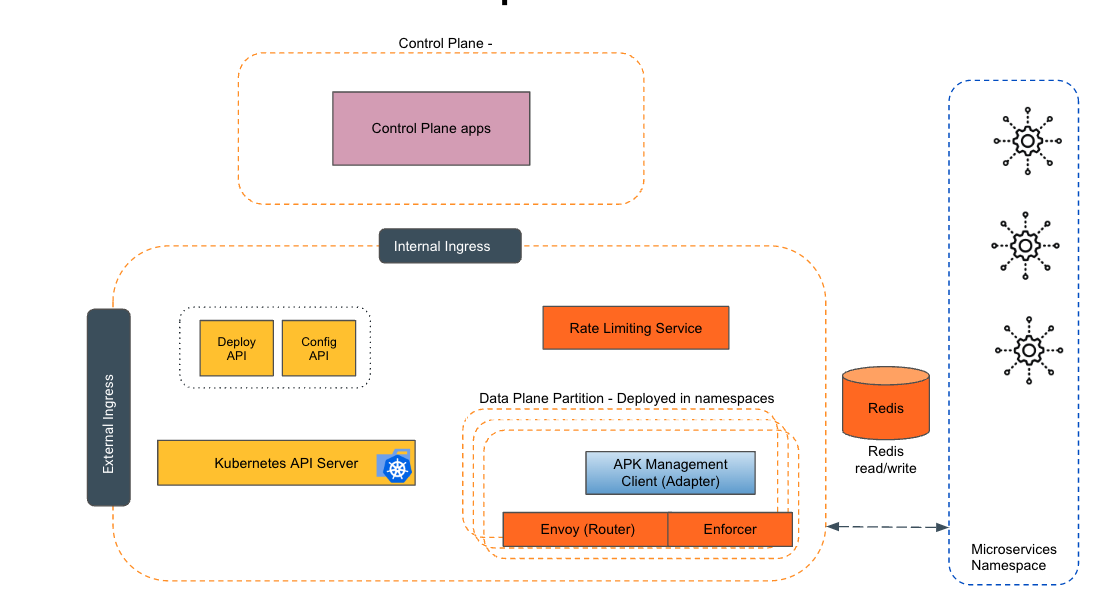
Empowering the Future of API Management: Unveiling the Journey of WSO2 API Platform for Kubernetes (APK) Project and the Anticipated Alpha Release

  Introduction In the ever-evolving realm of API management, our journey embarked on the APK project eight months ago, and now, with great a...