How to add user claims as custom header of login response of WSO2 API Manager

WSO2 API Manager is a complete solution for publishing APIs, creating and managing a developer community and for scalably routing API traffic. It leverages proven, production-ready, integration, security and governance components from the WSO2 Enterprise Service Bus, WSO2 Identity Server, and WSO2 Governance Registry. In addition, as it is also powered by the WSO2 Business Activity Monitor, the WSO2 API Manager is ready for massively scalable deployment immediately.

Sometimes users may want to get some user claims as response headers of login call response message. Let say if you have your own implementation of JDBC User store manager you might have different user claims. So here we will see how we can use configurations to retrieve them as headers. This is bit complex use case which might not use by each and every one. I did this post because we support this feature and for my future reference.

In the identity.xml add following section (with the claims you need)
<OAuth>.....</OAuth>

When you define the claim - DisplayName will appear as the HTTP Header name in the response.

<RequiredRespHeaderClaimUris>
<ClaimUri>http://wso2.org/claims/emailaddress</ClaimUri>
<ClaimUri>http://wso2.org/claims/gender</ClaimUri>
 </RequiredRespHeaderClaimUris>

 Send curl request as follows :
curl -v -X POST -H "Authorization: Basic Z3pidExIS3NsTVU2dm82dXVmZExcvxcvcZDRU9ZYTpkUzFydFRSWjlVMnIwX241bzkyRk9WTlpldFVh" -H "Content-Type: application/x-www-form-urlencoded;charset=UTF-8" -d "grant_type=password&username=admin&password=admin" http://localhost:8280/login/

This is the response.
< HTTP/1.1 200 OK
< Content-Type: application/json;charset=UTF-8
< Cache-Control: no-store
< Email: test@test.com
< Gender: male
< Pragma: no-cache
< Server: WSO2 Carbon Server
< Date: Wed, 12 Sep 2012 09:54:30 GMT
< Transfer-Encoding: chunked

How to use clustering and replicating cache to improve performance and high availability of WSO2 API Manager

Performance is very critical factor when it comes to real product deployments. So most of use use cache to avoid unnecessary web service calls database calls. In WSO2 API Manager api gateway is the most critical thing if we consider performance. In real production systems we separate api manager in to several parts based on their functionalities.
01. API Gateway (All api calls hits gateway validation throttling happen here)
02. API Keymgt (Security validation part)
01. API Store (Allows users to subscribe apis / allow self registrations)
01. API Publisher (Allow publishers to create and publish new API's)
01. API Registry (Control registry)

So as you see API Gateway hits all inbound calls to apis. So most of production systems we recommend users to have 2 nodes clustered instead having one node. In this case you have to configure load balancer carefully to distribute load between both nodes. If you are using F5 like hardware load balancer make it session aware to get optimum performance and if you are using WSO2 Elastic Load Balancer it will take care of session awareness as well as service awareness for you. Both nodes should share same configurations and db and most importantly cache and carbon context. Because carbon context carries throttling related sensitive information. Also we use cache to cache keys to avoid unnecessary web service calls.

So first we will we how to enable clustering for nodes. Replace clustering section in repository/conf/axis2/axis2.xml with following configuration.


<clustering class="org.apache.axis2.clustering.tribes.TribesClusteringAgent" enable="true">
        <parameter name="AvoidInitiation">true</parameter>      
        <parameter name="membershipScheme">multicast</parameter>
        <parameter name="domain">wso2.carbon.domain</parameter>
        <parameter name="synchronizeAll">true</parameter>
        <parameter name="maxRetries">10</parameter>
        <parameter name="mcastAddress">228.0.0.4</parameter>
        <parameter name="mcastPort">45564</parameter>
        <parameter name="mcastFrequency">500</parameter>
        <parameter name="memberDropTime">3000</parameter>
        <parameter name="localMemberPort">4000</parameter>
        <parameter name="preserveMessageOrder">true</parameter>
        <parameter name="atmostOnceMessageSemantics">true</parameter>
        <parameter name="properties">
      <property name="backendServerURL" value="https://${hostName}:${httpsPort}/services/"/>
        <property name="mgtConsoleURL" value="https://${hostName}:${httpsPort}/"/>
        </parameter>
        <groupManagement enable="false">
       <applicationDomain name="apache.axis2.application.domain"
      description="Axis2 group"
     agent="org.apache.axis2.clustering.management.DefaultGroupManagementAgent"/>
        </groupManagement>   
        <nodeManager class="org.apache.axis2.clustering.management.DefaultNodeManager"
                     enable="true"/> 
        <stateManager class="org.apache.axis2.clustering.state.DefaultStateManager"
                      enable="true">
            <replication>
                <defaults>
                    <exclude name="local_*"/>
                    <exclude name="LOCAL_*"/>
                </defaults>
                <context class="org.apache.axis2.context.ConfigurationContext">
                    <exclude name="local_*"/>
                    <exclude name="UseAsyncOperations"/>
                    <exclude name="SequencePropertyBeanMap"/>
                </context>
                <context class="org.apache.axis2.context.ServiceGroupContext">
                    <exclude name="local_*"/>
                    <exclude name="my.sandesha.*"/>
                </context>
                <context class="org.apache.axis2.context.ServiceContext">
                    <exclude name="local_*"/>
                    <exclude name="my.sandesha.*"/>
                </context>
            </replication>
        </stateManager>
    </clustering>
 

Do this for both nodes. Refer  this article on cluster configurations if you need more information.

Now we need to enable replicate cache between two nodes.

1.In your setup caching synchronization should be done based on a predefined multicast ip and a port.
The caching synchronization is done by Jgroups multicasting - and you can specify a port and the address if needed as system properties by updating wso2server.sh.

-Djgroups.udp.mcast_addr="224.10.10.10" \
-Djgroups.udp.mcast_port="5555" \

Add following configurations to repository/conf/etc/cache.xml
<configuration>
        <clusterName>apimanager-cache</clusterName>
        <cacheMode>replicated</cacheMode>
        <sync>true</sync>
        <l1>
            <enabled>true</enabled>
            <lifespan>60000</lifespan>
        </l1>
    </configuration>

2. Specify valid<HostName>in carbon.xml
3. If you do not want to replicate user-core caches among nodes, add unique cache identifiers for each node as a child under the corresponding

<UserStoreManager>
(JDBCUserStoreManager or AD) of user-mgt.xml
<Property name="UserCoreCacheIdentifier">node2</Property>
i.e:- Since we use separate user stores for publisher and store, user-store caches should not be replicated among those nodes. Hence, we can add two different cache identifiers for each publisher and store nodes.
In store:
<UserStoreManager class="org.wso2.carbon.user.core.jdbc.JDBCUserStoreManager">
<Property name="UserCoreCacheIdentifier">node2</Property>

In publisher:
<UserStoreManager class="org.wso2.carbon.user.core.ldap.ActiveDirectoryUserStoreManager">
<Property name="UserCoreCacheIdentifier">node1</Property>
4. Start servers with -Dbind.address= system property

Repeat same for other node as well. If you done configurations propery you will see cluster joining messages in output log of api gateway nodes as follows.

[2012-09-04 16:22:39,265]  INFO - TribesMembershipListener New member 192.168.115.218:4000(wso2.carbon.domain) joined cluster.

[2012-09-04 16:22:41,061]  INFO - TribesClusteringAgent Local Member 192.168.115.218:40(wso2.carbon.domain)

[2012-09-04 16:22:41,062]  INFO - TribesUtil Members of current cluster

[2012-09-04 16:22:41,062]  INFO - TribesUtil Member1 192.168.115.218:4000(wso2.carbon.domain)

If you enabled logs for jgroup you will see following messages as well.

[2012-09-04 16:22:27,278]  INFO - JGroupsTransport ISPN000094: Received new cluster view: [sanjeewa-TECRA-M11-23170|2] [sanjeewa-TECRA-M11-23170, sanjeewa-TECRA-M11-37541, sanjeewa-TECRA-M11-17759]

Please note that keeping other configurations as default is fine. But you have to configure gateway, store, publisher, registry, keymgt in a way they aware about each others. With this type of deployment you will be able to achieve great performance. To fine tune API gateway node please refer my previous blog post which describe how improve response time of api calls.

How to fine tune WSO2 API Manager gateway

WSO2 API Manager is a complete solution for publishing APIs, creating and managing a developer community and for scalably routing API traffic. It leverages proven, production-ready, integration, security and governance components from the WSO2 Enterprise Service Bus, WSO2 Identity Server, and WSO2 Governance Registry. In addition, as it is also powered by the WSO2 Business Activity Monitor, the WSO2 API Manager is ready for massively scalable deployment immediately. 

Here in this article i will briefly  describe how we can tune up gateway to get response with minimum time. Fine tuning is depend on the load on you system.
following configurations for get minimum response time when you have 350 to 30000 gateway calls per second(in a cluster with maximum 10 nodes).


Memory allocated for the server increase by modifying /bin/wso2server.sh with the following setting.


Default setting : -Xms256m -Xmx512m -XX:MaxPermSize=256m. 
New setting     : -Xms2048m -Xmx2048m -XX:MaxPermSize=1024m
NHTTP and PT HTTP transports
In /repository/conf/nhttp.properties set the following
           http.socket.timeout=60000
           snd_t_core=200
           snd_t_max=250
           snd_io_threads=16
           lst_t_core=200
           lst_t_max=250
           lst_io_threads=16
Please note that number of threads above should equal to number of processor cores in your system.These parameters vary on the load on machine processing time and etc. So you can change them and observe how results behave. Based on observations you can decide optimum parameters. Also apply followings to keymgt node to get maximum out come for login requests.


Axis2Client.xml 
<parameter name="defaultMaxConnPerHost">1000</parameter> 
<parameter name="maxTotalConnections">30000</parameter> 

masterdatasource.properties 
<maxActive>250</maxActive> 
<testOnBorrow>false</testOnBorrow> 
<validationInterval>120000</validationInterval> 

Mysql maximum connections 
mysql> show variables like "max_connections"; 
 max_connections was 151 
 set to global max_connections = 250; 


CatlinaServer.sh 
maxThreads="750" 
minSpareThreads="150" 
disableUploadTimeout="false" 
enableLookups="false" 
connectionUploadTimeout="120000" 
maxKeepAliveRequests="600" 
acceptCount="600" 

Open Files Limit 
Set open files limit to 200000 by editing 
/etc/sysctl.conf 
sudo sysctl -p

Configure WSO2 ESB with jms, accept message to ESB and persist to database

Required
WSO2 ESB 4.0.3
Activemq-5.6.0

Steps
Download ActiveMQ from here http://activemq.apache.org/
Download WSO2 ESB from here http://wso2.com/products/enterprise-service-bus/
Download Mysql and connector jars from http://dev.mysql.com/downloads/
Setup ActiveMQ
Extract ActiveMQ to /opt folder
/opt/apache-activemq-5.6.0
run activeMQ using type command /opt/apache-activemq-5.6.0/bin/activemq

Setup WSO2 ESB
First we need to copy following activeMQ jars available in /opt/apache-activemq-5.6.0/lib into repository/lib folder of ESB distribution home. From here onwards i will refer that place as ESB_HOME.

Copy these 2 jars
geronimo-j2ee-management_1.1_spec-1.0.1.jar
activemq-core-5.6.0.jar

Since we are using mysql database download and copy mysql jar as well
mysql-connector-java-5.1.12-bin.jar

Now we need to configure jms transport from ESB. open ESB_HOME/repository/conf/axis2.xml file and Enable jms transport receiver by uncommenting following section


<transportReceiver name="jms" class="org.apache.axis2.transport.jms.JMSListener">
<parameter name="myTopicConnectionFactory" locked="false">
<parameter name="java.naming.factory.initial"
locked="false">org.apache.activemq.jndi.ActiveMQInitialContextFactory</parameter>
<parameter name="java.naming.provider.url" locked="false">tcp://localhost:61616</
parameter>
<parameter name="transport.jms.ConnectionFactoryJNDIName"
locked="false">TopicConnectionFactory</parameter>
<parameter name="transport.jms.ConnectionFactoryType" locked="false">topic</
parameter>
</parameter>
<parameter name="myQueueConnectionFactory" locked="false">
<parameter name="java.naming.factory.initial"
locked="false">org.apache.activemq.jndi.ActiveMQInitialContextFactory</parameter>
<parameter name="java.naming.provider.url" locked="false">tcp://localhost:61616</
parameter>
<parameter name="transport.jms.ConnectionFactoryJNDIName"
locked="false">QueueConnectionFactory</parameter>
<parameter name="transport.jms.ConnectionFactoryType"
locked="false">queue</parameter>
</parameter>
<parameter name="default" locked="false">
<parameter name="java.naming.factory.initial"
locked="false">org.apache.activemq.jndi.ActiveMQInitialContextFactory</parameter>
<parameter name="java.naming.provider.url" locked="false">tcp://localhost:61616</
parameter>
<parameter name="transport.jms.ConnectionFactoryJNDIName"
locked="false">QueueConnectionFactory</parameter>
<parameter name="transport.jms.ConnectionFactoryType"
locked="false">queue</parameter>
</parameter>
</transportReceiver>


Enable jms transport sender by uncomment following configuration

<transportSender name="jms" class="org.apache.axis2.transport.jms.JMSSender"/>


So now we have enabled jms transport for WSO2 ESB.
Now we will define new proxy service to consume messages through jms transport. Create new proxy service as follows.


                    step5: edit out sequence(we don’t have to do anything here)

Now we have completed proxy service.Next we will see how to invoke this service.

First build sample
Go to ESB_HOME/samples/axis2Server/src/SimpleStockQuoteService
run ant command > ant
Next we have to start Axis2Service for that go to ESB/samples/axis2Server.
run command > sh axis2Server.sh

So now we have proxy service with following sub items
01.Log full message
02.Extract some parameter in message body using xpath expression
xmlns:m="http://services.samples"
xmlns:m0="http://schemas.xmlsoap.org/soap/envelope/" expression="//m0:Body/m:placeOrder/
m:order/m:symbol" type="VARCHAR"
03.Persist that parameter to database using db report mediator(We can write our own mediator
using class mediator to store message or part of it in any given store)
04.Send to some back end service or drop message(in this particular use case we can drop
message since we are not going to send it to actual back end anyway i have added that as well)
Here is the synapse configuration for proxy service.


<proxy name="StockQuoteProxy" transports="jms" startOnLoad="true" trace="disable">
<target>
<endpoint>
<address uri="http://localhost:9000/services/SimpleStockQuoteService"/>
</endpoint>
<inSequence>
<log level="full"/>
<dbreport>
<connection>
<pool>
<password>root</password>
<user>root</user>
<url>jdbc:mysql://localhost/testdb</url>
<driver>com.mysql.jdbc.Driver</driver>
</pool>
</connection>
<statement>
<sql>call addmessage(?)</sql>
<parameter xmlns:m="http://services.samples" xmlns:m0="http://
schemas.xmlsoap.org/soap/envelope/" expression="//m0:Body/m:placeOrder/m:order/
m:symbol" type="VARCHAR"/>
</statement>
</dbreport>
<property name="OUT_ONLY" value="true"/>
</inSequence>
<outSequence><send/></outSequence>
</target>
<publishWSDL uri="file:repository/samples/resources/proxy/sample_proxy_1.wsdl"/>
<parameter name="transport.jms.ContentType">
<rules>
<jmsProperty>contentType</jmsProperty>
<default>application/xml</default>
</rules>
</parameter>
</proxy>

Create test_db and execute following commands to create table and stored procedure.
CREATE TABLE `testdb`.`messages` (
`message_id` int(10) NOT NULL AUTO_INCREMENT,
`message` text,
PRIMARY KEY (`message_id`)
) ENGINE=MyISAM AUTO_INCREMENT=44 DEFAULT CHARSET=latin1
CREATE DEFINER=`root`@`localhost` PROCEDURE `testdb`.`addmessage`(message_txt
VARCHAR(10))
INSERT INTO messages (message) values (message_txt)
Now we can invoke proxy service from the axis2 Client available inside wso2 ESB.
Goto ESB_HOME/samples/axis2Client and type following command.
>ant jmsclient -Djms_type=pox -Djms_dest=dynamicQueues/StockQuoteProxy -
Djms_payload=dddddd
So now you will see message log in ESB console and then persist extracted parameter to
database and message send to actual back end. If you want to drop message drop it from proxy
configuration.
ESB-log
=======
[2012-08-28 12:11:43,798] INFO - LogMediator To: http://localhost:9000/services/
SimpleStockQuoteService, WSAction: urn:placeOrder, SOAPAction: urn:placeOrder,
MessageID: urn:uuid:ed0de324-79eb-4101-9a0b-c201971910fd, Direction: request
To : http://localhost:9000/services/SimpleStockQuoteService
WSAction : urn:placeOrder
SOAPAction : urn:placeOrder
MessageID : urn:uuid:ed0de324-79eb-4101-9a0b-c201971910fd
Body : 70.25</
m0:price>200MSFT
</
m0:placeOrder>

[2012-08-28 12:11:43,801] INFO - PlaceStockOrderTask placed order symbol:MSFT
quantity:200 price:70.25
[2012-08-28 12:11:45,213] INFO - LogMediator To: , MessageID: ID:sanjeewa-TECRA-
M11-47367-1346181105012-1:1:1:1:1, Direction: request, Envelope: encoding='utf-8'?>

150.33783033599516
6095
MSFTddii
Actual axis2 backend log
==================
Tue Aug 28 12:11:45 PDT 2012 samples.services.SimpleStockQuoteService :: Accepted order
#76 for : 6095 stocks of MSFTddii at $ 150.33783033599516
Table entry in database
=================
If you go to database and see there will be entry for stock symbol you entered

How to move files between 2 folders using WSO2 ESB


In some deployments users may want to synch up files between folders.
With WSO2 ESB you can do this simply. Here in this example we will listen
to one folder and if you put some xml file in to that folder it will move it to some other location. Here you can see few parameters. Action should named as Move and you can define where we pick file and also output folder. Inside in sequence or out sequence you dont have to do anything. So we will keep them as it is and put drop tag there. See the complete configuration for file copy proxy below.

Also you have to enable vfs transport from axis2 xml. To do that go to repository/conf/axis2/axis2.xml file and and uncomment vfs transport tags.
There are two tags.

<proxy name="filetest" transports="vfs" startOnLoad="true" trace="disable">
        <target>
            <inSequence>
                <drop/>
            </inSequence>
            <outSequence>
                <drop/>
            </outSequence>
        </target>
<publishWSDL uri="file:repository/samples/resources/proxy/sample_proxy_1.wsdl"/>
<parameter name="transport.PollInterval">15</parameter>
<parameter name="transport.vfs.ActionAfterProcess">MOVE</parameter>
<parameter name="transport.vfs.FileURI">file:///home/sanjeewa/test/in</parameter>
<parameter name="transport.vfs.MoveAfterProcess">file:///home/sanjeewa/test/out</parameter>
<parameter name="transport.vfs.MoveAfterFailure">file:///home/sanjeewa/test/original</parameter>
<parameter name="transport.vfs.FileNamePattern">.*.xml</parameter>
<parameter name="transport.vfs.ContentType">text/xml</parameter>
<parameter name="transport.vfs.ActionAfterFailure">MOVE</parameter>
</proxy>


How to disable chunking - WSO2 ESB Proxy service


Some times .Net back end services are not supporting chunked encoding. By default
when  ESB calls back end it assumes back end supports chunked encoding.
If your .Net back end service cannot access through proxy service you can try this.
Sometimes you may get empty response for the request due to this issue.
So what we have to do is add following 2 lines to in sequence


<property name="FORCE_HTTP_1.0" value="true" scope="axis2" />
 <property name="DISABLE_CHUNKING" value="true" scope="axis2" />
 
See the following complete proxy service configuration

<proxy xmlns="http://ws.apache.org/ns/synapse" name="IssueProxy" 
transports="https,http" statistics="disable" trace="disable" 
startOnLoad="true">
 <target>
  <inSequence>
   <property name="FORCE_HTTP_1.0" value="true" scope="axis2" />
   <property name="DISABLE_CHUNKING" value="true" scope="axis2" />
   <send>
     <endpoint>
       <address uri="http://192.168.1.216:3333/Service1.svc" />
      </endpoint>
   </send>
   </inSequence>
   <outSequence>
      <send />
   </outSequence>
   </target>
   <publishWSDL uri="http://192.168.1.216:3333/Service1.svc?wsdl" />
</proxy>

How to set revision number to svn external

Sometimes when we branched out from trunk we have to remove svn externals. Other possible solution is set branched revision number to external. so it will always referring that particular revision even externals got updated.

Command to get svn externals
svn propget svn:externals -R

Then you will see out put like this
modules/application - store-web  https://svn.test.org/repos/test/store-web


so first you have to go to that folder
cd modules/application

then you have to set the revision number as follows. Let say we branched from revision 11111. then we have to set to that version

svn propset svn:externals 'store-web -r11111 https://svn.test.org/repos/test/store-web' . property 'svn:externals' set on '.'

Then commit to svn branch.

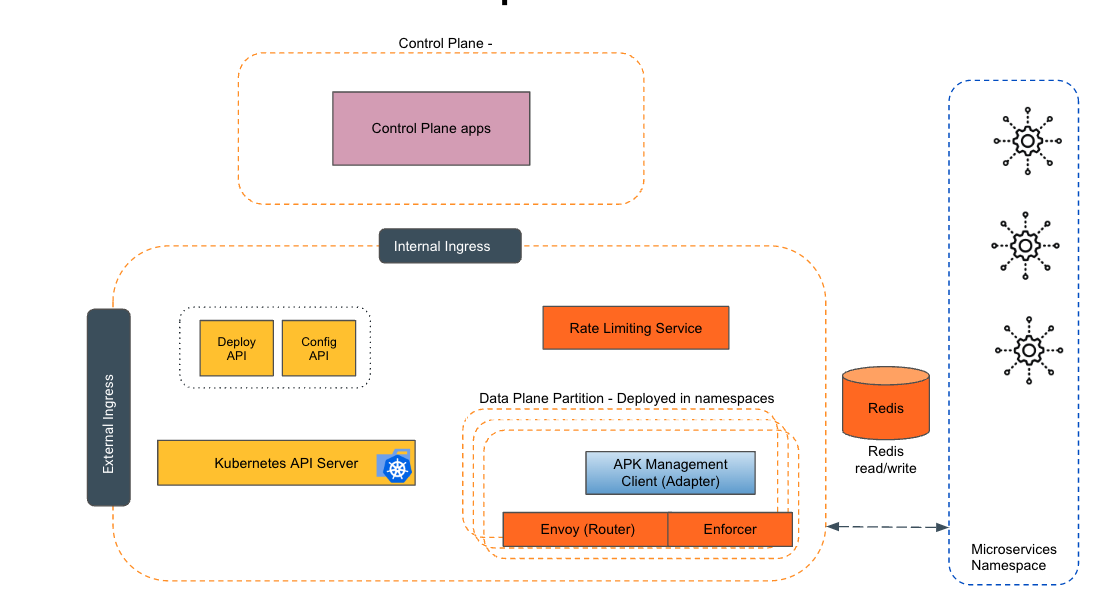
Empowering the Future of API Management: Unveiling the Journey of WSO2 API Platform for Kubernetes (APK) Project and the Anticipated Alpha Release

  Introduction In the ever-evolving realm of API management, our journey embarked on the APK project eight months ago, and now, with great a...