How to use SQS Client to invoke SQS service in message broker

  1. Create SQS Client Code

    Generate code from wsdltojava tool. See following figure


    Unzip given zip file from wsdl to java tool and open it with some IDE(eclipse or idea). Use following command to create idea project
    mvn idea:idea

    Build project with maven using the command
    mvn clean install

    Then we have to add necessary jars to class path
    First run ant command inside your message broker product as follows
    packs/wso2mb-1.0.2/bin$ ant
    Then this will copy jars to repository/lib folder inside your pack. We have to add those jars to class path of created project(Eclipse or idea)


    Then build your project using ide. If it complaints about axiom or rampart jars please remove them from the class path(remove any axiom jars except version 1.2.11.wso2v1)

    Then add SQSClient java code to project. We must run the main method in this class in order to run the SQS operations. Code is available at following url http://wso2.org/project/message-broker/1.0.2/docs/samples/sqs_soap_client.html
    Change the "accessKey" and the "secretAccessKey" in sqsClient.java code to the keys which can be found at "Home > Manage> Message Boxes(SQS)> Access Keys" of wso2mb server


  1. Run sqsClient java code and you will see following output in terminal
    createQueueResponse.getCreateQueueResult().getQueueUrl() = http://localhost:9763/services/MessageQueue/admin/Shared
    createQueueResponse.getCreateQueueResult().getQueueUrl() = http://localhost:9763/services/MessageQueue/admin/Shared
    message_type0.getBody() = TEST MESSAGE
    message_type0.getBody() = TEST MESSAGE
    message_type0.getBody() = TEST MESSAGE
    message_type0.getBody() = TEST MESSAGE
    message_type0.getBody() = TEST MESSAGE
    message_type0.getBody() = TEST MESSAGE
    message_type0.getBody() = TEST MESSAGE
    message_type0.getBody() = TEST MESSAGE
    message_type0.getBody() = TEST MESSAGE
    message_type0.getBody() = TEST MESSAGE
    createQueueResponse.getCreateQueueResult().getQueueUrl() = http://localhost:9763/services/MessageQueue/admin/Shared
    createQueueResponse.getCreateQueueResult().getQueueUrl() = http://localhost:9763/services/MessageQueue/admin/Shared

How to get Laptop battery related information from ubuntu command

Type Following command in command Line
sanjeewa@sanjeewa-TECRA-M11:$ cat /proc/acpi/battery/BAT1/info
sanjeewa@sanjeewa-TECRA-M11:$ cat /proc/acpi/battery/BAT1/state

If BAT1 didnt work try BAT0 as well.
You will see following output. This is working in ubuntu 11 as well :)


How to put file to some ftp location

First copy the file you need scp to your folder(Here in this example its /Desktop/issue)
Then connect to Ftp server using following command.
sanjeewa@sanjeewa-TECRA-M11:~/Desktop/issue$ sftp username@ftp.test.com
Then enter your password
username@ftp.test.com's password:
Connected to ftp.test.com.
You can view the content of ftp location by following command.
sftp> ls
WSO0.1-0008.zip          WSO2-CARBON-PATCH-3.0.1-0013.zip     file1.zip        file2.zip      
Then copy your file using put command as follows.
sftp> put axis2-1.6.1.tar.gz
Note that  axis2-1.6.1.tar.gz file should be located at your machine /Desktop/issue
folder.

How to use mysql to get first/least/max row per group

This is really important if you need to latest or oldest entry when there are few matching entries on the table. See the use case below


As you can see there are multiple entries per given BC_TENANT_ID please note that BC_ID is auto increment field. let say you need to get latest entry for that paticular
BC_TENANT_ID.So ideallt we can do this by following way.
1. select all entries per given BC_TENANT_ID 
2.Then get the latest BC_ID within them
3.continue this for all BC_TENANT_ID s


 below query will do this
select f.BC_ID, f.BC_TENANT_ID, BC_FILTER from (select BC_TENANT_ID, MAX(BC_ID) as minID from BC_SUBSCRIPTION group by BC_TENANT_ID
) as x inner join BC_SUBSCRIPTION as f on f.BC_TENANT_ID = x.BC_TENANT_ID and f.BC_ID = x.minID;


See the below results
 
so you will get latest entry per each BC_TENANT_ID
If you need to do further filtering you can do it following way
 if you need to get latest entry per  BC_TENANT_ID with BC_FILTER = 'Demo' and BC_IS_ACTIVE='0'
use following query


select f.BC_ID, f.BC_TENANT_ID, BC_FILTER from (select BC_TENANT_ID, MAX(BC_ID) as minID from BC_SUBSCRIPTION group by BC_TENANT_ID
) as x inner join BC_SUBSCRIPTION as f on f.BC_TENANT_ID = x.BC_TENANT_ID and f.BC_ID = x.minID and f.BC_FILTER = 'Demo' and f.BC_IS_ACTIVE='0';


Results will look like this


change the query as you need and use it.

Some usefull windows commands

If you need to get installed windows version and service pack name from command line use following command.

C:\>systeminfo | findstr /B /C:”OS Name” /C:”OS Version”

Then you will see output as follows
OS Name: Microsoft Windows XP Professional
OS Version: 5.1.2600 Service Pack 2 Build 2600

Alfresco on WSO2 Stratos Application Server(1.5.1)

Bit about products and terms
Alfresco is the open source alternative for Enterprise Content Management (ECM), providing Document Management, Collaboration, Records Management, Knowledge Management, Web Content Management, and Imaging. If you need more information on alfresco go to to their home page by clicking this link.


WSO2 Stratos is the most complete, enterprise-grade, open PaaS, with support for more core services than any other available PaaS today.Developers can simply click to add users and services, develop new applications, and manage their own setup. New services automatically participate in and benefit from governance policies already in place. In addition, new service versions can be deployed and tested side-by-side with versions in production, allowing traffic to be carefully diverted to newer versions
http://wso2.com/cloud/stratos/

With WSO2 Stratos Application Server you can serve both sets of users and easily share logic, management, monitoring, and more. The WSO2 Stratos Application Server brings together the best of breed in open source technologies for Web Applications with Apache Tomcat, and Web Services with Apache Axis2.The WSO2 Application Server, supporting the development, deployment, and management of Web Services and Web applications, delivered as a multi-tenant, elastically scaling, metered platform.

To try ApplicationServer in cloud environment fell free  to visit this link


How to edit war file
We can deploy alfresco on WSO2 ApplicationServer4.1.0 and Stratos Application server1.5.1 both. In my previous post i have described how to deploy alfresco on WSO2 Application Server. Here i will explain additional details to deploy it on stratos. Here in this example we will see how to deploy alfresco on local stratos setup and later we will see how we can do it on stratosLive. First we have to create alfresco-wso2.war file by following the guidelines provided. Those steps are same for this deployment as well.please refer that post regarding those instructions here i will briefly list out them.
01. First unpack war file
02. Then we have to remove Catalina jar file
03. add mysql connector jar to the lib folder(alfresco/alfresco/WEB-INF/lib)
04. Add database configuration entries to alfresco/WEB-INF/classes/alfresco/repository.properties

Database creation
How to use WSO2 Stratos Data Services Server(DSS) for database
When we use stratos application server for databases we can use WSO2 Data Services Server for manage databases. It provides simplified user interface for users.
The WSO2 Data Services Server, a platform for hosting of data services, with service hosting, service testing, and message tracing features is delivered as a multi-tenant, elastically scaling, metered platform. Data as a Service exposes the data stored in a database. Database level operations can be done using the interface provided by Data as a Service.We will see how to create database using StratosLive DSS

First goto data base and create database


Then you will see database name and database url in user interface. Next goto manage


Then create privileged group.
Next add user and set privilage group. Now we have all necessary propertites for database connection.


Now we can use those permissions to database connection.See the following configurations

# Database configuration
db.schema.update=true
db.driver=com.mysql.jdbc.Driver
db.name=alfresco_sanjeewa_info
db.url=jdbc:mysql://rss4.crik244zrfxc.us-east-1.rds.amazonaws.com/alfresco_sanjeewa_info
db.username=sanj_92jp9Pdo
db.password=mypassword
db.pool.initial=10
db.pool.max=20

Deploy on Stratos
Now we have fix few issues due to security related restrictions on stratos.  Though you can deploy above created war file on Application server you canot deploy it on stratos application server due to security constrains. you will see some error messages if you try to do it.For this problem we have 2 solutions.

01. Then you jave to sign those jar files with server security key file. Use following command to do it.
wso2stratos-as-1.5.1$ jarsigner -keystore repository/resources/security/wso2carbon.jks -storepass wso2carbon location_of_jarfile  wso2carbon

02. We can disable security from Stratos Application server by removing following 2 entries from wso2server.sh file located at wso2stratos-as-1.5.1/bin folder.
#    -Djava.security.manager=java.lang.SecurityManager \
#    -Djava.security.policy=$CARBON_HOME/repository/conf/sec.policy \

Now we can deploy war file without having any issues.Go to webservices refresh window. then you will see Alsresco service. see following figures.


Screenshot-3

Why tenants cant deploy it on stratosLive.
Alfresco uses wso2stratos-as-1.5.1/alf_data for keep alfresco related data. Each alfresco deployment we need seperate folder.If one tenant deploy it next tenat will not be able to deploy it because that olso tries to access same folder and database. according to stratos design multiple tenats can deploy same war file without having any issues. but when this comes to alfresco installation it fails due to the way alfresco deploy on server. By its design we can run only one alfresco instance on one tomcat server.So the best way to deploy alfresco on public stratos deployment is first super tenat deploy it on Applicationserver and allow other users(Tenants) to use it. 

How to install alfresco on WSO2 Appserver 4.1.0

Alfresco is the open source alternative for Enterprise Content Management (ECM), providing Document Management, Collaboration, Records Management, Knowledge Management, Web Content Management, and Imaging. If you need more information on alfresco go to to their home page by clicking this link.
With WSO2 Application Server you can serve both sets of users and easily share logic, management, monitoring, and more. The WSO2 Application Server brings together the best of breed in open source technologies for Web Applications with Apache Tomcat, and Web Services with Apache Axis2. If you wish to aware more about WSO2 Application server go to here
We need WSO2 Application server to use as application server
you can download it from following url
http://wso2.org/downloads/appserver/
Then we need alfresco war file. you can download it by clicking on Alfresco war file or you can download alfresco file archive from their web site
Then we have to modify Alfresco War file in order to use it on WSO2 Application server. Alfresco war file has designed to use with tomcat sever. WSO2 Appserver has inbuilt tomcat server.we have to do few modifications to alfresco war file before host on Appserver.We will see those steps in detail now.
First unpack war file then you will see following three
.
|—css
|--images
|--index.jsp
|--jsp
|--META-INF
|--scripts
|--services
|--WEB-INF
|—wsdl
Then we have to remove Catalina jar file from the that war file.Go to alfresco/alfresco/WEB-INF/lib inside lib folder you will see Catalina jar. Then delete it.
META-INF.
        |—classes
        |--lib
        |—licenses

Database configuration change
Now we have to do Database configurations for war file.First we need mysql jar file(mysql-connector-java-5.0.8-bin.jar). Download mysql jar file from here.
Next we have to add it to the lib folder(alfesco/alfresco/WEB-INF/lib) inside extracted war file
Then we have to tell alfresco specifically what is our DB Connector.To do that we have to edit file located at alfresco/WEB-INF/classes/alfresco/.
Add the following entry to the line 73 of repository.properties file which is located at alfresco/WEB-INF/classes/alfresco/repository.properties
db.driver=com.mysql.jdbc.Driver
So we have configured Data Source successfully.
see the following entries at alfresco/WEB-INF/classes/alfresco/repository.properties

# Database configuration
db.schema.update=true
db.driver=com.mysql.jdbc.Driver
db.name=alfresco
db.url=jdbc:mysql:///${db.name}
db.username=alfresco
db.password=alfresco
db.pool.initial=10
db.pool.max=20

How to avoid BindException: Permission denied
The SMB/CIFS server uses ports 137, 138 and 139, the FTP server defaults to using port 21. All of these ports are in the privileged socket range, so if you use these directly you will be required to run Appserver from a privileged account. You can run SMB/CIFS on non privileged ports on Unix provided you redirect privileged ports to the unprivileged ones.
Firstly ensure alfresco is using unprivileged ports:
    Edit /alfresco/WEB-INF/classes/alfresco/file-servers.xml
    and uncomment

<tcpipSMB port="1445" platforms="linux,solaris,macosx"/>
<netBIOSSMB sessionPort="1139" namePort="1137" datagramPort="1138" platforms="linux,solaris,macosx"/>

Now we have fix all the issues in war file. so now we have to re create war file from the extracted folder. select all folders inside extracted folder and encode as jar file and rename it as alfresco-wso2.war. So now we can deploy this war file directly on WSO2 Application server.Copy war file in to /wso2as-4.1.0/repository/deployment/server/webapps or upload it using GUI. see the following figures.
Screenshot
Figure: From this window you will be able to upload war file
Screenshot-1
Figure: You will see deployed war files after refreshing UI
Screenshot-3
Figure : After clicking on deployed alfresco application you will see above window

Setting up database
Now we have to create databse for alfresco.To create database you have to follow next few steps   

mysql -u root -p < ./extras/databases/mysql/db_setup.sql  or type                                                   mysql> create database alfresco default character set utf8;
mysql> create user alfresco identified by 'alfresco';
mysql> grant all on alfresco.* to 'alfresco'@'localhost' identified by 'alfresco' with grant option;
mysql> grant all on alfresco.* to 'alfresco'@'localhost.localdomain' identified by 'alfresco' with grant option;
Now type show databases; and you will see following database structure

+------------------------------+
| Database                       |
+------------------------------+
| information_schema       |
| alfresco                         |
| mysql                            |
| test                               |
+------------------------------+

4 rows in set (0.00 sec)
Setting memory usage of Appserver
Before we can start deploying Alfresco, make sure your server installation has a configured heap size of at least 256 MB. By default, Tomcat is started with the default heap size of your JVM. Usually, with these default settings the deployment of Alfresco will fail. Set following parameter at wso2server.sh file which is available at #wso2as-4.1.0/bin
export JAVA_OPTS='-Xms128m -Xmx1024m -XX:MaxPermSize=256m -server'
  
Once you finished database creation you  will be able to deploy alfresco properly. run wso2server.sh and deploy war file and try the service.

Fixing minor issue after deployment
If you get following error we have to clear /wso2as-4.1.0/alf_data folder and we have to re create database
[2011-09-08 09:28:46,932] ERROR {org.springframework.web.context.ContextLoader} -  Context initialization failed
org.springframework.beans.factory.BeanCreationException: Error creating bean with name 'dictionaryRepositoryBootstrap' defined in class path resource [alfresco/core-services-context.xml]: Invocation of init method failed; nested exception is org.alfresco.error.AlfrescoRuntimeException: Failure during rollback: org.alfresco.repo.dictionary.DictionaryRepositoryBootstrap$1@354742ee
Caused by:
org.alfresco.error.AlfrescoRuntimeException: Failure during rollback: org.alfresco.repo.dictionary.DictionaryRepositoryBootstrap$1@354742ee
    at org.alfresco.repo.transaction.RetryingTransactionHelper.doInTransaction(RetryingTransactionHelper.java:281)
To fix the above issue
Delete all the contents inside /wso2as-4.1.0/alf_data
Go to mysql trminal and type
mysql> drop database alfresco;
mysql> create database alfresco default character set utf8;
Then restart Application server. Then you will see deployed service if you have any problems or issues please ask i will reply you soon.


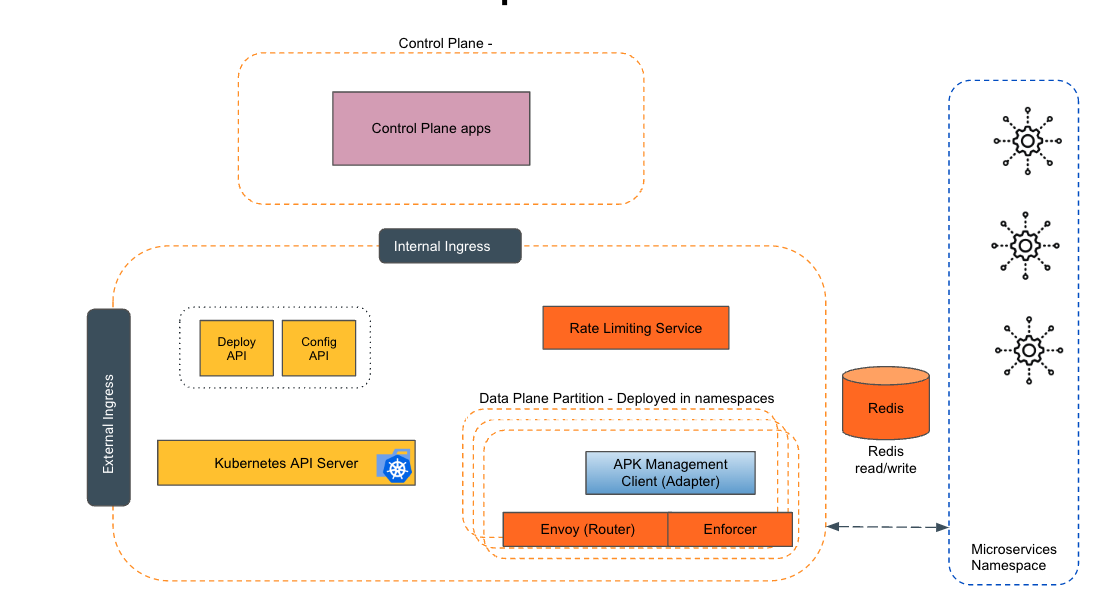
Empowering the Future of API Management: Unveiling the Journey of WSO2 API Platform for Kubernetes (APK) Project and the Anticipated Alpha Release

  Introduction In the ever-evolving realm of API management, our journey embarked on the APK project eight months ago, and now, with great a...