How to build wso2 stratos 1.5.1 from the source

WSO2 Stratos is the most complete, enterprise-grade, open PaaS, with support for more core services than any other available PaaS today.
WSO2 Stratos provides the core cloud services and essential building blocks for example federated identity and single sign-on, data-as-a-service and messaging-as-a-service and more, required for developing SaaS and cloud applications.
Here below i will describe how to build stratos 1.5.1 from source.
You will find more information on wso2 stratos main page from this Link
Download stratos source from the hosted location
$ wget http://dist.wso2.org/products/stratos/1.5.1/wso2-stratos-1.5.1-src.zip

unzip content into some given location
unzip wso2-stratos-1.5.1-src.zip

go inside the extracted folder and start build it on line
stratos151src@sr2:~/stratos151src$mvn clean install

if it fails due to some reason(may be due to on line repo problems) follow the below guide lines.
In order to build carbon products we need to build axis2 first if that is not available at online repos

stratos151src@sr2:~/stratos151src/wso2-stratos-1.5.1-src/dependencies/axis2/1.6.1-wso2v1
Then build dependencies
And continue build in following order with given commands
stratos151src@sr2:~/stratos151src/wso2-stratos-1.5.1-src/dependencies$ mvn clean install

stratos151src@sr2:~/stratos151src/wso2-stratos-1.5.1-src/orbit$ mvn clean install -Dmaven.test.skip=true

stratos151src@sr2:~/stratos151src/wso2-stratos-1.5.1-src/service-stubs$ mvn clean install -Dmaven.test.skip=true
You must build carbon core with tests so use following command
stratos151src@sr2:~/stratos151src/wso2-stratos-1.5.1-src/core$ mvn clean install

Before build components we have to little change for stratos pom.xml file. Due to the error in pom file location of
org.wso2.carbon.tenant.dispatcher folder.

So lets see how we can do that modification
Go to stratos folder as follows
stratos151src@sr2:~/stratos151src/wso2-stratos-1.5.1-src/components/stratos$ vi pom.xml

Do the following change
replace line
org.wso2.carbon.tenant.dispatcher/3.2.0
with
org.wso2.carbon.tenant.dispatcher/1.5.1

Then build components
stratos151src@sr2:~/stratos151src/wso2-stratos-1.5.1-src/components$mvn clean install

Then we have to build features
stratos151src@sr2:~/stratos151src/wso2-stratos-1.5.1-src/features$mvn clean install

Then we have to build products and services
stratos151src@sr2:~/stratos151src/wso2-stratos-1.5.1-src/products$ ls
as  bam  bps  brs  carbon  cep  css  dss  esb  greg  gs  is  lb  manager  mb  ms  pom.xml  wsf

here you will see available products inside products folder
if you need to build appserver product and service use the following command. same way you can do this for other products as well

stratos151src@sr2:~/stratos151src/wso2-stratos-1.5.1-src/products/as/4.1.1$mvn clean install
Then built packs will be available on following location
stratos151src@sr2:~/stratos151src/wso2-stratos-1.5.1-src/products/as/4.1.1/modules/distribution/service/target



How to get date time and device id from BlackBerry device programatically Java

These are very basic things in mobile development. but its very useful to keep them documented.First we will see how to get date time
public static String  getCurrentDateTime()
    {
    SimpleDateFormat dateFormat = new SimpleDateFormat("MM/dd/yyyy hh:mm:ss aaa");
    return dateFormat.format(new Date(System.currentTimeMillis()));

    }

Then we will see how to get device id from device 
net.rim.device.api.system.DeviceInfo.getDeviceId()

How to download entire web site using wget command in ubuntu/Linux

If you need to download entire web site( let say some series of tutorial or doc series) you can do this easily with wget command. its easy to use this command for ubuntu/linux users.Use following command with the url that you need.

$ wget --recursive --no-clobber --page-requisites --html-extension --convert-links --restrict-file-names=windows --no-parent  http://sanjeewamalalgoda.blogspot.com/

How to encrypt and decrypt data using Advanced Encryption Standard(AES) Java BlackBerry Pragramming

sample code provides information on how to encrypt and decrypt data using the most common symmetric key algorithm, Advanced Encryption Standard


package com.DataStore;

import java.io.ByteArrayInputStream;
import java.io.ByteArrayOutputStream;
import java.io.IOException;
import java.io.InputStream;
import java.io.OutputStream;
import javax.microedition.io.Connector;
import javax.microedition.io.file.FileConnection;
import javacard.security.CryptoException;
import net.rim.device.api.crypto.AESDecryptorEngine;
import net.rim.device.api.crypto.AESEncryptorEngine;
import net.rim.device.api.crypto.AESKey;
import net.rim.device.api.crypto.BlockDecryptor;
import net.rim.device.api.crypto.BlockEncryptor;
import net.rim.device.api.crypto.CryptoTokenException;
import net.rim.device.api.crypto.CryptoUnsupportedOperationException;
import net.rim.device.api.crypto.PKCS5FormatterEngine;
import net.rim.device.api.crypto.PKCS5UnformatterEngine;
import net.rim.device.api.crypto.RandomSource;
import net.rim.device.api.crypto.SHA1Digest;
import net.rim.device.api.system.EncodedImage;
import net.rim.device.api.util.Arrays;
import net.rim.device.api.util.DataBuffer;

public class CryptoRSA {

    private String keyMessage = "Data sent between a BlackBerry device and the BlackBerry Enterprise Server is encrypted using Triple DES (Date Encryption Standard) or AES (Advanced Encrption Standard). This is performed automatically and does not require application implementation to use it.There are cases where encrypting data can be required, such as secure communication with an external application using the BlackBerry Mobile Data Server. Communication between the BlackBerry and BlackBerry Mobile Data Server would be automatically encrypted but communication between the BlackBerry Mobile Data Server and an application server would not unless implemented in the BlackBerry application.";

    public byte[] encrypt(byte[] data ) throws CryptoException, IOException, CryptoTokenException, CryptoUnsupportedOperationException
    {
    AESKey key = new AESKey( keyMessage.getBytes() );
    // Now, we want to encrypt the data.
    // First, create the encryptor engine that we use for the actual
    AESEncryptorEngine engine = new AESEncryptorEngine( key );

    // Since we cannot guarantee that the data will be of an equal block
    // length we want to use a padding engine (PKCS5 in this case).
    PKCS5FormatterEngine fengine = new PKCS5FormatterEngine( engine );

    // Create a BlockEncryptor to hide the engine details away.
    ByteArrayOutputStream output = new ByteArrayOutputStream();
    BlockEncryptor encryptor = new BlockEncryptor( fengine, output );

    // Now we need to do is write our data to the output stream.
    // But before doing so, let's calculate a hash on the data as well.
    // A digest provides a one way hash function to map a large amount
    // of data to a unique 20 byte value (in the case of SHA1).
    SHA1Digest digest = new SHA1Digest();
    digest.update( data );
    byte[] hash = digest.getDigest();
    // Now, write out all of the data and the hash to ensure that the
    // data was not modified in transit.
    encryptor.write( data );
    encryptor.write( hash );
    encryptor.close();
    output.close();

    // Now, the encrypted data is sitting in the ByteArrayOutputStream.
    // We simply want to retrieve it.
    return output.toByteArray();
    }

    public byte[] decrypt(byte[] ciphertext ) throws CryptoException, IOException, CryptoTokenException, CryptoUnsupportedOperationException
    {
    // First, create the AESKey again.
    AESKey key = new AESKey( keyMessage.getBytes() );

    // Now, create the decryptor engine.
    AESDecryptorEngine engine = new AESDecryptorEngine( key );
    // Since we cannot guarantee that the data will be of an equal block length
    // we want to use a padding engine (PKCS5 in this case).
    PKCS5UnformatterEngine uengine = new PKCS5UnformatterEngine( engine );

    // Create the BlockDecryptor to hide the decryption details away.
    ByteArrayInputStream input = new ByteArrayInputStream( ciphertext );
    BlockDecryptor decryptor = new BlockDecryptor( uengine, input );

    // Now, read in the data. Remember that the last bytes represent
    // the SHA1 hash of the decrypted data.
    byte[] temp = new byte[ 100 ];
    DataBuffer buffer = new DataBuffer();

    for( ;; ) {
        int bytesRead = decryptor.read( temp );
        buffer.write( temp, 0, bytesRead );

        if( bytesRead < 100 ) {
        // We ran out of data.
        break;
        }
    }

    byte[] plaintextAndHash = buffer.getArray();
    int plaintextLength = plaintextAndHash.length - SHA1Digest.DIGEST_LENGTH;
    byte[] plaintext = new byte[ plaintextLength ];

    System.arraycopy( plaintextAndHash, 0, plaintext, 0, plaintextLength );
   
    return plaintext;
    }
}

How to use PersistentStore to store objects in BlackBerry Java programming

Here in this post we will see how to store customer data using PersistentStore.
In my DataObject class used to store customer data. it has 2 parameters customer ID and some string property it may be name address or any other parameter. Also you can change those parameters according to your requirements. we are suing vector to store those pairs in runtime. Hope this will useful for you
============================================
package com.DataStore;

import java.util.Vector;
import net.rim.device.api.util.Persistable;

public final class DataObject implements Persistable
{

    private Vector elements;
    public static final int CLIENT_ID = 0;

    public DataObject()
    {
    elements = new Vector(1);
    int capacity = elements.capacity();
    for (int i = 0; i < capacity; ++i)
    {
        elements.addElement(new String(""));
    }
    }

    /**
     * @param id
     * @return String
     * String getElement(int id)
     */
    public String getElement(int id)
    {
    return (String) elements.elementAt(id);
    }

    public void setElement(int id, String value)
    {
    elements.setElementAt(value, id);
    }
}

==============================================
package com.DataStore;

import java.util.Vector;

import net.rim.device.api.system.PersistentObject;
import net.rim.device.api.system.PersistentStore;
public class DataHandler {

    private static Vector data;
    private static PersistentObject store;

    static
    {
    store =    PersistentStore.getPersistentObject(1);

    synchronized (store) {
        if (store.getContents() == null) {
        store.setContents(new Vector());
        store.commit();
        }
    }

    data = (Vector) store.getContents();

    }

    /**
     * @param info
     * static void saveObject(DataObject info)
     */
    public static void saveObject(DataObject info)
    {
    data.addElement(info);
    synchronized (store) {
        store.setContents(data);
        store.commit();
    }
    }

    /**
     * @return String
     * static String getClient()
     */
    public static String getClient() {

    synchronized (store) {
        data = (Vector) store.getContents();
        if (!data.isEmpty()) {
        DataObject info = (DataObject) data.lastElement();
        return info.getElement(DataObject.CLIENT_ID);
        }
        else
        {
        //If data is empty here we return empty string
        return "";
        }
    }
    }
}

Simplest way to Display Pregressing bar - BlackBerry Java programming

You can create the instance of the  ProgressBar and you can pass the time out and display messages to progressing bar.

import net.rim.device.api.ui.UiApplication;
import net.rim.device.api.ui.component.Dialog;
import net.rim.device.api.ui.component.GaugeField;
import net.rim.device.api.ui.component.LabelField;
import net.rim.device.api.ui.container.DialogFieldManager;
import net.rim.device.api.ui.container.PopupScreen;

public class ProgressBar extends Thread 
{
    private int maximum, timeout;
    private boolean useful;
    private PopupScreen popup;
    private GaugeField gaugeField;
    public ProgressBar(String title, int maximum, int timeout)
    {
        this.maximum = maximum;
        this.timeout = timeout;
        DialogFieldManager manager = new DialogFieldManager();
        popup = new PopupScreen(manager);
        gaugeField = new GaugeField(null, 1, maximum, 1, GaugeField.NO_TEXT);
        manager.addCustomField(new LabelField(title));
        manager.addCustomField(gaugeField);
    }

    public void run() 
    {
        useful = true;
        UiApplication.getUiApplication().invokeLater(new Runnable() 
        {
            public void run() 
            {
                UiApplication.getUiApplication().pushScreen(popup);
               
            }
        });

        int iterations = 0;
        while (useful)
        {
            try 
            {
                Thread.sleep(timeout);
            } 
            catch (Exception e) 
            {
               
            }
            if (++iterations > maximum)
            {
                useful =false;
                UiApplication.getUiApplication().invokeLater(new Runnable() 
                {
                    public void run() 
                    {
                        Dialog.alert("Successfully  Completed");
                         System.exit(0);
                    }
                });
               
                iterations = 1;
            }
            gaugeField.setValue(iterations);
        }

        if (popup.isDisplayed()) 
        {
            UiApplication.getUiApplication().invokeLater(new Runnable() 
            {
                public void run() 
                {
                    UiApplication.getUiApplication().popScreen(popup);
                }
            });
        }
    }

    public synchronized void remove() 
    {
        useful = false;
    }
}

How to do POSTRequest (in a secured way) in BlackBerry Mobile device

If you need to do a secured post operation with server we can use Authentication token from the server side that obtained when we log into system. And do the server side implementation to check the authentication token per each request coming from the user(client). Its better if we can delete that token periodically. And ask user to re login if that key is expired.Here in this post i will show how to send request with the authentication token. Remember that we need to set APN unless we configured device properly. Here is the separate post on how to Get APN key without worrying about the service provider that we used(Which contains most of service providers in united states and Canada). If you operator not available there add it following format. Later i will add server side code also.

<MCC,MNC>APN-KEY</MCC,MNC>
Here is the example
<310,160>wap.voicestream.com</310,160>

Here is the code for process post request to server


/**
     * @param serviceUrl
     * @param authToken
     * @param requestData
     * @return String
     * @throws IOException
     * @throws ServerException
     * static String processPOSTRequest(String serviceUrl,String authToken, String requestData)
     */
    public static String processPOSTRequest(String serviceUrl,String authToken, String requestData) throws IOException,ServerException {

    HttpConnection httpConnection = null;
    OutputStream streamOutput = null;
    InputStream inputStream = null;
    StringBuffer strBuffer = new StringBuffer();
    String response = "";

    try {
 //Here getAPN() method gives you APN key for particular network operator
 //I have written separate blog post on getting APN key for any operator
        httpConnection = (HttpConnection) Connector.open(serviceUrl.concat(getAPN()), Connector.READ_WRITE);
        httpConnection.setRequestMethod(HttpConnection.POST);
        httpConnection.setRequestProperty("Content-Length", Integer.toString(requestData.length()));
        httpConnection.setRequestProperty("Content-Type", "text/xml");
        if (authToken.length() > 0) {
        httpConnection.setRequestProperty("Authorization",Base64OutputStream.encodeAsString(authToken
                .getBytes("UTF-8"), 0, authToken
                .getBytes("UTF-8").length, false, false));
        }
        streamOutput = httpConnection.openOutputStream();

        streamOutput.write(requestData.getBytes(), 0, requestData
            .getBytes().length);
        streamOutput.flush();

        int responseCode = httpConnection.getResponseCode();

        if (responseCode != 200) {
        ServerException getErrorExceptions = new ServerException(
            responseCode, httpConnection.getResponseMessage());
        throw getErrorExceptions;
        }

        inputStream = httpConnection.openInputStream();

        int character;

        while (-1 != (character = inputStream.read())) {
        strBuffer.append((char) character);
        }

        response =  strBuffer.toString();

    } finally {
        try {
        streamOutput.close();
        inputStream.close();
        httpConnection.close();
        } catch (Exception e) {
        //not related to user error if this exception happens due to
        //unavailability then connection assigns to null and then implicitly removes it
        }
        httpConnection = null;
        inputStream = null;
        streamOutput = null;
    }

    return response;
    }

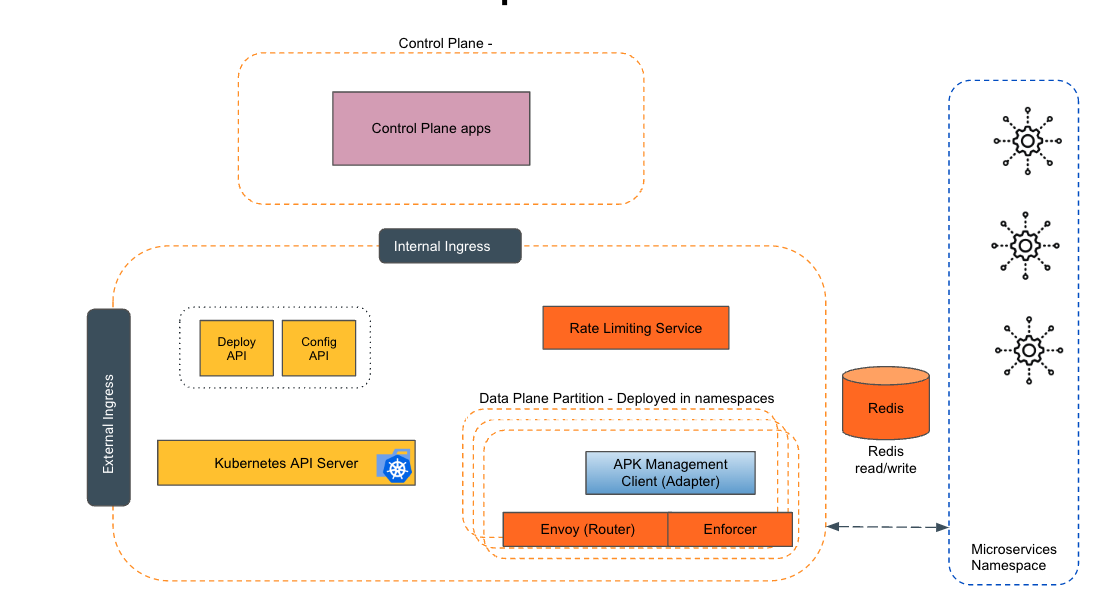
Empowering the Future of API Management: Unveiling the Journey of WSO2 API Platform for Kubernetes (APK) Project and the Anticipated Alpha Release

  Introduction In the ever-evolving realm of API management, our journey embarked on the APK project eight months ago, and now, with great a...