import java.net.*;
import java.io.IOException;
import java.io.*;
import java.util.Scanner;public class Main {
private static ServerSocket serverSocketin;
private static ServerSocket serverSocketout;public static void main(String[] args) {
try {
serverSocketin = new ServerSocket(8206);
serverSocketout = new ServerSocket(8207);
DataSender dtsender = new DataSender();
DataRiciver dataRiciver=new DataRiciver();
dtsender.start();
dataRiciver.start();
} catch (IOException e) {
e.printStackTrace();
}
}
static class DataRiciver extends Thread{
public void run(){
while (true){
try {
Socket incoming = serverSocketin.accept();
DataInputStream in = new DataInputStream(incoming.getInputStream());
String data="";
data = in.readLine();
System.out.println(data);
in.close();
incoming.close();
Thread.sleep(1000);
} catch (Exception e) {
}
}}
}static class DataSender extends Thread {
public DataSender() {}
public void run() {
while (true) {
try {
Scanner reader = new Scanner(System.in);
String data = reader.nextLine();
Socket outgoing = serverSocketout.accept();
PrintStream out = new PrintStream(outgoing.getOutputStream());
data=data+ "\n";
out.write(data.getBytes());
out.flush();
out.close();
outgoing.close();
Thread.sleep(1000);
}
catch (Exception ioe)
{
}
}
}
}}
-Java Blackberry application to send byte stream to some server via socket

How to change value of form element before submit(Remove white space from a form variable before submit) - java script code
Here what i need to do is remove white spaces from the username variable before submit to server.This add advantage because server no need to do additional processing. This is very useful because in most cases before submit usernames and most of other parameters we have to remove white spaces
<script type="text/javascript">
function checkform()
{
var username=document.getElementById('txtUserName').value;
username=username.trim();
document.getElementById('txtUserName').value=username;
return true;
}String.prototype.trim = function ()
{
return this.replace(/^\s*/, "").replace(/\s*$/, "");//Regular expression is used to remove white space
}</script>
Add above script to your page and modify your submit action as follows so it will call above methods when submitting
<form target="_self" method="POST" action="../admin/login_action.jsp" id="loginForm" onSubmit="return checkform()">
How to modify redirector to direct somewhere we need in WSO2 Stratos
Here we will discuss how to modify AllPagesFilter.java file to redirect requests.Check the comments shown in the below code.That will show you how to modify this file to add new redirector.
package org.wso2.stratos.redirector.servlet.ui.filters;
import org.apache.commons.logging.Log;
import org.apache.commons.logging.LogFactory;
import org.wso2.carbon.utils.multitenancy.MultitenantConstants;
import org.wso2.stratos.common.constants.StratosConstants;
import org.wso2.stratos.redirector.servlet.ui.clients.RedirectorServletServiceClient;import javax.servlet.*;
import javax.servlet.http.HttpServletRequest;
import javax.servlet.http.HttpServletResponse;
import java.io.IOException;
import java.util.HashMap;
import java.util.Map;
import java.util.StringTokenizer;public class AllPagesFilter implements Filter {
private static final Log log = LogFactory.getLog(AllPagesFilter.class);
private static Map<String, Boolean> tenantExistMap = new HashMap<String, Boolean>();
ServletContext context;
public void init(FilterConfig filterConfig) throws ServletException {
context = filterConfig.getServletContext();
}public void doFilter(ServletRequest servletRequest,
ServletResponse servletResponse, FilterChain filterChain) throws
IOException, ServletException {
if (!(servletRequest instanceof HttpServletRequest)) {
// no filtering
return;
}HttpServletRequest request = (HttpServletRequest)servletRequest;
String requestedURI = request.getRequestURI();StringTokenizer tokenizer = new StringTokenizer(requestedURI.substring(1), "/");
String[] firstUriTokens = new String[2];
int i = 0;
while (tokenizer.hasMoreElements()) {
firstUriTokens[i] = tokenizer.nextToken();
i ++;
if ( i > 1) {
break;
}
}
if (i > 1 && firstUriTokens[0].equals("t")) {
if (requestedURI.startsWith("//")) {
requestedURI = requestedURI.replaceFirst("//", "/");
}
String path = requestedURI.substring(firstUriTokens[0].length() +
firstUriTokens[1].length() + 2);// need to validate the tenant exists
String tenantDomain = firstUriTokens[1];
boolean tenantExists = true;
boolean tenantInactive = false;
if (tenantExistMap.get(tenantDomain) == null) {
// we have to call the service :(
RedirectorServletServiceClient client;
try {
client =
new RedirectorServletServiceClient(context, request.getSession());
} catch (Exception e) {
String msg = "Error in constructing RedirectorServletServiceClient.";
log.error(msg, e);
throw new ServletException(msg, e);
}try {
String status = client.validateTenant(tenantDomain);
tenantExists = StratosConstants.ACTIVE_TENANT.equals(status);
if (!tenantExists &&
StratosConstants.INACTIVE_TENANT.equals(status)) {
tenantExists = true;
tenantInactive = true;
}
} catch (Exception e) {
String msg = "Error in checking the existing of the tenant domain: " +
tenantDomain + ".";
log.error(msg, e);
throw new ServletException(msg, e);
}
// we have some backup stuff, if the tenant doesn't exists
if (tenantExists) {
// we put this to hash only if the original tenant domain exist
tenantExistMap.put(tenantDomain, true);
}
}
if (tenantInactive) {
String contextPath = request.getContextPath();
if (contextPath == null || contextPath.equals("/")) {
contextPath = "";
}
String errorPage = contextPath +
"/carbon/admin/error.jsp?The Requested tenant domain: " +
tenantDomain + " is inactive.";
RequestDispatcher requestDispatcher =
request.getRequestDispatcher(errorPage);
requestDispatcher.forward(request, servletResponse);
} else if (tenantExists) {
request.setAttribute(MultitenantConstants.TENANT_DOMAIN, tenantDomain);
//===========================================================
//Here wi will identify wether request contains docs/about.html
//Normally this will redirect to carbon about page if we didnt add this code. if we need to redirect it somewhere else in
//Stratos we can do it here
if(path.indexOf("docs/about.html")>=0)
{
//checking and replacing doing here.So we can create "about_stratos.html" file inside
//stratos/services/manager/modules/styles/src/main/resources/web/docs folder. So once we requested docs/about.html
//it will redirect to about_stratos.html located in styles/src/main/resources/web/docspath=path.replace("/docs/about.html","/docs/about_stratos.html");
request.setAttribute(StratosConstants.TENANT_SPECIFIC_URL_RESOLVED, "1");
System.out.println("url is"+path);
}
//=========================================================
if (path.indexOf("admin/login.jsp") >= 0) {
// we are going to apply the login.jsp filter + tenant specif filter both in here
path = path.replaceAll("admin/login.jsp",
"tenant-login/login_ajaxprocessor.jsp");
request.setAttribute(StratosConstants.TENANT_SPECIFIC_URL_RESOLVED, "1");
}
if (path.indexOf("/admin/index.jsp") >= 0) {
// we are going to apply the login.jsp filter + tenant specif filter both in here
path = path.replaceAll("/admin/index.jsp", "/tenant-dashboard/index.jsp");
request.setAttribute(StratosConstants.TENANT_SPECIFIC_URL_RESOLVED, "1");
}
if (path.indexOf("admin/docs/userguide.html") >= 0) {
// we are going to apply the dasbhoard docs.jsp filter +
// tenant specif filter both in here
path = path.replaceAll("admin/docs/userguide.html","tenant-dashboard/docs/userguide.html");
request.setAttribute(StratosConstants.TENANT_SPECIFIC_URL_RESOLVED, "1");
}
if ("".equals(path) || "/".equals(path) || "/carbon".equals(path) ||
"/carbon/".equals(path) || "/carbon/admin".equals(path) ||
"/carbon/admin/".equals(path)) {
// we have to redirect the root to the login page directly
path = "/t/" + tenantDomain + "/carbon/admin/login.jsp";
((HttpServletResponse)servletResponse).sendRedirect(path);
return;
}
RequestDispatcher requestDispatcher =
request.getRequestDispatcher(path);
requestDispatcher.forward(request, servletResponse);
} else {
String contextPath = request.getContextPath();
if (contextPath == null || contextPath.equals("/")) {
contextPath = "";
}
String errorPage = contextPath +
"/carbon/admin/error.jsp?The Requested tenant domain: " +
tenantDomain + " doesn't exist.";
RequestDispatcher requestDispatcher =
request.getRequestDispatcher(errorPage);
requestDispatcher.forward(request, servletResponse);
}
}
}
public void destroy() {
// nothing to destroy
}
}
How to create redirector in WSO2 Stratos
The url's that we typed normally goes through the redirector and filters so if you want to add
some changes you must aware about these.there so many files with same name in different components
so we have to redirect correctly and carefully
Let's see how we can add redirector
First we have to open redirector component in idea

then we have to create redirector file AboutPageFilter.java as follows and add to filters
package org.wso2.stratos.redirector.servlet.ui.filters;
import org.wso2.stratos.common.constants.StratosConstants;
import javax.servlet.*;
import javax.servlet.http.HttpServletRequest;
import java.io.IOException;public class AboutPageFilter implements Filter {
ServletContext context;
public void init(FilterConfig filterConfig) throws ServletException {
context = filterConfig.getServletContext();
}public void doFilter(ServletRequest servletRequest,
ServletResponse servletResponse, FilterChain filterChain) throws
IOException, ServletException {
if (!(servletRequest instanceof HttpServletRequest)) {
// no filtering
return;
}
HttpServletRequest request = (HttpServletRequest)servletRequest;
if (request.getAttribute(StratosConstants.TENANT_SPECIFIC_URL_RESOLVED) != null) {
// if the tenant specifc url filter is passed, we are not calling the login.jsp filter
return;
}String url = request.getRequestURI();
// use the name admin in place of admin
url = url.replaceAll("admin/docs/about.html", "tenant-dashboard/docs/about.html"); //url replace here
RequestDispatcher requestDispatcher =
request.getRequestDispatcher(url);
requestDispatcher.forward(request, servletResponse);
}public void destroy() {
// nothing to destory
}
}
Then we have to register that filter in utils.java file. We can add new method to utils file to register our filter
as follows.so below code registers our filter
public static void adminAboutRegisterServlet(BundleContext bundleContext) throws Exception {
if (!CarbonUtils.isRemoteRegistry()) {
HttpServlet reirectorServlet = new HttpServlet() {
// the redirector filter will forward the request before this servlet is hit
protected void doGet(HttpServletRequest request, HttpServletResponse response)
throws ServletException, IOException {
}
};
Filter redirectorFilter = new AboutPageFilter();
Dictionary redirectorServletAttributes = new Hashtable(2);
Dictionary redirectorParams = new Hashtable(2);
redirectorParams.put("url-pattern", "/carbon/admin/docs/about.html"); //This url pattern will identified and apply filter
redirectorParams.put("associated-filter", redirectorFilter);
redirectorParams.put("servlet-attributes", redirectorServletAttributes);
redirectorServiceRegistration = bundleContext.registerService(Servlet.class.getName(),
reirectorServlet, redirectorParams);
}
}
Then we have to activate our filter. We can activate our filter in RedirectorServletUIComponent.java file
public class RedirectorServletUIComponent {
private static Log log = LogFactory.getLog(RedirectorServletUIComponent.class);protected void activate(ComponentContext context) {
try {
Util.domainRegisterServlet(context.getBundleContext());
Util.loginJspRegisterServlet(context.getBundleContext());
Util.indexJspRegisterServlet(context.getBundleContext());
Util.adminDocsRegisterServlet(context.getBundleContext());
Util.adminAboutRegisterServlet(context.getBundleContext());//Here we have activated our filter
log.debug("******* Multitenancy Redirector Servlet UI bundle is activated ******* ");
} catch (Exception e) {
log.error("******* Multitenancy Redirector Servlet UI bundle failed activating ****", e);
}
}
protected void deactivate(ComponentContext context) {
log.debug("******* Multitenancy Redirector Servlet UI bundle is deactivated ******* ");
}
}
So now we have successfully add filter and activated it.Now you can use this as you need in different locations in WSO2 Stratos
How to run server in debug mode with idea
sanjeewa@sanjeewa-laptop:/media/New Volume/wso2stratos-manager-1.0.0/bin$ sh wso2server.sh debug 5005
- Go to Run > Edit Configurations.
- Click the plus icon and choose Remote.
- Name your profile and hit "OK".
- Go to Run > Debug to connect to begin debugging
Then go to idea interface open corresponding project source go to remote debug
then set the same port from the UI, then press debug button. server will not start till we press debug button from idea UI
How to set session variables from JSP
session.setAttribute( "theName", "sanjeewa malalgoda" );
//session.setAttribute( "Attribute name", "Value" );
Get session variables using the command given below
<%= session.getAttribute( "theName" ) %>
//this may return null if there no such session variable
Set Cookies from JSP - example
You may need to add page import
<%@ page language="java" import="java.util.*"%>
<%
Cookie cookie = new Cookie ("username","sanjeewa malalgoda");
cookie.setMaxAge(365 * 24 * 60 * 60);
response.addCookie(cookie);
%>
Get Cookies as Follows
Here we search cookie for name username and display the results
<%
String cookieName = "username";
Cookie cookies [] = request.getCookies ();
Cookie myCookie = null;
if (cookies != null)
{
for (int i = 0; i < cookies.length; i++)
{
if (cookies [i].getName().equals (cookieName))
{
myCookie = cookies[i]; break;
}
}
}
%>
<%
if (myCookie == null)
{
%>No Cookie found with the name <%=cookieName%>
<%
}
else
{
%>
Welcome: <%=myCookie.getValue()%>.
<%
}
%>
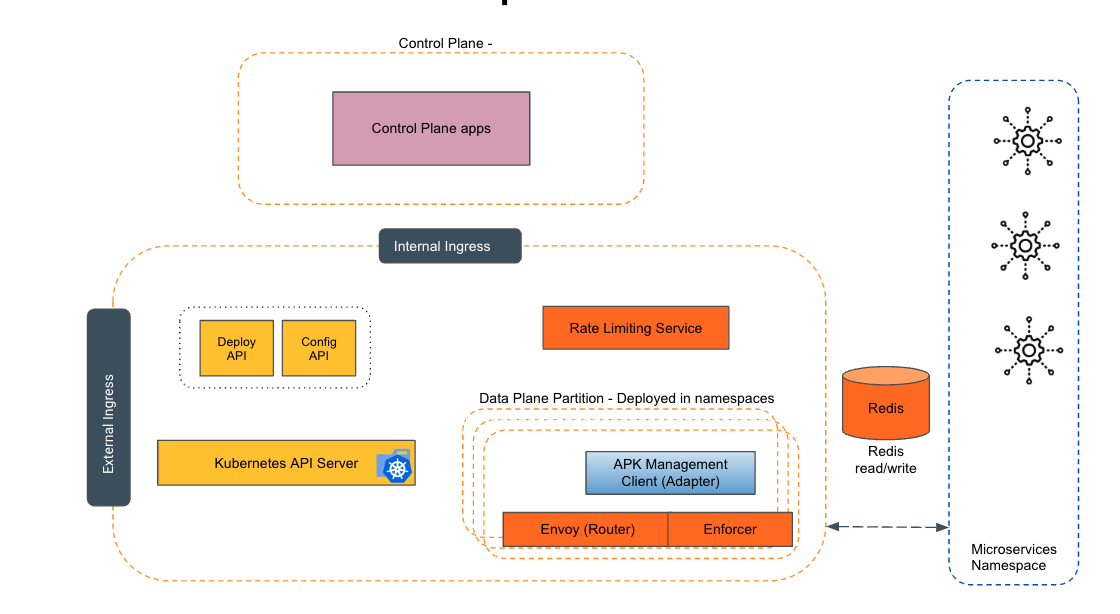
Empowering the Future of API Management: Unveiling the Journey of WSO2 API Platform for Kubernetes (APK) Project and the Anticipated Alpha Release
Introduction In the ever-evolving realm of API management, our journey embarked on the APK project eight months ago, and now, with great a...
-
Remove current installation of Nginx sudo apt-get purge nginx nginx-common nginx-full Install Nginx sudo apt-get install nginx Edit c...
-
When we calling an API, we request for an oauth token which we send with each API call. The reason for introduce OpenID on top of oauth 2...
-
 Here i'm explaining solution for manage multiple API Manager environments and external key management server to build central API r...