Showing posts with label Linux - Ubuntu. Show all posts

How to avoid loading error in soapui on ubuntu 11.04 (ERROR [SoapUI] An error occured [no protocol: POECommonEPrescribeService-wsdl-soapui-project.xml])

 When you start soapui in ubuntu 11.04 you may see following error.

sanjeewa@sanjeewa-TECRA-M11:/media/9558-83FD/software/soapui-4.0.0/bin$ sh soapui.sh
================================
=
= SOAPUI_HOME = /media/9558-83FD/software/soapui-4.0.0
=
================================
Configuring log4j from [/media/9558-83FD/software/soapui-4.0.0/bin/soapui-log4j.xml]
10:55:27,301 INFO  [DefaultSoapUICore] initialized soapui-settings from [/media/9558-83FD/software/soapui-4.0.0/soapui-settings.xml]
10:55:29,001 INFO  [WorkspaceImpl] Loading workspace from [/media/9558-83FD/software/soapui-4.0.0/bin/../../TestPBE-workspace.xml]
10:55:29,285 INFO  [SoapUI] File [/media/9558-83FD/software/soapui-4.0.0/bin/POECommonEPrescribeService-wsdl-soapui-project.xml] does not exist, trying URL instead
10:55:29,285 ERROR [SoapUI] An error occured [no protocol: POECommonEPrescribeService-wsdl-soapui-project.xml], see error log for details
10:55:30,144 INFO  [SoapUI] Used java version: 1.6.0_21
Exception in thread "XpcMessageLoop" java.lang.RuntimeException: java.io.FileNotFoundException: Library libgthread-2.0 not found at any known locations !
    at com.jniwrapper.linux.utils.LinuxLibraryLoader.(LinuxLibraryLoader.java:90)
    at com.jniwrapper.gdk.GdkMultithreading.(GdkMultithreading.java:48)
    at com.jniwrapper.gdk.GdkMultithreading.getInstance(GdkMultithreading.java:35)
    at com.jniwrapper.gtk.GTK.initialize(GTK.java:97)
    at com.teamdev.xpcom.a.b.a.a.(Unknown Source)
    at com.teamdev.xpcom.XpcMessageLoop.(Unknown Source)
    at com.teamdev.xpcom.XpcMessageLoop.getInstance(Unknown Source)
    at com.teamdev.xpcom.b$a.run(Unknown Source)
Caused by: java.io.FileNotFoundException: Library libgthread-2.0 not found at any known locations !
    ... 8 more
You can fix this issue by disabling browser component. To do that open soapui.sh file locates inside bin folder of the soapui distribution and edit it. you have to uncomment following line.

 JAVA_OPTS="$JAVA_OPTS -Dsoapui.jxbrowser.disable=true"

Then save it and start soapui again.

How to get Laptop battery related information from ubuntu command

Type Following command in command Line
sanjeewa@sanjeewa-TECRA-M11:$ cat /proc/acpi/battery/BAT1/info
sanjeewa@sanjeewa-TECRA-M11:$ cat /proc/acpi/battery/BAT1/state

If BAT1 didnt work try BAT0 as well.
You will see following output. This is working in ubuntu 11 as well :)


How to put file to some ftp location

First copy the file you need scp to your folder(Here in this example its /Desktop/issue)
Then connect to Ftp server using following command.
sanjeewa@sanjeewa-TECRA-M11:~/Desktop/issue$ sftp username@ftp.test.com
Then enter your password
username@ftp.test.com's password:
Connected to ftp.test.com.
You can view the content of ftp location by following command.
sftp> ls
WSO0.1-0008.zip          WSO2-CARBON-PATCH-3.0.1-0013.zip     file1.zip        file2.zip      
Then copy your file using put command as follows.
sftp> put axis2-1.6.1.tar.gz
Note that  axis2-1.6.1.tar.gz file should be located at your machine /Desktop/issue
folder.

How to get back missed 3 buttons(Maximize/Minimize/Close) in ubntu 11.04

Ubuntu 11.04 is the most annoyed Ubuntu operating system i have ever found(OS should be there to help us not for bug us). This time with 11.04 you will see  3 buttons(Maximize/Minimize/Close) vanishs after some time.That was really annoyed thing.so after searching some time i was able to found how to fix it.
Here are the steps.
Go to system> administration > Synaptic Package manager
You will see following window.

Then select  compiz-decorator and tick it and then apply it.

So now go to command line and type following command
>compiz-decorator

Then you will see those buttons come back.
Then you need to add this to start up applications.To do that do followings.

Goto preferences > Startup Applications
You will see following window and type there as shown in the below image


So thats it :)

How to get simple ubuntu 10 appearnce from 11.04

Did you messed up after new Ubuntu installation. Its really annoyed(with new side menu bar). i was able to fix this and get back my lovely ubntu UI. Here are the steps.
01. Type settings on search window(from menu search)
02. Go to login screen and click on it
You will see following window
     
Then unlock it by giving your password. Then select Ubuntu classic.yes you have done it. now you have to logout and re login. Thats it :)

How to download entire web site using wget command in ubuntu/Linux

If you need to download entire web site( let say some series of tutorial or doc series) you can do this easily with wget command. its easy to use this command for ubuntu/linux users.Use following command with the url that you need.

$ wget --recursive --no-clobber --page-requisites --html-extension --convert-links --restrict-file-names=windows --no-parent  http://sanjeewamalalgoda.blogspot.com/

How to install sinhala fonts on ubuntu

First you have to download the font file "filename.ttf" to you machine.
Then you need some permissions to add those files to folder named
/usr/share/fonts/truetype
To do that first goto truetype folder by using following command
sanjeewa@sanjeewa-laptop:~$ cd /usr/share/fonts/truetype
Then use next command to grant file permissions to that folder(Else you wont be able to copy files to that folder)
sanjeewa@sanjeewa-laptop:/usr/share/fonts/truetype$ sudo chmod 777 ttf-sinhala-lklug/
Then copy your font file into folder named ttf-sinhala-lklug/

Then refresh browser

Change the order of window buttons and move side from left to right in Ubuntu 10.04

One of the change in the Ubuntu 10.04  is the  window buttons on the left side. We’ll show you how to move the buttons back to the right.

Press Alt+F2 to bring up the Run Application, enter “gconf-editor” in the text field, and click on Run.

The key that we want to edit is in apps/metacity/general.

Click on the + button next to the “apps” folder, then beside “metacity” in the list of folders expanded for apps, and then click on the “general” folder.

The button layout can be changed by changing the “button_layout” key. Double-click button_layout to edit it.
Change the text in the Value text field to:
menu:maximize,minimize,close
Click OK and the change will occur immediately

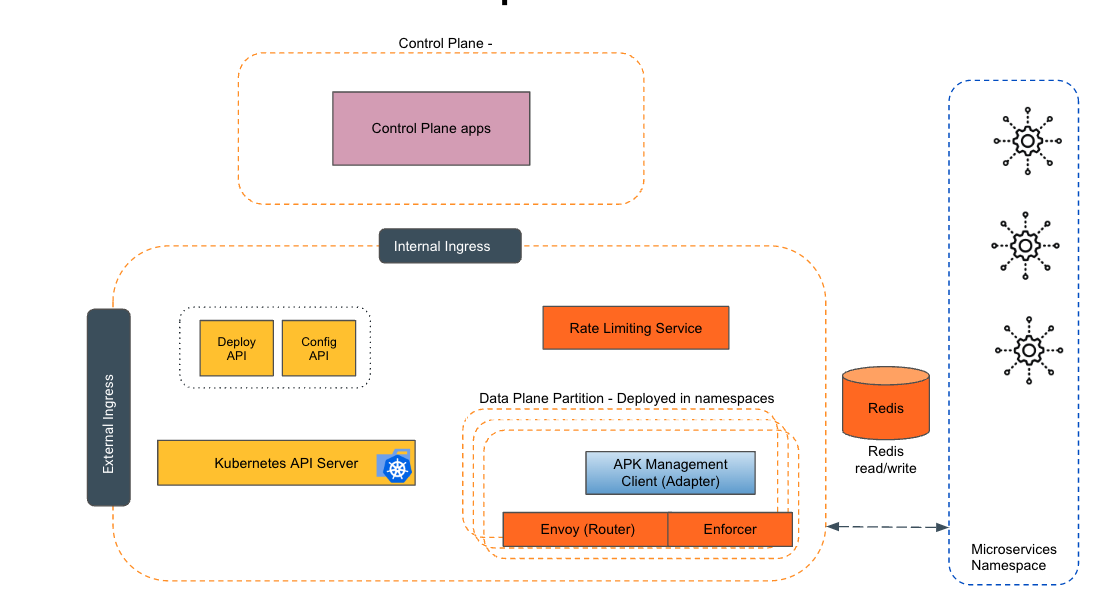
Empowering the Future of API Management: Unveiling the Journey of WSO2 API Platform for Kubernetes (APK) Project and the Anticipated Alpha Release

  Introduction In the ever-evolving realm of API management, our journey embarked on the APK project eight months ago, and now, with great a...